Note: - Ensure you have installed the analysis toolpak. To install analysis toolpak click on tools à add ins and check analysis toolpak.
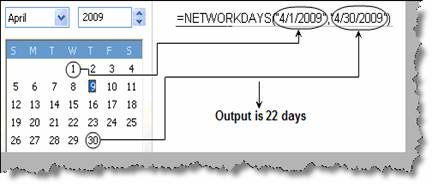
We can get the actual working days using the ‘NetworkDays’ function. Please note to ensure that ‘NetworkDays’ is functional you need to install the analysis pack as said in the previous section. ‘NetWorkDays’ helps you to calculate actual number of working days excluding Saturdays, Sundays and holidays. Its takes three parameters from date ( MM/DD/YYYY) , to date ( MM/DD/YYYY) and holiday array. We will go step by step, first we will calculate number of days excluding only Saturday and Sunday. For that we need to only put from date and to date as shown in figure ‘NetWorkDays excluding Saturday and Sunday’. The total number of working days is 22 i.e. 4 Saturday and Sunday which comes to 8 holidays.
Figure :- NetWorkDays excluding Saturday and Sunday
Every country has custom holidays like Christmas , ID , Diwali etc. For that you can use the third parameter in the ‘NetWorkDays’ function. In this parameter you can input the days which needs to be counted as holidays. Currently we have put dates as custom holidays, which leads to 20 actual working days.
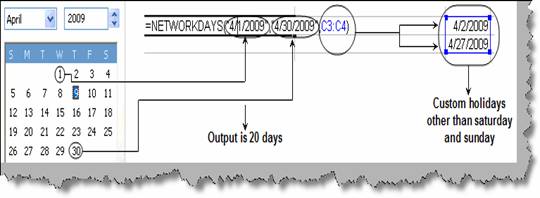
Figure: - NetWorkDays excluding Saturday, Sunday and custom holidays