Hard copy is hard copy.You can read it , experiment it , prepare notes and
lot. So why read online samples when you can own a full copy for less than 4$
.Email [email protected] to buy hard copy
of the same. If you think the excel book can be improved please email the author
at [email protected]
Home
Note: - You can find the accounting EXCEL sheet in CD
itself. Please feel free to explore the same.
In this section we will try to make a basic accounting
application in EXCEL. Any accounting package has four major sections:-
- Journal entry form: - This is where all journal
entry will be done. One of the most important things about accounting is the
accounting master. The journal entry sheet has two sections one where the
voucher entry is done and second list of accounting master code with type of
account ( i.e. expense , income , assets and liabilities ). We have created
a combo box for debit account and credit account. Please refer question ‘How
can we create a dropdown in an EXCEL column?’.
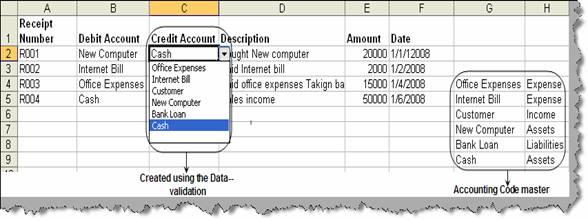
Figure: -
Journal Entry Form
- Trial Balance: - To do the trial balance report
we have used the SUMIF formula. Please refer ‘How can we do SUM according to
criteria?’ to read details about how to use SUMIF.
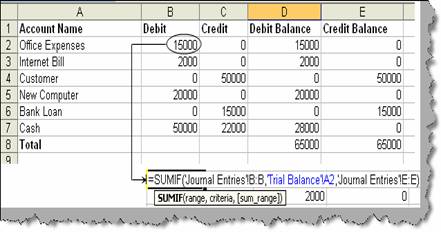
Figure: -
Trial balance
·
Profit and Loss: - Using VLOOKUP we have prepared the
profit and loss report. Please refer ‘Can you explain VLOOKUP?’ of how VLOOKUP
works.
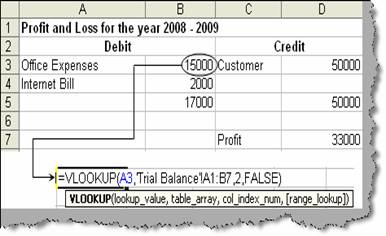
Figure: -
Profit and Loss
- Balance Sheet: - The final is the balance sheet
report which is again prepared using the VLOOKUP excel function.
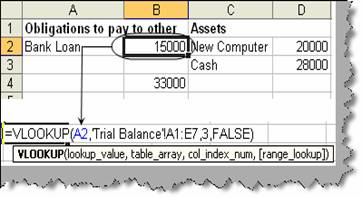
Figure: -
Balance sheet
Hard copy is hard copy.You can read it , experiment it , prepare notes and
lot. So why read online samples when you can own a full copy for less than 4$
.Email [email protected] to buy hard copy
of the same. If you think the excel book can be improved please email the author
at [email protected]
Home