Evil Spades Companion Tutorial
Companion is a tool to help Evil Spaders keep score, and post some spades hands. It
is a very small program that can sit on your desktop ready to use whenever you play
Evil. This tutorial will assume that you have already downloaded the program to your
desktop, ready to use. We highly recommend that you go to an empty room and sit at
a table so that you can actually see how posting hands and scores to the table from
companion works. Note: You do not need to open a clipboard to post from
Companion at Rengames! Companion works at Rengames like it was intended to and
did at Game Zone before they changed their programming.
1. At the beginning of each game open Evil Spades Companion by double clicking
on the desktop icon. You will need a fresh Companion for all three games, so
after the first game, close Companion and open a new one.
2. You will be prompted to Click anywhere to begin! When you do so,
Companion opens to the posting screen.
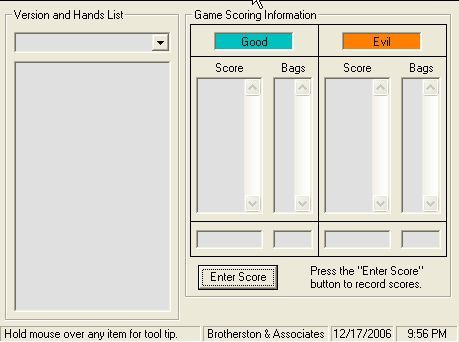
On the left side, you will see Version and Hands List, with a pulldown menu beneath
it. On the right side you will see Game Scoring Information with blue and orange
rectangles.
3. Insert team names. To do so, highlight "Good" in the blue rectangle and type
the blue team's names, and repeat the same process in the orange box with
the orange team's names. It is ok to use shortened names, as long as you
choose something that the scorekeepers can recognize.
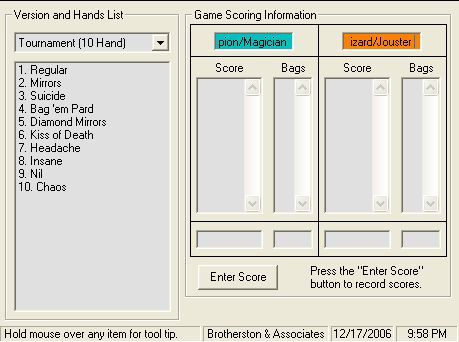
4. If you wish to post the Regular Evil game hands from Companion, click the
pulldown arrow then click on the last choice, Tournament (10 Hand) The list
of the ten hands that we use in Regular Evil Spades appears in the larger
rectangle below.
5. To post a hand to the table, simply double click on the hand. You will see the
rectangle go yellow momentarily indicating that the hand has been copied,
ready to paste at the table. At your table, right click in the typing box, and
click paste. When you hit enter, it will appear at the table for people to read.
You will note that the hand will stay highlighted on the list in Companion until
you click on the next hand, so you will always know which hand to post next.
6. When it is time to take score, go back to Companion and click the Enter Score
button. You will see the rectangles just above the post score button go from
gray to white. Click in the rectangle below Score on the left and type in the
score for the blue team. Hit your tab key and it will move to the Bags
rectangle. You can either type in the number of bags or choose the number
using the pulldown arrow. When you've entered the score and bags for the
blue team, tab to the orange side and enter the score for Orange, tab to the
bags and enter the bags. NOTE: The scores at Rengame tables have been
known to mysteriously disappear. Until the bugs are worked out, we
recommend that you first jot down the scores on a piece of paper before you
enter them in Companion, in the event that they disappear before you have them entered.
7. When you have entered the scores, hit the Post Score button. A box will come
up prompting you to check your scores. It is a good idea to get in the habit of
double checking that you have entered the scores correctly before you hit the
No button. It almost tells the truth when it says there is no way to correct
wrong scores or bags.

8. When you have verified that scores are correct, hit the No button, then right
click in the typing box at the table, then click paste. When you hit the enter
button it will post the score to the table for everyone to see. Remember that
everyone must agree to the score posted before you can proceed to the next
hand!
Keeping score with Companion, and posting Regular Evil from Companion is easy and
reliable, if you take the time to double check your scores. We encourage all Evil
players to become familiar with it and make it part of your Evil game.
IF YOU INADVERTENTLY POST AN INCORRECT SCORE (BUT CORRECT BAGS)
TO THE TABLE AND NEED TO MAKE CORRECTIONS: Go back to Companion
and enter a minus score equal to the wrong score listed last for each team,
and 0 bags for each team, hit the Post Score Button and No, and it will
take you back to the previous score. Now enter the correct scores and 0
bags and post it to the table. Correcting bags isn't as easy. If you were
under bags, you can enter the number of bags you were short instead of 0
bags. If you were over bags, you can make a note of it and when you score
again deduct the over bags from the newly accumulated bags. If bags
become a problem, you can revert to scoring on paper using the previously
agreed score as a starting point, then add the new score to it. This is
another good reason to write down scores on paper. |

Page Design by Diane 2006.
All layouts and information are not to be used without permission.
|