|
| OSI Reference Layer | Layer Definition | TCP/IP | |||||||||
| 7 | Application | Specifies distributed client/server applications | Applications:
|
||||||||
| 6 | Presentation | Specifies protocols for translating data format | |||||||||
| 5 | Session | Specifies protocols for starting and ending a communications session across a network | |||||||||
| 4 | Transport | Specifies protocols for end to end error control | TCP | ||||||||
| 3 | Network | Specifies protocols for routing messages:
|
IP | ||||||||
| 2 | Data Link | Specifies protocols for point-to-point transmission and error control | Data Link | ||||||||
| 1 | Physical | Specifies protocols for transmission of data over physical media | Physical |
Implementación Microsoft
1. La capa de enlace de datos (data layer)
es manejada por el NDIS,
Network Driver Interface.
Este interfaz proporciona a los protocolos de red
unos servicios básicos para comunicarse con los drivers de
las tarjetas de red. Estos servicios permiten enviar paquetes de datos
crudos (raw paquets), y ser notificados de los paquetes entrantes,
a través de un dispositivo de red
Permite tanto enlazar (bind) múltiples
controladores de protocolo a un único controlador de NIC, como un
único protocolo a varios controladores distintos de NIC.
Las especificaciones de NDIS describen el mecanismo
de multiplexado usado para llevar a cabo esto. Los enlaces pueden ser vistos
y/o cambiados desde el panel de control de red de Windows NT (Control Panel
- Network - Bindings)
Puesto que este interfaz maneja paquetes crudos,
el Protocol Stack es el responsable de construir cada paquete de
acuerdo al protocolo utilizado, incluyendo cabeceras MAC. Esto significa
que el Protocol Stack debe explicitamente soportar cada tipo de
medio: Ethernet (and 802.3 SNAP) , FDDI, Token Ring (802.5) , ARCNET ...
Link Layer Functionality
Link layer functionality is divided between the network interface card/driver
combination and the low-level protocol stack driver.
The network card/driver combination filters are based on the destination MAC address of each frame. Normally, the hardware filters out all incoming frames except those containing one of the following destination addresses:
All frames (including broadcasts) that do pass the hardware filter get passed up to the NIC driver through a hardware interrupt. The NIC driver brings the frame into system memory from the interface card. Then the frame is indicated (passed up) to the appropriate bound transport driver(s).
The NDIS specification provides more detail on this process.
Frames are indicated up to all bound transport drivers, in the order that they are bound. By default, the binding order is the alphabetical order of their key names in the registry.
As a packet traverses a network or series of networks, the source MAC address is always that of the NIC that placed it on the media, and the destination MAC address is that of the NIC that is intended to pull it off the media. This means that in a routed network, the source and destination MAC address change with each "hop" through a network-layer device (router).
MTU (Maximum Transfer Unit)
Each media type has a maximum frame size that cannot be exceeded. The link layer is responsible for discovering this MTU and reporting it to the protocols above.
NDIS drivers may be queried for the local MTU by the protocol stack. Knowledge of the MTU for an interface is used by upper layer protocols such as TCP, which optimizes packet sizes for each media automatically.
If a NIC driver such as an ATM driver uses LAN emulation mode, it may report that it has an MTU higher than what is expected for that media type. For instance, it may emulate Ethernet but report an MTU of 9180 bytes. Windows NT will accept and use the MTU size reported by the adapter even when it exceeds the normal MTU for a given media type.
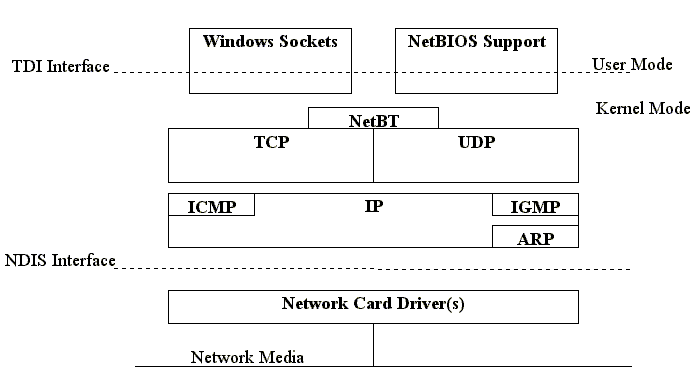
2.3.4. Las tres capas siguientes quedan agrupadas en el llamado Core Protocol Stack. Son implementadas en el driver TCPIP.SYS. Es un núcleo conjunto y no permite acceso directo a la capa IP. Sus componentes son:
6.7. Las aplicaciones de red, a nivel de las capas de presentación y aplicación, pueden comunicarse con el TCP/IP protocol stack de varias maneras:
TCP\IP under Windows NT allows a computer to communicate over a network
with another computer by using either an IP address, a host name,
or a NetBIOS name. However, when one computer attempts to communicate
with another computer using one of these three naming conventions, that
name must ultimately be resolved to a hardware address. The following are
the steps used by TCP\IP to resolve a host name and a NetBIOS name to a
hardware address.
a) Host Name Resolution Using a Hosts File
b) NetBIOS Name Resolution
Subnet Mask
The subnet mask is used by the TCP/IP protocol to determine whether a host is on the local subnet or on a remote network.
In TCP/IP, the parts of the IP address that are used as the network
and host addresses are not fixed, so the network and host addresses above
cannot be determined unless you have more information. This information
is supplied in another 32-bit number called a subnet mask. In this example,
the subnet mask is 255.255.255.0. It is not obvious what this number means
unless you know that 255 in binary notation equals 11111111; so, the subnet
mask is:
11111111.11111111.11111111.0000000
Lining up the IP address and the subnet mask together, the network and host portions of the address can be separated:
11000000.10101000.01111011.10000100 -- IP address (192.168.123.132)
11111111.11111111.11111111.00000000 -- Subnet mask (255.255.255.0)
The first 24 bits (the number of ones in the subnet mask) are identified as the network address, with the last 8 bits (the number of remaining zeros in the subnet mask) identified as the host address. This gives you the following:
11000000.10101000.01111011.00000000 -- Network address
(192.168.123.0)
00000000.00000000.00000000.10000100 -- Host address (000.000.000.132)
So now you know, for this example using a 255.255.255.0 subnet mask, that the network ID is 192.168.123.0, and the host address is 0.0.0.132. When a packet arrives on the 192.168.123.0 subnet (from the local subnet or a remote network), and it has a destination address of 192.168.123.132, your computer will receive it from the network and process it.
Almost all decimal subnet masks convert to binary numbers that are all ones on the left and all zeros on the right. Some other common subnet masks are:
Decimal
Binary
255.255.255.192
1111111.11111111.1111111.11000000
255.255.255.224
1111111.11111111.1111111.11100000
Internet RFC 1878 (available from http://ds.internic.net)
describes the valid subnets and subnet masks that can be used on TCP/IP
networks.
Network Classes
Internet addresses are allocated by the InterNIC (http://www.internic.net), the organization that administers the Internet. These IP addresses are divided into classes. The most common of these are classes A, B, and C. Classes D and E exist, but are not generally used by end users. Each of the address classes has a different default subnet mask. You can identify the class of an IP address by looking at its first octet. Following are the ranges of Class A, B, and C Internet addresses, each with an example address:
Subnetting
A Class A, B, or C TCP/IP network can be further divided, or subnetted, by a system administrator. This becomes necessary as you reconcile the logical address scheme of the Internet (the abstract world of IP addresses and subnets) with the physical networks in use by the real world.
A system administrator who is allocated a block of IP addresses may be administering networks that are not organized in a way that easily fits these addresses. For example, you have a wide area network with 150 hosts on three networks (in different cities) that are connected by a TCP/IP router. Each of these three networks has 50 hosts. You are allocated the class C network 192.168.123.0. (For illustration, this address is actually from a range that is not allocated on the Internet.) This means that you can use the addresses 192.168.123.1 to 192.168.123.254 for your 150 hosts.
Two addresses that cannot be used in your example are 192.168.123.0 and 192.168.123.255 because binary addresses with a host portion of all ones and all zeros are invalid. The zero address is invalid because it is used to specify a network without specifying a host. The 255 address (in binary notation, a host address of all ones) is used to broadcast a message to every host on a network. Just remember that the first and last address in any network or subnet cannot be assigned to any individual host.
You should now be able to give IP addresses to 254 hosts. This works fine if all 150 computers are on a single network. However, your 150 computers are on three separate physical networks. Instead of requesting more address blocks for each network, you divide your network into subnets that allow you to use one block of addresses on multiple physical networks.
In this case, you divide your network into four subnets by using a subnet
mask that makes the network address larger and the possible range of host
addresses smaller. In other words, you are borrowing some of
the bits usually used for the host address, and using them for the network
portion
of the address. The subnet mask 255.255.255.192 gives you four networks
of 62 hosts each. This works because in binary notation, 255.255.255.192
is the same as 1111111.11111111.1111111.11000000. The first two digits
of the last octet become network addresses, so you get the additional networks
00000000 (0), 01000000 (64), 10000000 (128) and 11000000 (192). (Some administrators
will only use two of the subnetworks using 255.255.255.192 as a subnet
mask. For more information on this topic, see RFC 1878.) In these four
networks, the last 6 binary digits can be used for host addresses.
Using a subnet mask of 255.255.255.192, your 192.168.123.0 network then becomes the four networks 192.168.123.0, 192.168.123.64, 192.168.123.128 and 192.168.123.192. These four networks would have as valid host addresses:
192.168.123.1-62
192.168.123.65-126
192.168.123.129-190
192.168.123.193-254
Remember, again, that binary host addresses with all ones or all zeros are invalid, so you cannot use addresses with the last octet of 0, 63, 64, 127, 128, 191, 192, or 255.
You can see how this works by looking at two host addresses, 192.168.123.71
and 192.168.123.133. If you used the default Class C subnet mask of 255.255.255.0,
both addresses are on the 192.168.123.0 network. However, if you use the
subnet mask of 255.255.255.192, they are on different networks; 192.168.123.71
is on the 192.168.123.64 network, 192.168.123.133 is on the 192.168.123.128
network.
Is this an incorrect netmask?
Case A: 168 is not a valid value for an ending octet in a netmask. A netmask is actually a binary value with all ones to the left and all zeroes to the right. A lot of equipment and software even sets a netmask by the number of one bits in the mask, Ascend routers for instance. A value of 168 would be 10101000, and the zeroes mixed with the ones makes it invalid for a netmask.
If you are using CIDR rules (most equipment and software does nowadays) to subnet then valid values for the fourth octet of a netmask must be one of:
128 2 subnets of 126 usable host addresses (25 bits)
192 4 subnets of 62 usable host addresses (26 bits)
224 8 subnets of 30 usable host addresses (27 bits)
240 16 subnets of 14 usable host addresses (28 bits)
248 32 subnets of 6 usable host addresses (29 bits)
252 64 subnets of 2 usable host addresses (30 bits)
Some equipment and software will not allow you to use the first and/or last subnet, though this restriction is uncommon in recent times.
Case B: If my range is 12.8.227.80 through 12.8.227.85 how do I figure out the mask?
80 thru 85 is not a normal range. I could see you having the network 12.8.227.80 with a netmask of 255.255.255.248. This would give you 6 usable host addresses ranging from 12.8.227.81 thru 12.8.227.86, with an announce address of 12.8.227.87
You have to use binary to figure out netmasks. A netmask of 255.255.255.248 would look like:
11111111.11111111.11111111.11111000
If you look at just the last octet of your addresses in binary, 80 would be 01010000 and 85 would be 01010101. It is only the last 3 bits that change, so a netmask of 29 ones and 3 zeroes masks out the part that changes. I say that it would normally go from 80 to 87 because 87 is 01010111, still with only the last 3 bits changing.
Case B2: If my range is 12.8.227.80 through 12.8.227.85 how do
I figure out the mask?
Using a 'legal' mask (i.e. high order <leftmost> bits set, low order
<right most> bits cleared with no intermixing), you can't. The closest
you could come would be a mask of 255.255.255.248. This would limit you
to a block of 6 usable IPs, but the range would be 81-86, not 80-85.
Everyone has their own method to work out this type of thing, I tend to prefer to look at the binary version of the relevant octets (in this case the 4th) to figure it out. You wanted a range of 80 - 85:
Dec Binary
--- --------
80: 01010000
85: 01010101
You can see that the bits that need to change are the 3 least significant.
So you can use a 5 bit mask to separage these 'host' bits from the
'subnet' bits. Once you apply a bitwise AND (i.e. mask the IP), you can
verify that both IPs fall into the same subnet range (80).
| 80 : 01010000
AND AND 248 : 11111000 --- -------- 80 : 01010000 |
85 : 01010101
AND AND 248 : 11111000 --- -------- 80 : 01010000 |
Since your mask leaves the last 3 bits available for host IDs, your range will exceed the original 85 you requested. To determine the actual range, set all of the 'host' bits. Your full range would be 80-87
87 : 01010111
AND
AND
248 : 11111000
--- --------
80 : 01010000
Host IDs of all ones and all zeros have special meaning and can't be used for hosts. So, you will need to drop the first and last IPs from your block. The end result is 192.168.1.81 - 192.168.1.86.
If you specifically need to retain the IP: 80 in your subnet, you will need to use change to a 3 bit mask (you need to include the lowest order bit of 80 in the host ID). This will result in a much larger IP block (65 - 94). Note that your original block of 80--85 does fall within this block.
Hint> You can use the Windows Calculator in scientific mode to convert between binary and decimal, as well as, doing the bitwise AND.
"AT&T is not the worst ISP when it comes to routing, but some of their techs are trying hard to earn that distinction. I had once had an AT&T tech confidently assure me that my range of IP included numbers starting at 300 and going to 315. I politely thanked him and asked for that in an e-mail message so I would have something to refer back to. When I got it I forwarded it to their NOC team and got a profuse apology, complete with my correct IP range and a netmask of 225.225.225.240 (yep, 225...).
Getting the correct netmask is very important. It tells a system two critical pieces of information. First it tells the system what range of addresses are local on that interface. Second it identifies the announce address for that local segment.
When your system is trying to send packets to a destination it looks at the local interfaces and their netmasks. If a the destination address is in the range defined by the address and netmask on an interface then your system will ARP for the MAC address through that interface. If that IP address exists on that segment then the system with that IP address should respond to the ARP request with a message giving its MAC address. Then your system sends the packets through that interface to the MAC address.
If an IP address is not in the local range for any interface on your system, then your system will walk your routing table looking for the gateway that most closely matches the address. Unless you have additional routes this is usually the default gateway. Your system will then take the IP address of the gateway and will ARP for its MAC address. When it gets the MAC address, it sends the packets with a Destination IP Address for the actual destination but transmitted to the gateway's MAC address. The gateway system then follows the same procedure, comparing the destination IP address to its own tables of interface IP addresses, netmasks, and gateways.
If you get the netmask set too wide (e.g. a Class A when it should be a subnetted Class C) then your system will think a lot of addresses are on the local segment when they actually should be reached through a gateway. Your system will then ARP for that address, will get no response, and will report back to you that the destination is unreachable or that the destination does not exist.
If you get the netmask set too narrow (e.g. a subnetted Class C when it should be a full class C) then the packets could still get to the destination if the gateway is configured correctly, it will just cause extra traffic on the net. Your system will send packets to the gateway, then the gateway will turn them around and send them back on the local segment to the destination.
The problem with setting a netmask too narrow is that announce messages don't work properly. The highest address in a range is the announce address. For example, an IP address of 12.8.277.85 with a netmask of 255.255.255.0 would have an announce address of 12.8.277.255, but if the netmask was 255.255.255.248 then the announce address would be 12.8.277.87. When a system wants to send a message to everyone on the local segment, like a NetBIOS message asking for a Browser Election, that message is sent to the announce address. If your netmask is not set correctly then your system will try to send these messages to the wrong address and all of the other systems on that segment will ignore the message. Also, your system will not be listening to the correct address to hear announce messages from other systems on the local segment."