Network Tic-Tac-Toe (with Chat)

Introduction:
This is my second Java application, the first being The Ultimate Jigsaw Puzzle. Network Tic-Tac-Toe has received a 'Top 25%, 4 Stars' rating from JARS - Java Applet Review Service. The objective was to understand the
Networking API provided by Java.
Unlike thousands of the other versions of Tic-Tac-Toe that U may find on the WWW, the USP(Unique Selling Point - a
little bit of Marketing jargon never harmed anyone) of this implementation is the fact that, this version has
re-incarnated itself as a Network Game. Wot that means is that U can play the game with another friend of U'rs who
may be hundreds or even thousands of miles away from U, and yet get the feeling that Ur opponent is just across
the table. The Chat facility embedded in this applet makes it even more easier for U to forget the geographical
separation between U and Ur opponent.
Players Guide:
Pre-Requisites:
There following classes together make up the Network Tic-Tac-Toe application.
- The Server class: TTTServer.class
- The Server Game Handler class: NewGameHandler.class
- The Client class: NetworkTTT.class
- The Client Frame class: NetworkTTTFrame.class
Ideally, the server class(TTTServer) should run as a Daemon process on the Web Server hosting this Application.
The client class(NetworkTTT) would be embedded in an HTML page on the same server. This HTML page would act as the front end
for all players. It is important for both the classes to be present on the same Host. The reason for this is
simple. The Java security model prevents applets from contacting any machine other than the one that it came from.
Two players can then visit the same site and play the game with each other, with the Webserver acting as the
connecting link between them. But alas, ye good soul, things in the real world R far from ideal. Unfortunately, I
do not have access to a Webserver which can run the TTTServer daemon process. So I have modified the logic, a
little bit to allow U to test and play around with the Application on Ur own PC, and NOT as an applet in the browser. So, in effect, we would be using
the same PC as a server and a client using the following steps. I am assuming that U already have the Java Runtime
Environment(JRE) set up on Ur machine.
- Download the following classes into a local directory on Ur PC:
TTTServer.class,
NetworkTTT.class,
NetworkTTTFrame.class &
NewGameHandler.class
Make sure that the directory containing these files is included in the CLASSPATH environment variable.
- Open up a DOS PROMPT window. Go to the directory holding the downloaded classes(eg. cd C:\Download). Launch
the server(daemon) process. For instance, on WinNT, type in the following at the command prompt:
java TTTServer
Minimize the DOS window.
- Open up another DOS PROMPT window. Go to the directory holding the downloaded classes(eg. cd C:\Download).
Launch the client class. For instance, on WinNT, type in the following at the command prompt:
java NetworkTTT UrPCname
where UrPCname is the name of Ur PC. For instance,
C:\Download> java NetworkTTT SameerPC
This launches the game GUI for the first player: PLAYER1.
Minimize the DOS window.
- Open up a third DOS PROMPT window. Go to the directory holding the downloaded classes(eg. cd C:\Download).
Launch the client class. On WinNT, type in the following at the command prompt:
java NetworkTTT UrPCname
This launches the game GUI for the second player: PLAYER2.
Minimize the DOS window.
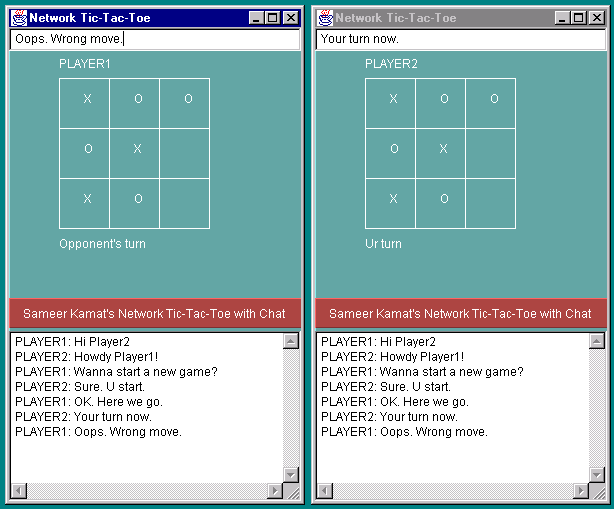
OK, now we can start the game session. As U will see, the extremely simple design for the visual interface of the
game, eliminates the need to have any doumentation for it. But just for the sake of completeness, I have included
it here. There are only three components in the application. The main play-pad for the Tic-Tac-Toe game, an input
box where U can type in any text for chatting and the display area where all chat messages from either side endup.
PLAYING THE GAME:
The odd-numbered player PLAYER1, PLAYER3, ..., always has the right to start the first game by clicking inside any of the nine boxes.
The clicked box is filled with a "O" and this action is reflected in the second player's window. The first player
now has to wait till the second player makes his move. All invalid clicks are ignored. After a game is over (either won or drawn), anyone can start a new game by clicking on any part of the work-area. The player who clears the entries, gets to start the next game.
USING THE CHAT FACILITY:
Type in Ur comments in the input box on the top of the window and press the ENTER key when U R done. The entered
message is sent over to the other side and the display area is updated accordingly on both sides. Ideally, these windows would exist on two different PCs.
This image below shows a typical game session being executed on the same PC. The window on the left is controlled
by PLAYER1 and the second one is controlled by PLAYER2.
Technical Stuff:
I have used the ServerSocket and Socket classes from the java.net package to handle the game sessions. Once a
session has been established between two players, the communication is handled using SAMTP (Sameer's Awesome
Message Transfer Protocol), which is a protocol that I have specially designed for the Network Tic-Tac-Toe
game. SAMTP has been hailed by many, as the protocol for the next Millenium. U'll be hearing more about it in the
future ;-)
Security Considerations and Limitations:
- Network Tic-Tac-Toe, in its current form, runs as an application. If U want to run it as an applet and use
it on Ur own web server, U would need to modify the code, a bit.
- Currently, the server supports five sessions simultaneously i.e 10 players. But the server side logic has been designed in such a manner that it can be easily enhanced to handle more sessions.
- Every odd-numbered player gets to play only with the immediate next even numbered player only. That is, PLAYER3 can play only with PLAYER4, and not with anyone else.
- When any player quits, the opponent cannot wait for another player to log into the server. He has to re-start his Tic-Tac-Toe Console so that he gets a new name.
Future Enhancements:
I'll try to eliminate as many limitations as possible, from the list above, depending on how much free time I get. Any other ideas, that U may have to enhance the Application, R welcome.
Back to the Main Page