
When you go to the PDF Order Form Page, your Web Browser will open the version of Adobe Acrobat or Reader in your computer attached to your browser.
Select the first field, and then use the Tab Key if you want to. xAt the Drop-Down Menus you will not see the cursor, but if you use the Arrow Keys there, you will see the selections.
Proceed to fill the necessary fields.
The mailing information gets the actual product to you. xThe request for an e-mail address and/or phone number will only be used if there are any questions about the information on the form and to negotiate pricing -- you will not be spammed!
Unfortunately, if you get the dialogue window telling you that there might be functional problems, then the 'Send Email' button might not work, but you can still fill the form fields. xIn that case, send the data in a regular e-mail or print the form and send it by snail-mail.
Select the Email Button.
This is the first pop-up dialogue you will see:
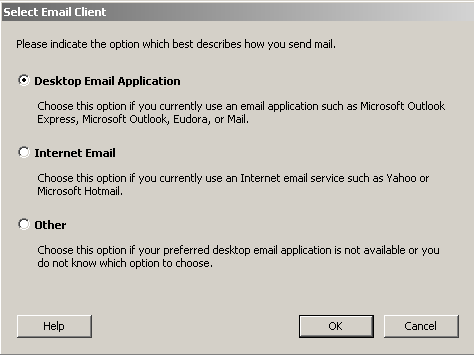
If you use your Personal Computer Email Application, then select Desktop Email Application, and you will see this second pop-up dialogue:
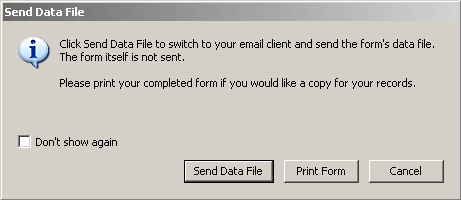
After you select 'Send Data File', an '.xml' file will be placed in Attachment, along with a standard body of text. xLeave all as is. xOr rename the attached file and/or change the text if you wish, but this is not necessary. xWhen you send this message, the XML Attachment allows this Studio to reproduce the same PDF Order Form that you filled out.
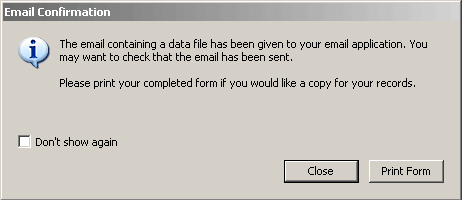
After you send the message, and close the application, you may find this dialogue hiding behind it:
x
If you select Internet Email or Other, this pop-up dialogue will appear:
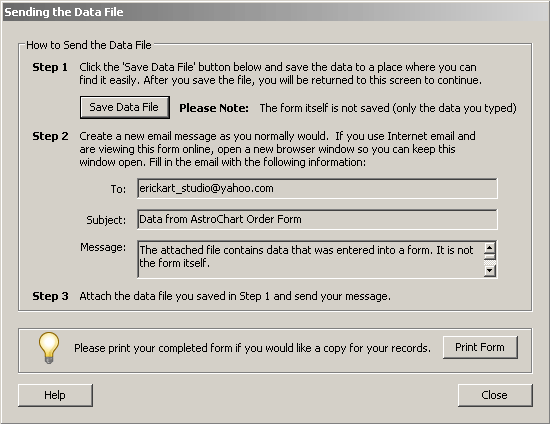
Follow the directions. xSave the '.xml' file to a convenient place on your disc. xGo to your Internet (or Other) Email Service, attach the saved file, and then Copy-Paste the 'To:' data and the 'Subject:' data. xDon't bother with the 'Message' info. xThe XML Attachment will allow this Studio to reproduce the original PDF Order Form.
I recomend that you open a second browser window at this point, before you select the hyperlink below. xSelect the link in the second window, and you will retain these instructions on this first window. xThank you for your interest in this valuable Device for Self-Exploration.