|
Home
: Extremely Flexible
Oracle Monitoring (XFIM) Revision Notes July
3, 2001 - Document Created
Downloads/Links
-
Sample Code - View
some of my PL/SQL coding. XFIM is not publicly available so only
some of the required files are included.
-
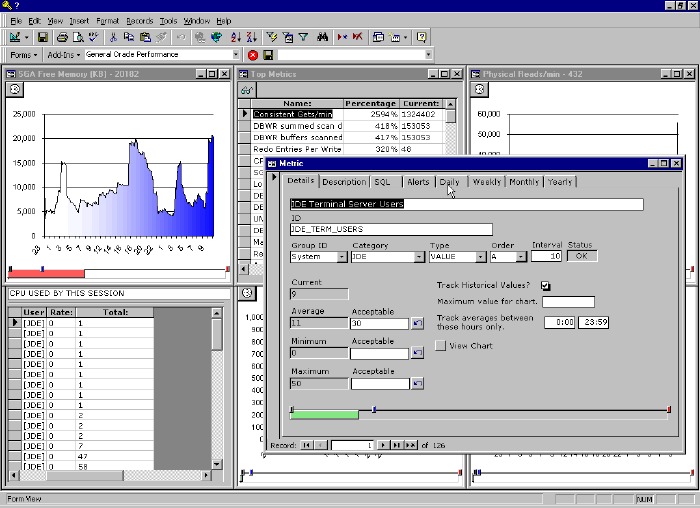
Screen Shot - Here is
a screen captures of the GUI built in MS Access that worked with a
prior version of XFIM.
-
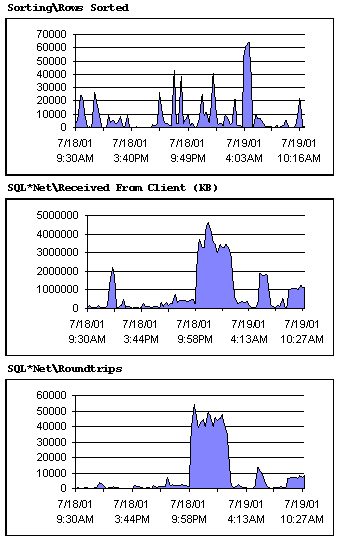
Sample Report - Check out one
of the reports you can produce with the data acquired using
XFIM. Requires the free Report
Snapshot Viewer from Microsoft.
Overview XFIM is an Oracle
performance monitoring tool I built using PL/SQL. I have developed a
number of Oracle monitoring tools in the past 3 years and each one builds
upon the knowledge I have gained from the last. XFIM is only my
latest swing at the bat and by no means my last. There are
a lot of Oracle performance monitoring solutions out there. Most are
either expensive or did not suit my needs. There is no secret to
building a good performance monitor. All you need to do it grab a
performance statistic at regular intervals and store it somewhere.
These are the challenges I overcame in the design of XFIM.
-
Design a system that efficiently stores historical
data.
-
Design a system that has minimal impact on the
databases it is responsible for monitoring.
-
Design a system that is capable of monitoring multiple
databases easily from a central location (single installation).
-
Design a system that works on multiple versions of
Oracle.
XFIM will work on any version of Oracle over 7.3. A
single installation of XFIM takes only a few minutes and can multiple
multiple database via the use of database links. The administrator
has great flexibility in deciding how much data will actually be stored by
the system. This flexibility allows performance storage characteristics
such as:
-
Store 8 hours of data at 10 minute intervals.
-
Take the above information and aggregate it into
weekly, monthly and yearly storage tables.
-
Store the hour by hour averages for each day of the
week in a compact rolling averages table.
-
Deactivate the metric that has been configured and
only reactivate if the average for a given hour is exceeded
consistently for more than 60 minutes. Also email the admin an
alert when this type of event occurs.
As you can see XFIM is "extremely
flexible". You have a increadible capacity to adjust polling
interval and data storage characteristics for each metric you want to
gather. Metrics are simply SQL statements so can monitor a lot more
than just Oracle performance measurements. XFIM comes with a huge
set of pre-defined metrics and allows you to quickly add new ones. |