|
Home
: Excel Dump (Access
97) Revision Notes July
18, 2001 - Document Created
Downloads/Links
Overview
I developed Excel Dump because I wanted an easy way to
dump information from a database fast and share it with
others. This is especially useful when faced with a serious tuning
challenge late at night. Using Excel Dump you can export a large
number of performance related tables from your database to Excel.
The application also creates a "xls.html" file which indexes
each of the Excel files it creates. You can quickly upload all of
these files to your personal web site or home page using FTP. When
you post messages seeking help regarding the problem others will have
access to a lot more information and won't have to ask you for it. Instructions 1.
Download and run the program. You will need Access 97. Make
sure you configure an ODBC connection to your database from the machine
this is running on. 2. Edit the entries in the OutputDefs
table to suit your needs. Any valid SQL select statement will
work. The "Name" column is the name that will be given to
the Excel file. Make sure you use valid file names. You do not
need to include the ".xls" extension. 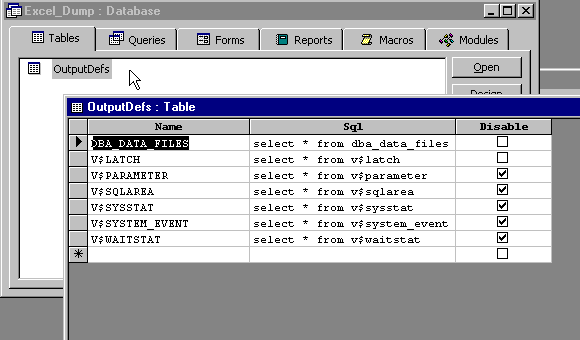
3.
Specify the directory you want the files placed and the name of the ODBC data source. This should already be configured. Go to the
Windows Control Panel to configure data sources. Press the
"Dump" button when your ready to export the data. 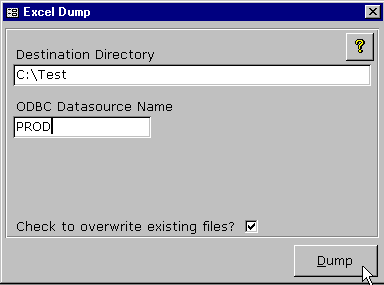
4. The files will be located in the specified directory
when the export completes.
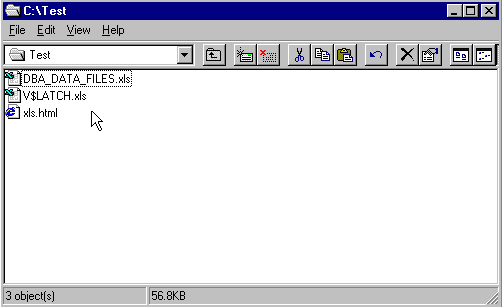
5.
Upload the files to your personal web site or homepage to share with
others. View The Code Below is the
bulk of the code. The best way to view the code is to use the Ctrl-A
key to select all of the text and then copy it using the Crtl-C key.
You can paste it into your own editor (i.e. Notepad) using the Ctrl-V
key. These are the procedures and functions that are included in
this code. 1. DumpFiles - Connects to the databases and
dumps data to Excel. 2. MyDir - Returns directory of
application. 3. utlPassThru - Creates a pass through query
using DAO.
|