|
To promote our organization, at first we have to start as an advertisement on a radio or television. Then when our organization is strong to the point, we will move on to set up our own online radio station or television station. We can put those into our website also.
To start an online radio station or be a broadcaster
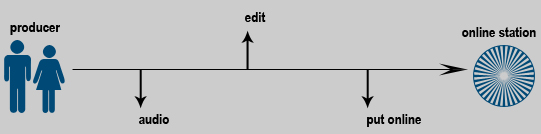
First Step: Getting Audio From ordinary user like we are, we need the audio that we want to put online such as music, interview, talk show, news. To get the audio can be from CD, or go on a field and record. Tools To record an audio, user primary need microphone , speaker . To go on a field for reporting, user may need something like wind filter .
Second Step: Editing After we had all audio recorded, we first need to put them into our computer to edit, or maybe edit at a studio. For PC, user must have sound card (PC's today normally has sound card on board). The quality of sound will depend on the sound that user has recorded and sound card. Tools To put audio onto computer, user has to have device. This depends on user's audio format. For example, if user record on a USB Flash Drive , user may directly use from that, but if user record onto a cassette, user may need device to put them into computer. When you have your audio on your computer, ready to be edited, now you need software. Software used for editing audio is various. The two common used are “ Sonic Foundry Sound Forge ” and “ Pro Tools ”. Sonic Foundry Sound Forge is most commonly used for beginners as well as professionals. Pro Tools is recommended for advanced users. Tools are better but they are also harder to use. User must know when putting sound into computer in which formats software support. For example, user may use MP3, WAV. But most of software do not support MID, user need to be careful.
Third Step: Putting Online To put audio online, user must have server. User can find someone who runs for. Two is using Shout cast system. Tools Shout cast system runs on a server attached to an IP network with lots of bandwidth, and is responsible for receiving audio from a broadcaster, updating the Shout cast directory with information about what the broadcaster is sending, and sending the broadcast out to listeners. Recommended players are: Windows users should use Winamp with Plug-in , Mac users should use Audion , Linux/X Windows users should use XMMS .
When our company has our own online radio station, we can do many things: • When we go out to do a promotion, we can note our station. • Also we can put our station into our website.
What to be on our website: Once we have our own radio station, we will put them online.
Program: • News (in accident and injury) • Interview governors • Songs for campaign • Process of organization
When we put our station online, we will not put all programs online. We just provide some highlight online. For example, all news that will be on a station will not be on our website. We will put only highlight such as comments from governors.
Same thing as broadcasting an online television station: To start an online television station or be a broadcaster
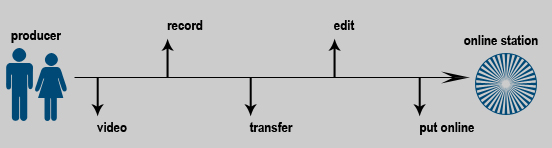
First Step: Video To start broadcasting an online television station, user definitely needs the video camera to record your file. Unless, user has their file already that user downloaded or captured from Video CD, DVD. Tools To record a video, user needs a video camera which can be any brands such as JVC , Sony . Common used of video camera currently is Digital Video which is easier to use than a film video. Sony is known as worldwide brand of electronics. Memory stick can be used in all of their technologies such as laptop, digital camera, and digital video. JVC is also known as one of the electronics. The capability is not less than Sony and cost lower.
Second Step: Recording When user got their video camera, now it is time to record. Tools For an accident, there is no way to prepare to record an event. Therefore, user must have a handy digital camera and ready to record the event all the time. In other case, if user prepares for an interview, user may need more than a camera. User may have a light , camera stand , portable mixer , etc.
Third & Fourth Step: Transferring & Editing Once user has an event recording, user must transfer to computer to edit. Tools To transfer recording events into computer, user must know what is required. For example, user needs to beware of some new digital video camera that requires IEEE 1394 device but old version USB port should be fine (since most computer nowadays has USB plugged in). To transfer does not need only a device, it also requires some software. For some digital camera, it may come along with own hardware (device) and software. Recommended software for editing videos: for beginners may use software from Windows such as Windows Movie Maker . For this software, user must transfer video into file format: .mpeg, .mov, .avi, etc. before importing to edit. For advanced user may use Adobe Premiere . With this software, user can transfer through this software directly from video tape using a device like USB or IEEE 1394. Editing videos: user can import file or capture video from tape into timeline and also import sound or still image to editing your video. After all actions have been done, user can export file and make a video CD, DVD.
Fifth Step: Putting Online When everything is done, now it is ready to be put online. Tools Almost the same thing as online radio station, user needs to run a server. User may use Meet software or Hardware MCU to set up a server. For user to view your station, user may use Apple QuickTime , Real player , Windows Media Player to view a station. Meet software provides a powerful multi-point control and transcoding engine, which can connect more disparate systems than any other communications infrastructure product on the market.
Close this window to go back |