8-Step Sequencer with Auto Pan and Intensity
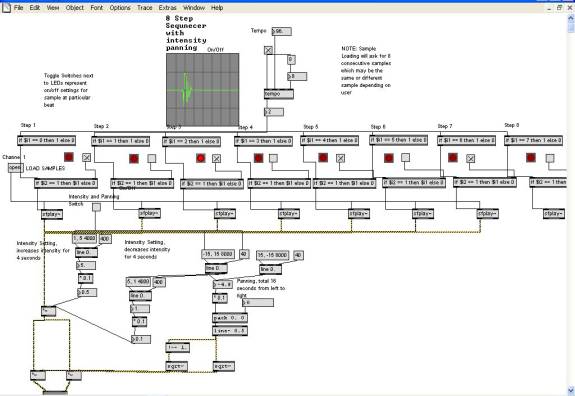
Initially the plan for this project was to create multi-channel 8-step sequencer that would pan in sync with the tempo, but this became a greater challenge than I was prepared for. This implementation loads 8 samples into memory, then allows a tempo to be set at the top. Once the tempo is set and the samples are selected we can tell the sequencer which step we want the sample to play on by clicking the toggle buttons next to the LEDs. The steps are divided by the tempo so that they play a rhythmic value of 8th notes. Selection of every other button would play a sequence at a given tempo in quarter notes. The samples can be set to auto pan and intensify using the Intensity and Panning switch. This switch sets off a panning sequence, which intensifies loudness, then moves from left to right, then decreases intensity and moves from right to left, and repeating.