With whath you have learned in part 1 you can create a simple map. With this knowledge you can create also big and amusing constructions.But you can achieve lots more than this with unrealED for example colored light, moving doors,... That's why we have designed part2 and more
FIRST: Colored light
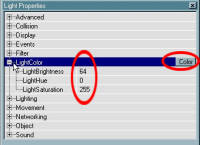
How you add light to your map you already know and if you don't go to the previous tutorial. But you can also change the color and intensity of the light. You can do this by right clicking on the torch in the 3d screen.Choose light properties and next on lightcolor. After lightBrightness you can change the intensity of the lamp and when you click on the button color you can choose the color of the light
The light properties
The level properties
this is also very important go to view and then to levelproperties and open Levelinfo. Fill in your name after Author and after LevelEntertekst a short introduction of your Level. You can see all this info when you start your level. You can also change the music which you will hear in the game. But you can figur that out for youself easily enough.
MORE TO COME SOON |