Pong in OpenGL
|
|
Project
|
|
GWU CS185 2004 Project 1: Pong
|
|
Instructor
|
|
Dr. James K. Hahn
|
|
Assistant
|
|
Sang-Joon Lee
|
|
|
Code written by
|
|
Grace E. Cho
|
|
Documentation written by
|
|
Grace E. Cho
|
|
Created in
|
|
October 2004
|
Implementation Methods
The source code is written in C++ using OpenGL and compiled by VC++ 6.0.
These are represented as classes PongBall, PongPaddle, and PongWall, respectively.
Each of these classes are derived from an abstract class called PongObject.
PongObject class provides basic functions to set and retrieve position of
the object and its color.
The virtual function Draw() is to be implemented in a derived class.
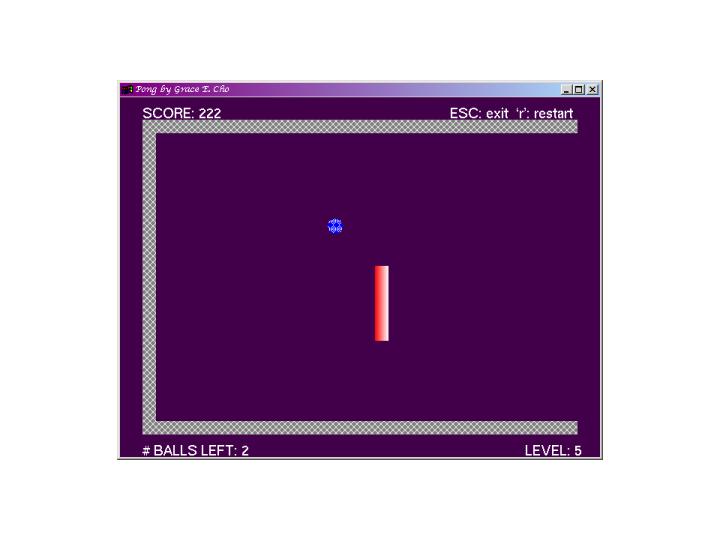
Graphically Speaking
- Pong ball is represented by a filled polygon
- Paddle is repesented by a filled rectangle
- Border is represented by three walls,
each of which is a filled rectangle.
Basic Functionalities
- Collision Detection And Trajectory Handling
The ball can collide with the paddle or the border.
- Collision with the paddle or the vertical wall:
The ball bounces with a trajectory = 180 degrees - old trajectory.
- Collision with a horizontal wall (i.e., ceiling or floor):
The ball bounces with a trajectory = 360 degrees - old trajectory.
- Collision at a corner of the border:
The ball bounces with a trajectory = 180 degree + old trajectory.
In other words, the ball bounces to the direction where it came from.
- Paddle Position Correction
If the player tries to move the paddle passed with window size,
it will be detected and the paddle will be placed right at the border.
- Logic To Terminate A Game Session
Each session of a game is over if the ball goes over the left most boundary.
The play will be noticed and the scene will be redrawn after a brief pause.
Enhencement
- OOP
Create PongObject class from which PongBall, PongPaddle, and
PongWall are derived to represent game objects
- Representation of the Ball
Ball is represented by a filled polygon rather than a dot.
- Object Size Correction
If the window is resized so that the game objects are too big compared to
the window size, the size of game objects are modified to fit in the window.
- Level of Difficulty
Player can change the level from 1 to 9 by pressing the corresponding number
to change the speed of the ball as well as
to move the paddle closer to the horizontal wall.
However, the paddle will not move to the left of the ball's current position.
- Multiple Session Per Game
Initial of three balls are available per a game.
A session is over if the current ball goes out of the bound.
- Game Score
Each time the ball hits a game object (paddle or wall),
the player scores.
Basic points:
| Hitting the paddle: | 7 |
| Hitting the vertical wall: | 3 |
| Hitting the horizontalwall: | 5 |
| Hitting the corner of the border: | 7 |
1 point will be added for each level up.
The score is kept from a session to the next,
and it will be reset for a new game
- Score Display
Score is displayed and updated continuously.
- Warning For a Stalled Game
Keeps track of the paddle movement to warn if it's not moving for more
than 15 seconds.
The player will not score any more points
until the paddle starts moving again.
- Input Checking
If any of the input values (ball and paddle position and ball trajectory),
it will be modified so that all game objects are correctly visable
- Various Text Display
- Score is displayed and updated continuously.
- Number of the balls left (not including the currently used ball)
is displayed.
- Help texts for key functionalities are displayed
- A warning message will be displayed if the paddle is not moving for
more than 15 seconds
- The text font size will be changed depending on the window size.
- Some of the text will be hidden if the window size becomes too small.
- Visual Enhencement
Game objects are filled with patterns
- Code Documentation
Source code is documented in
Doxygen format
and html is created.
How To Play
The default intial position of the ball in on the left of the play field and
in the half way in the y direction.
The paddle is located on the right and in the half way in the y direction,
like the ball.
The initial tractory of the ball is set to 15 degrees.
To change the initial values, start the game in the commond prompt
by entering:
gec_pong [ball x position] [ball y position] [ball trajectory] [paddle y position]
The paddle moves when the mouse is pressed on the paddle and moves up and down.
It does not move horizontally unless the level changes.
List of Key Commands
| `s' | | Start a game session |
| `r' | | Restart a game |
| `ESC' | | Quit Pong |
| Number 1 to 9 | | Change level |
Remarks:
- If you set the trajectory equal to 0 degree, it will be reset to
15 degrees.
- If the postion of a game object (ball and paddle),
it will be modified so that all game objects are correctly visable
- If the game objects are set so that the ball can bounce indefinitely
and if you do not move the paddle, the score will be frozen and
a warning message will be displayed.
Last update: Oct 7, 2004
Questions and comments to
Grace E. Cho