3.1.2 Network Architecture


  Learning Outcomes :

 Explain types of network architecture.

§Peer-to-peer
§Client-Server
                                             Network Architecture
Network architectures is the way network are designed to communicate.
Types of network architecture
  1. -Peer-to-peer (P2P)
                            -  Client-Server
                           
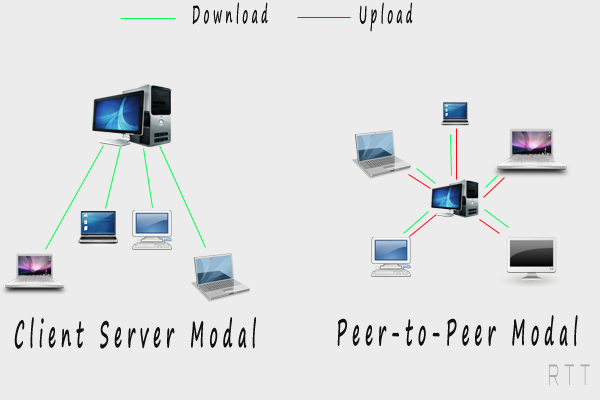
Peer to Peer (p2p)                                  Client -Server


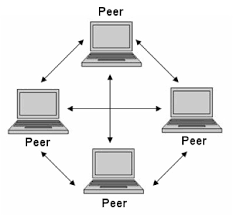
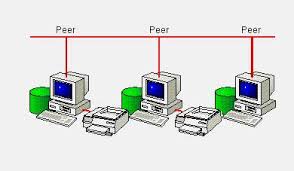
Peer-to-peer Network
§Definition :

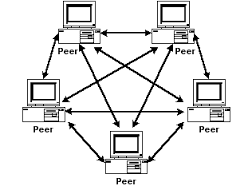
  1.    A network model in which all computers can function as

            clients or servers as needed, and there’s no centralized

            control over network resources.

     2.    Is a simple, inexpensive network that typically connects

            fewer than 10 computers.


ž  
  1. @Most computers function as clients or servers.

ž
          @Example : A computer can act as a server by sharing a printer it’s          connected to and at the same time act as client by accessing a file shared by another computer on the network


Advantages of a peer-to-peer network:
Less startup cost to setup the network architecture - No need for a server.
Easy to Setup up - An operating system (such as Windows XP) already in place may only need to be reconfigured for peer-to-peer operations.
Disadvantages of a peer-to-peer network:
Decentralized - No central repository for files and applications.
Less Security - Does not provide the security available on a client/server network

Client-Server Network

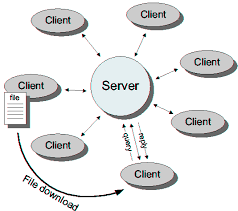
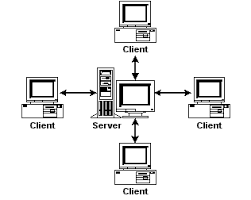
@Network in which one or more computers act as a server, and the other computers (clients) on the network request services from the server.

ž@Computers connected together to create a network which fall into two categories: clients (workstations) and servers.

The Client

The Server

Computer on a network that requests resources from the server. Also called a workstation.

Computer that controls access to the hardware, software, and other resources on a network, and provides a centralized storage area for programs, data, and information.

Note: Server can be a mainframe computer used in a network environment.


Client-Server network diagram


Servers
žServers are special, powerful computers that provide ‘services’ to the client computers on the network.
ž
žThese services might include:
*Providing a central, common file storage area
*Sharing hardware such as printers
*Controlling who can or can’t have access the network
*Sharing Internet connections

žAn architecture in which the user's PC (the client) is the requesting machine, and
the server is the supplying machine, both of which are connected via a local area network (LAN) or a wide area network (WAN) such as the Internet.

Advantages of a Client/Server


Centralized - Resources and data security are controlled

through the server.

                                 
     •Scalability - Any or all elements can be replaced individually as  

   needs increase.
   
 •
Flexibility - New technology can be easily integrated into

  system.
   
Interoperability - All components (client/network/server) work

  together.
    •Accessibility - Server can be accessed remotely and across

  multiple platforms.

Disadvantages of a Client/Server


Expense - Requires initial investment in dedicated server.
Maintenance - Large networks will require a staff to ensure efficient operation.
Dependence - When server goes down, operations will cease across the network


Peer-to-peer VS Client/Server Network

Network Attribute

Peer-to-peer

Client/Server

Resource access

Distributed among many desktop/client computers; makes access to resources more complex

Centralized on one or more servers; streamlines access to resources

Security

Users control their own shared resources and might have several sets of ID to access resources

Security is managed centrally, and users have a single sets of ID for all shared resources

Performance

Desktop OS not tuned for resources sharing

Server OS tuned for resources sharing

Cost

Initial costs lower

Higher up front costs because of dedicated hardware server OS and on going costs for administrative support


Peer to Peer (p2p) VS Client-Server


           Next