|
So you are using Internet Explorer?
Be sure that the security level of your browser is not set at Alto, which would never let JavaScript windows to be opened.
You can try to low it down to Medio-Alto.
CHANGE THE SETTINGS
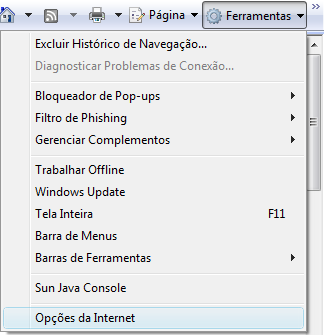
So in your menu bar, go first to Ferramentas and then to Opcoes da Internet:
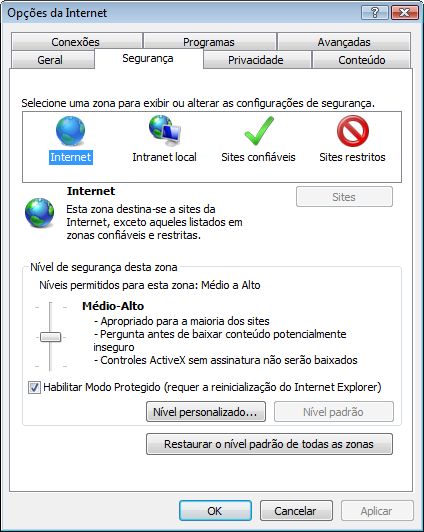
In Opcoes da Internet, go to Seguranca, where you will select the Internet zone. Set the security level of that zone to Medio-Alto, click on button Aplicar and then click OK:
RELOAD THE PAGE
Right after that box is closed, click CTRL+F5 to reload the page completely. A yellow bar will appear from the top of the browser, telling you about scripts and ActiveX:

ALLOW SCRIPTS TO WORK
If you just close the yellow notice, the links will never work. So move the mouse over the yellow notice, thus making its background becomes blue:

Click on the notice and select Permitir conteudo bloqueado:

Then click Yes on the alert box that will pop in the middle of the screen:

The page will then reload by itself, allowing JavaScript code to run.
Whenever that yellow banner appears in the website again, allow scripts to work!
|
|
|
|


 back
back