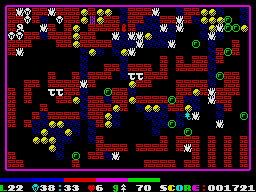
The map can be displayed at any point during play by pressing F, but only once during the current level or life. It will show the whole level on one screen in its current state, but only for just under 10 seconds, so this is all the time you have to take in as much information as possible so that you know what to do next. The graphics for the map never change, and this is important on level 20 (where the earth and wall have the same graphics) and 30 (where the earth and boulders have the same graphics). Showing the map is the only way of pausing the game too.
When you look at the map is up to you - if you've come to a difficult level for the first time and don't expect to complete it, it may be a good idea to view it straight away. On the other hand, I find that if you have a strategy for completing a level and half way through (especially if time is a problem) you forget what to do next or just need a short break, have a look at the map then.
