D'Zines
by Grace
~~~~~~~~~~~~~~~~~~~~~~~~~~~~~~~~~~~~~~
Scalloped
Edge Ribbon
This is what we will be
making. All the settings shown here,
are just a guide. Your actual
creation will be in color. :-)

This tutorial is being presented
to PSPMadeEZ as a learning tool,
with my express permission. ©D'Zines by
Grace 2008.
Any resemblance to this tutorial
is purely coincidental.
What you create with this
information, is owned solely by you.
SUPPLIES NEEDED
Paint Shop Pro - I used Version 8
Any version should work.
Unzip the filters and extract
into your plugin folder.
MuRa's Filter Meister
- zip
here
Greg's Factory Output Vol II Pool Shadow
- zip
here
Note: The settings I am
presenting are only guides.
This can be done with any size.
The following is what I use.
To get started, have your PSP
open.
1. File/New/New Image
600 X 400 Pixels
100.000 Resolution
Raster Background
16 Million colors ( 24 bit )
Transparent, OK
2. Flood Fill tool
Match Mode - None
Tolerance - 20
Blend Mode - Normal
Opacity - 100
Foreground - color
Background - color
3. Preset Shape
Ellipse/Anti-alias checked
Create as Vector checked
Line style - solid
Width - 7.00
(this is what I'm using for this
tutorial)
4. With your Foreground on color
and Background null, draw out a
circle.
To keep it round,
press down the "shift" key while
drawing it out.
5. Object/Align/Center in Canvas
6. Layers/Convert to Raster Layer
7. Effects/Plugins/MuRa's Filter
Meister/Copies
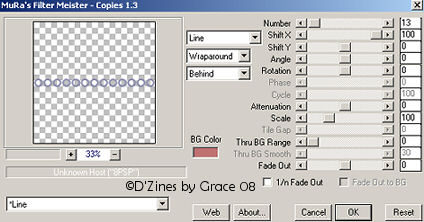
This is what I have with these
settings.

Let's erase those end pieces. Use
either the Eraser tool
or use the Selection tool, select
the ends, and press
delete and those will disappear.
8. Preset Shape tool with these
settings
Rectangle, Anti-alias checked
Create as Vector checked
9. Material Palette - For solid
color
set Foreground & Background
to same color
10. Draw out your rectangle
width and length you desire
11. Object/Align/Horizontal Center
in Canvas
12. Layers/Convert to Raster
Layer
13. Layers/Merge Visible
14. Effects/Plugins/Gregs Factory
Output Vol II
with these settings
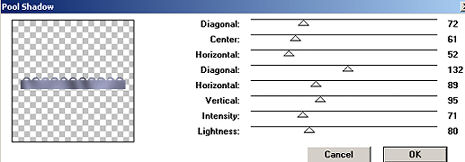
Diagonal - 72, Center - 61,
Horizontal - 52, Diagonal - 132
Horizontal - 89, Vertical - 95,
Intensity - 71, Lightness - 80
OK
15. Effects/Texture Effects/Texture
( optional)
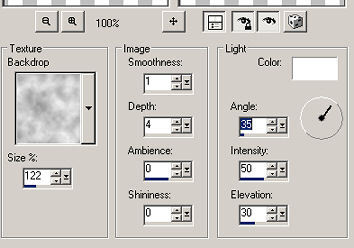
OK

And you have a Scalloped Ribbon!
Super!!
This is a simple version. There's
so much more
that can be done.
Decorate to your own taste.

 Home
Back
E-Mail
Home
Back
E-Mail
Sign
View