Internet
radio is one of the new Web's killer applications, beating out the traditional
AM/FM kind in several departments. Although there's already a huge amount of
material out there, there are still opportunities for creative people to
develop new cutting-edge music sites. If you're thinking of setting up your own
Internet radio station, here's a broad overview of how to do it, including the
technical and legal angles.
Internet
radio has quietly become one of the new Web's killer applications. A short
browse through the Internet Radio List
gives you an idea of how much audio material is available on the Internet these
days, and things are just getting started.
Internet
radio beats out the traditional AM/FM kind in several departments. Are you into
some obscure type of music that doesn't get played on mainstream radio? You can
find it on the Web. Perhaps you live in a foreign country, and would like to
hear some programming in your native language. Or maybe you're just homesick
for your old hometown radio station. While an old-fashioned radio gives you
access to perhaps a couple of dozen local stations, a computer with a sound
card and an Internet connection can give you access to an unbelievable variety
of programming, anywhere in the world. Not only music, but a huge variety of
news, sports, talk shows and other audio programming is available.
Online
radio does not have any geographical restrictions, nor does it need to be
sequential - users can listen to an ongoing program, or listen to pre-recorded
pieces on demand. Furthermore, the medium is not limited to audio. Limited
bandwidth is the only reason that it's called "Internet radio"
instead of "Internet TV". Pictures, text, and hyperlinks can
accompany online audio programs to related Web sites. Few sites have really
started to explore these possibilities. Many online radio stations are run by
traditional radio broadcasters, which simply duplicate their usual programs online.
In other words, there are still opportunities out there for creative people to
develop new cutting-edge music sites. If you're thinking of setting up your own
Internet radio station, here’s a broad overview of how to do it.
There are two ways
to deliver audio over the Internet. The easiest way is simply to make audio
files available for download. Compressed formats such as MP3 are the most
popular, but any type of audio file can be delivered through a Web site or an
FTP site, allowing users to store the file on their own system, and do with it
what they will.
A more complex way
to deliver audio (or video) over the Internet is called streaming. Streaming
media flows from the Internet directly to a user's sound card. It isn't stored
on the user's computer, but only played. Streaming makes it possible to deliver
a continuous broadcast over the Internet, and is thus the basis of an Internet
"radio station".
The streaming model
has several advantages over the downloading model. First, it allows for a program
of any length, or even a live broadcast. Second, it makes piracy easier to
control, since users only listen to a piece of music, rather than storing it on
their hard drives. Third, it's simpler for users. Why bother with storing files
on your own machine if you can stream music on demand?
The technical
centerpiece of an Internet radio station is a piece of software called a
streaming media server. Just as a Web server delivers Web pages, a streaming
media server delivers audio or video streams. There are three main players in
the streaming media game these days: RealNetworks, Apple and Microsoft. All three offer both
streaming servers and streaming media clients with their own native media
formats. Also worth checking out, especially if you're on a low budget, is ShoutCast, a free server that streams MP3 files.
Streaming
media works through a triad of software packages - the encoder, the server
and the player. The encoder converts audio (or video) content into a streaming
format, the server makes
 the
content available over the Internet, and the player (on the end user's machine)
retrieves the content.
the
content available over the Internet, and the player (on the end user's machine)
retrieves the content.
Each of the big
three streaming software makers makes a set of these three components. The
players are all pretty good about playing each others' formats, so which player
the user has makes little difference. The encoder and server work together,
however, so if you have (for example) the RealNetworks streaming media server,
you must use their RealProducer encoder.
Pre-recorded
material is prepared for streaming using the encoder, then simply stored on the
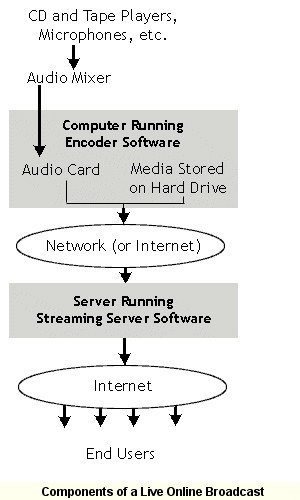
server, just like a Web page or other downloadable file. For a live broadcast,
however, the encoder must work together with the server in real time. An audio
feed runs to the sound card of a computer running the encoder software at the
broadcast location (this should be a dedicated machine). From there the stream
is uploaded to the streaming server, which may of course be at a different
location.
Do you need to buy
and install your own streaming media server? Of course not. Most major ISPs
offer streaming media as either a standard feature or an upgrade to their
server packages. Streaming pre-recorded content is pretty straightforward, and
could be done with an ordinary hosting account or virtual server account. Live
broadcasting is a bit more complex, since the encoder must run in real time at
the broadcast location, and because of the large amount of computing resources
required. If you're serious about live broadcasting, you'll probably want a
dedicated server account.
http://wdvl.internet.com/Multimedia/WebRadio/tech.html