
Ok, first off, Open your editor. (I am using WA, so...)
Now, create your water sector, like so:
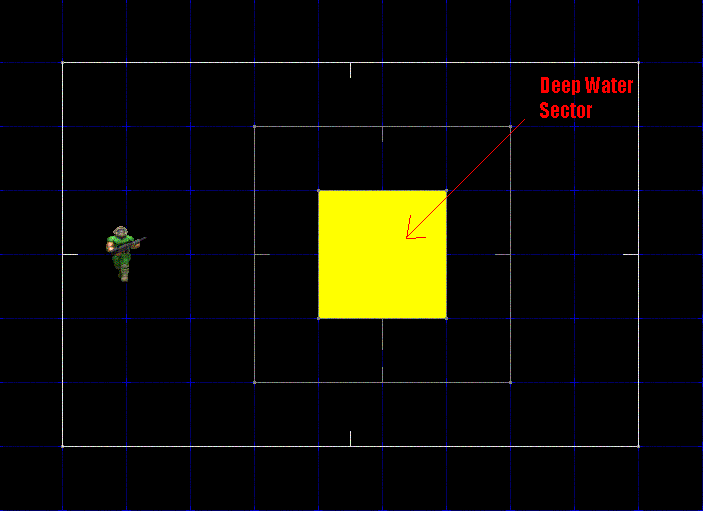
Most of the time, it is a square with all sides solid. Set its floor texture to whatever you want the bottom of the Deep Water Sector to be. Set its ceiling to whatever you set the Deep Water Sector to, ie "FWATER1."
Ok, now to what makes the water go where it needs to be. Bring up the properties of 1 line. Go down to special, then set the tag to 1, 50, or whatever tag you want it in the arguments box.
Make the dummy sectors heigh where you want the top of the water to be, ie if the ground is 0 then i would set it to -8, and set its ceiling height to whatever the Deep Water Sectors ceiling hieght is. Now compile it, it should like this: (Click here for screenshot) (i added a little detail to mine =p)
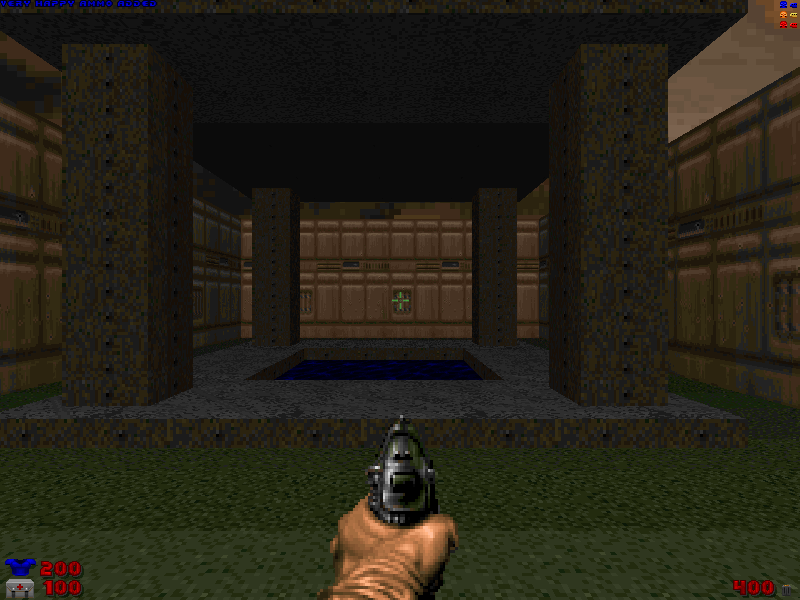
But, when you fall into the water, the color is no diffrent! To simply fix this, go the dummy sector line, and change it's lower texture too something like this: 7400032
This is what the format is: FFRRGGBB
FF Stands for Fog, Set to FF(full fill) and the sector is extremly difficult to see in.
RR/GG//BB stands for Red/Green/Blue. Set any of the colors to FF and it will become
a bright red/green/blue, set it low, and it will be a little darker. Mix colors to get diffrent colors.
The next step is to make it slower when you swim. I mean, if you go swiming, isn't harder to move as fast you can run in it? Of course it is ^_^
To do this, select another line on the dummy sector. Doesnt matter which. Go into:
Special>
Set_SectorFriction
Now, set it too what you want. Remeber, this is bacwards, so, if you set friction to 2, its gonna be like swimming in gum. So, for a reasonalbe friction, set it too 75/80/85. Great, now its much more like water. But, you don't really swim, now do you? You kinda just sit there at the bottom like a rock. To fix this, make a new object. Go to special, then go all the way down the menu.
At the bottom is "WATER ZONE". With this, you can swim, and drown if you stay under too long.
Thats all for now, and you can download a complete file here: dpwtr.zip