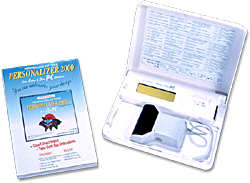
Personalizer 2000
The Personalizer 2000 is the latest in a series of exceptional Janome software products that enable the creation of embroidery designs with ease and unlimited possibilities. This Windows95/98/NT compatible software consists of two programs, EasyImport and EasyEdit, which function very much like programs of the same name in Customizer 2000.
The main difference between Personalizer 2000 and Customizer 2000 is the hardware required for the transfer of stitch data. Customizer 2000 is designed to work with the new Memory Craft Reader/Writer, while Personalizer 2000 is designed for the Scan 'n Sew PC. The other difference is the number of designs that can be placed on a ScanCard. Customizer 2000 has the capacity of up to 48 designs (or 512KB - whichever comes first), while Personalizer 2000 has the capacity of 6 designs.
EasyImport
Allows you to import clipart (.wmf) and bitmap (.bmp) formatted designs directly.Your design is automatically optimized to fit into the 480 x 350 embroidery area.When assigning stitch data, you can choose from five fill stitch types and five line stitch variations.Choose from a pallet of 78 thread color choices. Rotate, Mirror Image, Flip, and Re-size your design with ease. Make bitmap corrections with zoom, pencil and eraser capabilities.Using the Tracing Option feature you can create a line image quickly and easily. The split window display allows you to see your design image (.bmp) and stitch image (.sew) simultaneously. Print a line image template with crosshairs (for perfect placement using the Clothsetter) and design color separations.
EasyEdit
Combine designs on the EasyEdit screen up to 23 1/2" x 33".
Print a template up to 23 1/2" x 33".
Choose from 3 layout types for Monogramming: Free Layout, Straight
Layout and Arc Layout.
Combine embroidery designs for stitching without re-hooping.
Imported designs (.sew) can be flipped and rotated to enhance any design
combination.
EasyEdit can import stitch data from Memory Cards #121 and higher
(excluding Memory Cards that are Licensed).
Computer system requirements:
PC running Windows®95/98 or NT
486 processor or better (Pentium recommended)
16 MB of RAM minimum (32 MB recommended)
Hard Drive: 40 MB hard disk space
Video Display: 800 x 600 pixels resolution, 65,000 colors or higher (1,024
x 768 pixels, 16 million colors recommended)
Serial Port: You must have an unused serial port.
CD-ROM drive
Mouse
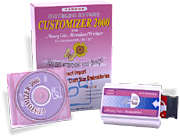
Customizer 2000 With Reader/Writer
The Customizer 2000 software package along with the Memory Craft Reader/Writer allows you to do Professional-Style Embroidery with greater ease and precision than ever before.
The Windows® 95/98/NT compatible software features two powerful embroidery applications: EasyImport and EasyEdit.
EasyImport
Allows you to import clipart (.wmf) and bitmap (.bmp) formatted designs
directly.
Your design is automatically optimized to fit into the 480 x 350
embroidery area.
When assigning stitch data, you can choose from five fill stitch types
and
five line stitch variations.
Choose from a pallet of 78 thread color choices.
Rotate, Mirror Image, Flip, and Re-size your design with ease.
Make bitmap corrections with zoom, pencil and eraser capabilities.
Using the Tracing Option feature you can create a line image quickly and
easily.
The split window display allows you to see your design image (.bmp) and
stitch image (.sew) simultaneously.
Print a line image template with crosshairs (for perfect placement using
the Clothsetter) and design color separations.
EasyEdit
Combine designs on the EasyEdit screen up to 23 1/2" x 33".
Print a template up to 23 1/2" x 33".
Choose from 3 layout types for Monogramming: Free Layout, Straight
Layout and Arc Layout.
Combine embroidery designs for stitching without re-hooping.
Imported designs (.sew) can be flipped and rotated to enhance any design
combination.
EasyEdit can import stitch data from Memory Cards #121 and higher
(excluding Memory Cards that are Licensed).
Memory Craft Reader/Writer
Works like a disk drive to transfer embroidery design data from Janome
Memory Cards and to or from ScanCards.
Connects to your PC computer through serial port.
Works with included Customizer 2000 software.
Computer system requirements:
PC running Windows® 95/98 or NT
486 processor or better (Pentium recommended)
16 MB of RAM minimum (32 MB recommended)
Hard Drive: 40 MB hard disk space
Video Display: 800 x 600 pixels resolution, 65,000 colors or higher (1,024
x 768 pixels, 16 million colors recommended)
Serial Port: You must have an unused serial port.
CD-ROM drive
Mouse
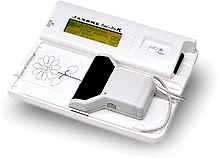
Scan 'n Sew PC
Now you don't have to be a computer genius to enjoy computerized embroidery. The brand new Scan 'n Sew PC gives you incredibly precise results with the easiest to use interface. It's possible to scan designs in one step, combine and manipulate images, check your finished design in true colors, and print out templates for perfect placement and unlimited size and design combination possibilities. But even better, the Scan 'n Sew PC is genuinely simple to use — continuing our tradition of making the easiest to operate sewing products.
The Scan 'n Sew PC Hardware
Like its predecessor the Scan 'n Sew II, the Scan 'n Sew PC is a compact scanning unit with an LCD display and a Scan Card drive. By saving your finished designs to a blank Scan Card, they can be transferred to the Memory Craft 9000 and Memory Craft 5000 computerized embroidery machines. The innovation is the ability to connect the Scan 'n Sew PC directly to your personal computer via an unused serial port. This breakthrough allows scanned designs to be manipulated on the computer with all the ease and power of the Windows® 95 compatible environment.
The Scan 'n Sew PC scans designs in one step. No need to scan a separate layer for each color in a design; instead you select colors right on the computer screen. Open the color menu, and choose the thread color and stitch pattern for each area. Customize further with size, rotation and mirror image options. And you can even choose a background color that patches your fabric so you get the truest idea of how your final design will look.
The earlier Scan 'n Sew II will not currently work with the new ScanSoft PC software. However, by February of 1998, Scan 'n Sew II owners will be able to upgrade their scanners to the level of a Scan 'n Sew PC.
The ScanSoft PC Software
What makes the Scan 'n Sew PC so easy to use is the
ScanSoft PC software. It comes on a CD-ROM, making
installation fast and easy. And, it takes full advantage of
Windows® 95, allowing the average home PC user to
be up and running in minutes. It also comes with a
library of pre-scanned images to use in addition to your
own scanned images or bitmap images from other programs.
How To Make A Finished Design
Using the Scan 'n Sew PC is remarkably straightforward. With your Scan 'n Sew PC connected to your computer and your ScanSoft PC software running, simply put the design you want to scan in the scanner bed and slowly pull the scanning device across it. One mouse-click on your computer brings the pattern into your PC.
Once a design has been scanned and transferred to the PC, the software converts it into a clean outline. Then it can be reduced, rotated, multiplied, and combined with other images with countless options. A little engine becomes a whole train. A single flower turns into a garden.
The finished image can be saved onto a floppy disk or the computer's hard drive. To embroider your design, simply save it to a Scan Card which can then be inserted into a Memory Craft 9000 or 5000. The Memory Craft sews your new custom design just as if it were using an off-the-shelf Memory Card.
The First Scanner-Computer Link Designed Specifically For Home Embroidery
The Scan 'n Sew PC is so easy to use because it was designed from the ground up to be used by home sewists. No time-consuming stitch-by-stitch digitizing. And that means more time for actually sewing your designs.
The beauty of the Scan 'n Sew PC is that it allows even the beginning embroiderer to use the most advanced omputerized machine right out of the box. Because it was specifically designed for Windows® 95, the ScanSoft PC software has Help boxes which provide an on-screen tutorial.
The optional on-screen stitch selections — directional weaving, satin stitches, outlines and cross stitch — provide the stitch quality and precise embroidery for which Janome computer models are famous.
Janome America, Inc. has been a leader in innovation, introducing in 1979, the first computerized sewing machine, and in 1991, the first computerized sewing machine to offer professional-style embroidery to the home market.
System Requirements (detailed requirement specifications)
Windows® 95
486 (80486) processor (Pentium recommended)
16 MB RAM (32 MB RAM recommended)
10 MB available hard drive space (20 MB recommended)
Mouse or other pointing device
CD-ROM drive
SVGA video
Available serial port
please contact us for any information on this list of accesories
- EasyHoop Software
- Floppy disk in .SEW format (Floral Art and Quilting
Designs)
- Floppy disk in .SEW format (Wildlife and Fishing
Designs)
- Scan 'n Sew Blank Memory Card
- Scan 'n Sew Drawing Paper
- Scan 'n Sew Pens (3 per pack)
- All Memory Cards
- All Presser Feet
- All Serger Feet