|
How to make dolls
This Tutorial will take 59 seconds
to load on a 28.8 modem and 30 second on a 56.6K so sorry about that!
First of all I don't use palace but
if you like go to AvatarPalace.net
and download the Client software under the download sign. Then you can
just surf around looking for props and stuff to get yourself
started.
Then go to Microsoft Paint (Start,
Programs, Accessories: Paint) If that isn't then then stick in your
Windows CD and load it back on to your computer.
But anyway what I do is get a doll
from my website or just get a base body, so anyway Its up to you I'm gonna take
one from my site.
|
�

To make this have a different top say a
sky blue one with a star on and light blue jeans you would copy the picture
into paint
Right click on the dolls, click on copy
and then go into paint go to edit and then click on paste (see
below)
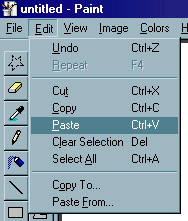
OK doing well, the doll should now
be on the screen. Click on a colour (or
double click on it to see millions
of new colours that you could use)
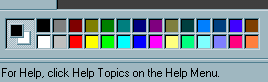
Then use the fill tool
 to fill in the top completely in (all
the I love me bit too)
to fill in the top completely in (all
the I love me bit too)
Now zoom in X8 and scroll along till you find the top, use
the bright yellow colour click on the paintbrush
in X8 and scroll along till you find the top, use
the bright yellow colour click on the paintbrush and make the star, you may want to put a few
dots around.
and make the star, you may want to put a few
dots around.
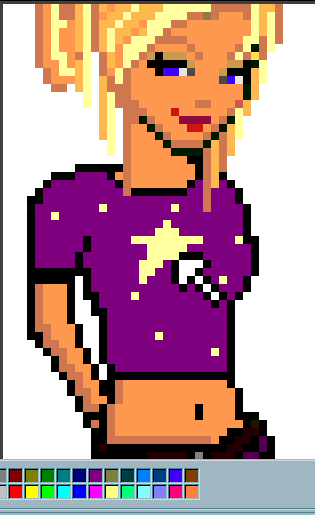
So then we get
on to the hard bit, the jeans. Coz the jeans have so
many different colours in, them its difficult to colour them different. So you have to be careful with his bit. Scroll Down (while you are still in zoom) to
the jeans and pick three colours, one darker, one lighter and one in the middle
of the the two. For a starter I suggest you copy and paste the below colours
but if you feel free to use your own.

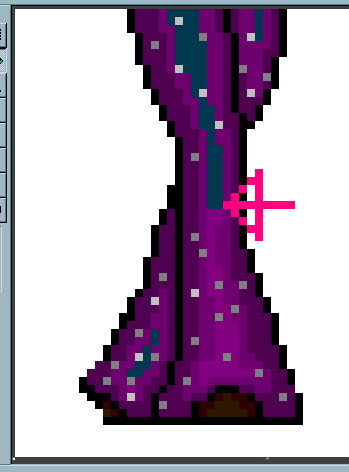
Click on the eyedropper tool (above) and
click on the lightest colour (bottom colour) Then click on the fill button and
click away on the middle part on the jeans (see below) Make sure anything in
that purple is coloured in.
Note: The colour below the arrow is
the original colour and when you fill it in I will be like that, it should fill
right through!
Carry on filling in till your doll is
finished. It should look something like this!
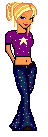
Finished! Well
Done!
If you want to make your dolls transparent
and into a GIF file (which I suggest for only dolls which will be put on a
website)You should
download Ultimate Paint from Ultimate
Paint.com.
Why GIF? Because .bmp are too big
a file
.jpg are small files but do lose
there quality.
.gif are small are keep there
quality
Shouldn't take long, then open your
.bmp file into Ultimate Paint and go to Save as. Scroll down where it says
scroll as type to CompuServe's GIF.
And tar-dah! There you go a GIF
doll! LOL.
I Will find out about making them
transparent and find out with of the files you must download!
Hope you've liked this lil' tutorial
brought to you by Jo!
