Directly With Cable
The traditional method to network two computers involves making
a cabled connection. Joining a single cable between the two systems
provides a dedicated network link. These alternatives exist for
networking two computers in this manner:
� Ethernet crossover cable
� Serial or parallel peripheral cable
� Special-purpose USB cables
Ethernet:
Of these two choices, the Ethernet method is preferred, as it
supports a reliable, high-speed connection with minimal configuration
required. Additionally,Ethernet technology presents a more
general-purpose solution, also allowing networks with more than two
computers to be built fairly easily. If only one computer possesses an
Ethernet adapter but the other has USB, an Ethernet crossover cable can
still be used by first plugging a USB-to-Ethernet converter unit into
the USB port.
USB-USB cable:
Connecting two PCs with a cable like this you can transfer files
from one PC to another, and even build a small network and share
your Internet connection with a second PC.
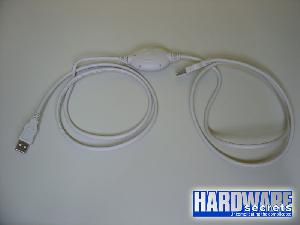
The first thing you should be aware of is that there are several
different kinds of USB-USB cables on the market. The one used to
connect two PCs is called �bridged� (or �USB networking cable�),
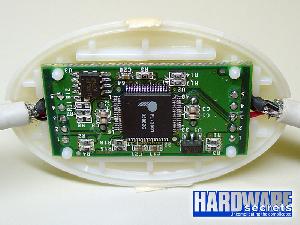
because it has a small electronic circuit in the middle allowing
the two PCs to talk to each other.
There are the so-called A/A USB cables that, in spite of having
two standard USB connectors at each end, don�t have a bridge
chip and cannot be used to connect two PCs.
In fact, if you use an A/A USB cable you can burn the USB ports
of your computers or even their power supplies.
So, these A/A USB cables are completely useless. A/B USB cables
are used to connect your computer to peripherals such as
printers and scanners, so they also won�t fit your needs.
As for speed, the bridge chip can be USB 1.1 (12 Mbps) or
USB 2.0 (480 Mbps). Of course we suggest you to buy an USB 2.0
bridged cable, because of its very high-speed. Just to remember,
the standard Ethernet network works at 100 Mps, so the USB 2.0 cable
will provide you a transfer rate almost five times higher than a
standard network connection and that�s why it is more expensive than
a simple A/A USB cable that doesn�t have any circuit at all.
 Serial and parallel cabling:
Called Direct Cable Connection (DCC) when using Microsoft Windows
computers, They are also workable alternatives. You may prefer this
option if you have these cables readily available and network speed
is not a concern. Serial and parallel cables are never used to
network more than two computers.
Wirelessly
In recent years, wireless solutions have enjoyed increasing
popularity in home networks. As with cabled solutions,
several different wireless technologies exist to support basic
two computer networks:
� Wi-Fi
� Bluetooth
� infrared
Wi-Fi:
Wi-Fi Connections can reach a greater distance than the wireless
alternatives listed above. Many newer computers, especially laptops,
now contain built-in Wi-Fi capability, making it the preferred choice
in most situations. Wi-Fi can be used either with or without a
network fixture.With two computers, Wi-Fi networking without a
fixture(also called ad-hoc Wi-Fi) is especially simple to set up.
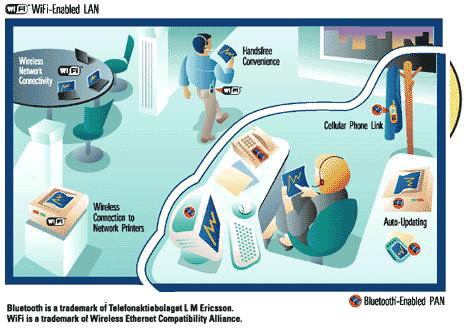
Bluetooth technology:
Also supports reasonably high-speed wireless connections between
two computers without the need for a network fixture.
Bluetooth is more commonly used when networking a computer with a
consumer handheld device like a cell phone. Most desktop and older
computers do not possess Bluetooth capability. Bluetooth works best
if both devices are in the same room in close proximity to each other.
You may consider Bluetooth if you have interest in networking with
handheld devices and your computers lack Wi-Fi capability.
Infrared:
Infrared networking existed widely on laptop computers before either
Wi-Fi or Bluetooth technologies became popular. Infrared connections
work only between two computers, are reasonably fast, and do not
require a fixture. Being extremely simple to set up and use,
consider infrared if your computers support it and you lack the
desire to invest effort in Wi-Fi or Bluetooth.