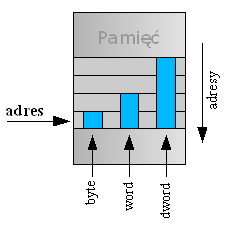
Definition:
"Little Endian" means that the low-order byte of the number
is stored in memory at the lowest address and the high-order byte
at the highest address.(The little end comes first.)
For example,a 4 byte LongInt
Byte3 Byte2 Byte1 Byte0
Will be arranged in memory as follows:
Base Address+0 Byte0
Base Address+1 Byte1
Base Address+2 Byte2
Base Address+3 Byte3
Intel processors (those used in PC's) use "Little Endian" byte order.
Big Endian
Definition:
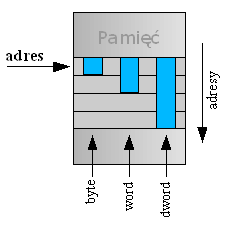
"Big Endian" means that the high-order byte of the number
is stored in memory at the lowest address, and the low-order byte
at the highest address.(The big end comes first.)
Our LongInt,would then be stored as:
Base Address+0 Byte3
Base Address+1 Byte2
Base Address+2 Byte1
Base Address+3 Byte0
Motorola processors(those used in Mac's)use "Big Endian" byte order.
Which is Better?
You may see a lot of discussion about the relative merits of
the two formats, mostly religious arguments based on the relative
merits of the PC versus the Mac. Both formats have their
advantages and disadvantages.
In "Little Endian" form, assembly language instructions for
picking up a 1, 2, 4, or longer byte number proceed in exactly
the same way for all formats: first pick up the lowest order byte
at offset 0. Also, because of the 1:1 relationship between address
offset and byte number (offset 0 is byte 0), multiple precision
math routines are correspondingly easy to write.
In "Big Endian" form, by having the high-order byte come first,
you can always test whether the number is positive or negative by
looking at the byte at offset zero. You don't have to know how long
the number is, nor do you have to skip over any bytes to find the byte
containing the sign information. The numbers are also stored in the
order in which they are printed out, so binary to decimal routines
are particularly efficient.
What does that Mean for Us?
What endian order means is that any time numbers are written
to a file, you have to know how the file is supposed to be constructed.
If you write out a graphics file (such as a .BMP file) on a machine
with "Big Endian" integers, you must first reverse the byte order,
or a "standard" program to read your file won't work.
The Windows .BMP format, since it was developed on a "Little Endian"
architecture,insists on the "Little Endian" format.You must write your
Save_BMP code this way, regardless of the platform you are using.
Common file formats and their endian order are as follows:
� Adobe Photoshop -- Big Endian
� BMP (Windows and OS/2 Bitmaps) -- Little Endian
� DXF (AutoCad) -- Variable
� GIF -- Little Endian
� IMG (GEM Raster) -- Big Endian
� JPEG -- Big Endian
� FLI (Autodesk Animator) -- Little Endian
� MacPaint -- Big Endian
� PCX (PC Paintbrush) -- Little Endian
� POV (Persistence of Vision ray-tracer) -- Not Applicable (text!)
� QTM (Quicktime Movies) -- Little Endian (on a Mac!)
� Microsoft RIFF (.WAV & .AVI) -- Both
� Microsoft RTF (Rich Text Format) -- Little Endian
� SGI (Silicon Graphics) -- Big Endian
� Sun Raster -- Big Endian
� TGA (Targa) -- Little Endian
� TIFF -- Both, Endian identifier encoded into file
� WPG (WordPerfect Graphics Metafile) -- Big Endian (on a PC!)
� XWD (X Window Dump) -- Both, Endian identifier encoded into file
 For example,a 4 byte LongInt