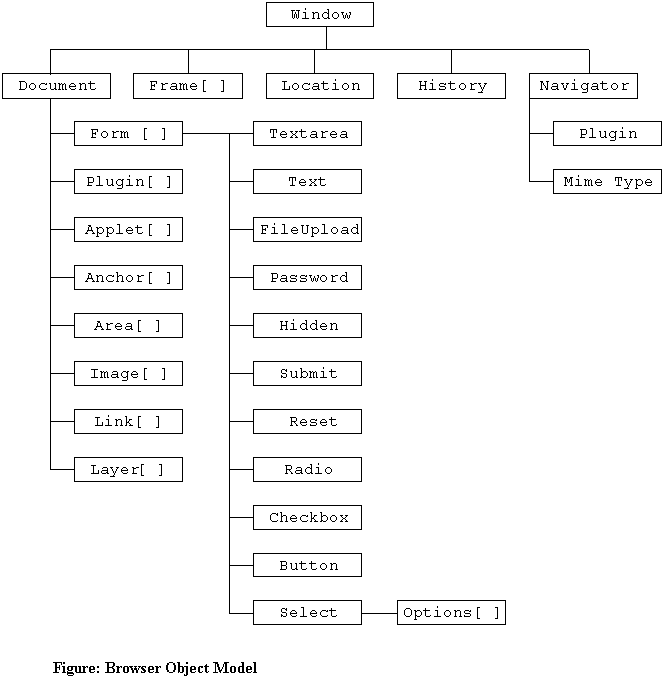
To control the Web browser window or the HTML document, you use the browser object model. The browser object model is a hierarchy of objects, each of which provides programmatic access to a different aspect of an HTML page or the Web browser window. You can use methods and properties of objects in the browser object model to manipulate the window, frames, and HTML elements displayed in a Web browser. You do not have to explicitly create any of the objects or arrays in the browser object model; they are create automatically when a Web browser opens an HTML document. The most common objects in the browser object model are displayed in the figure Browser Object Model.
Some of the JavaScript objects listed in the Browser Object Model figure represent arrays that contain other objects. In the figure, those objects that are arrays are followed by brackets, such as Form[], or Image[]. The contents of these array objects are created from the elements in an HTML document. For example, the Image object contains an images[] array that lists all the <IMG> tags in an HTML document.
To refer to a JavaScript object in code, you must refer to all of its ancestors as a series of properties separated by periods. For example, document.myImage.src, or document.myForm.myTextBox.value. When listing an object's ancestors, it is not necessary to include the Window object. The Web browser automatically assumes that you are always referring to the currently displayed window, which is the top-level object in the browser object model. It is also not necessary to include the Document object when listing an object's ancestors for Internet Explorer 4 and later and Netscape 6 and later. For example, myImage.src, or myForm.myText.value. In some cases, it is necessary to include the Window object when you need to clearly distinguish between the Window object and the Document object. For example, event-handling code automatically assumes you are referring to the Document object instead of the Window object. Therefore, in event-handling code you should include the Window object when you are explicitly referring to the Web browser window.
Example: Tutorial5Ex1.html
The Window object is the top-level object in the browser object model. The Window object represents a Web browser window or an individual frame within a window. The Web browser automatically creates the Window object, and you use its properties and methods to control the Web browser window. For example, the focus() method of the Window object allows you to programmatically select which window to display as the topmost window.
Another way of referring to the Window object is by using the self property. The self property refers to the current Window object. Using the self property is identical to using the window property to refer to the Window object.
The Window object includes several properties that contain information about the Web browser window. For example, the status property contains information displayed in a Web browser's status bar. Also contained in the Window object are various methods that allow you to manipulate the Web browser window itself.
| Window Object Methods | |
|---|---|
| Method | Description |
| alert() | Displays a simple message dialog box with an OK button |
| blur() | Removes focus from a window |
| clearInterval() | Cancels an interval that was set with setInterval() |
| clearTimeout() | Cancels a timeout that was set with setTimeout() |
| close() | Closes a window |
| confirm() | Displays a confirmation dialog box with OK and Cancel buttons |
| escape() | Returns the hexadecimal encoding of an argument in the ISO-Latin-1 character set. Old version. New Version uses encodeURI() |
| focus() | Makes a Window object the active window |
| moveBy() | Moves the window relative to its current position, moving the specified number of pixels |
| moveTo() | Moves the top-left corner of the window to the specified screen coordinates. |
| open() | Opens a new window |
| print() | Prints the contents of the window. |
| prompt() | Displays a dialog box prompting a user to enter information |
| resizeBy() | Resizes an entire window by moving the window's bottom-right corner by the specified amount. |
| resizeTo() | Resizes an entire window to the specified pixel dimensions. |
| scroll() | Scrolls a window to a specified coordinate |
| scrollBy() | Scrolls the viewing area of a window by the specified amount |
| scrollTo() | Scrolls the viewing area of the window so that the specified point becomes the top-left corner. |
| setInterval() | Repeatedly executes a function after a specified number of milliseconds have elapsed |
| setTimeout() | Executes a function once after a specified number of milliseconds have elapsed |
| unescape() | Returns the ASCII string for the specified value. Old version. New Version uses decodeURI() |
| Window Object Properties | |
|---|---|
| Property | Description |
| closed | Specifies whether a window is closed |
| defaultStatus | Default text that is written to the status bar |
| document | A reference to the Document object |
| frames[ ] | An array listing the frame objects in a window |
| history | A reference to the History object |
| length | The number of child frames in the window. |
| location | A reference to the Location object |
| name | The name of a window |
| navigator | A reference to the Navigator object |
| opener | The Window object that opens another window |
| parent | The parent frame that contains the current frame |
| self | A self-reference to the Window object; Identical to the window property |
| status | Temporary text that is written to the status bar |
| top | The topmost Window object that contains the current frame |
| window | A self-reference to the Window object; Identical to the self property |
| Window Object Events | |
|---|---|
| Event | Triggered When |
| onBlur | The window becomes inactive |
| on Error | An error occurs when the window loads |
| onFocus | The window becomes active |
| onLoad | A document is completely loaded in the window |
| on Resize | The window is resized |
| onUnload | The current document in the window is unloaded |
Netscape and Internet Explorer each have custom properties and methods for the Window object. You can find a cross-reference of Window object properties and methods at http://devedge.netscape.com/library/xref/2002/client-data/ for both browsers. Also, see http://developer.netscape.com/docs/manuals/communicator/jsref/contents.htm - Netscape JavaScript Reference.
Netscape and Internet Explorer both allow you to open new Web browser windows
in addition to the Web browser window that already be open. Whenever a new Web
browser window is opened, a new Window object is created to represent the new
window. The syntax for the open() method is
window.open("URL", "name", options);
The URL argument represents the Web address or filename to be opened. The
name argument is used to assign a value to the name property of the new
Window object. The options argument represents a string that allows you
to customize the new Web browser window's appearance. If you exclude the URL
argument, then a blank Web page opens. You can include all or
none of the open() method argument. If the name argument of the open() method is
already in use by another browser window, then JavaScript changes focus to the
existing Web browser window instead of creating a new window.
| Common open() method options | |
|---|---|
| Name | Description |
| directories | yes, or no. Includes directory buttons (Internet Explorer Favorite->Link, Netscape Bookmarks->Personal Toolbar Folder) |
| height | number. Set the window's height in pixels |
| location | yes, or no. Includes the URL Location text box |
| menubar | yes, or no. Includes the menu bar |
| resizable | yes, or no. Determines if the new window can be resized |
| scrollbars | yes, or no. Includes the scroll bars |
| status | yes, or no. Includes the status bar |
| toolbar | yes, or no. Includes the tool bar |
| width | number. Set the window's width in pixels |
If you exclude the options string of the open() method, then all the standard options will be included in the new Web browser window. However, if you include the options string, you must include all the components you want to create for the new window, that is, the new window is created with only the components you explicitly specify. When including multiple items in the options string, you must separate the items by commas. If you include space in the options string of an open() method, the options may not display properly in Netscape.
A Window object's name property can be used only to specify a target window
with hypertext links or forms, and can not be used in JavaScript code. If you
want to control the new window using JavaScript code located within the Web
browser in which it was created, then you must assign the new Window object
created with open() method to a variable. Example:
newWindow = window.open("http://www.netscape.com");
To set the focus to the mew window: newWindow.focus();
To close the new window: newWindow.close();
To close the window by itself: window.close(); or self.close();
The setTimeout() method of the Window object is used in JavaScript to
execute code after a specific amount of time has elapsed. Code executed with the
set setTimeout() method executes only once. Syntax:
setTimeout_variable = setTimeout("code", milliseconds);
The clearTimeout() method of the Window object is used to cancel a
setTimeout() method before its code executes. The clearTimeout() method receives
a single argument, which is the variable that represents a setTimeout() method
call. Syntax:
clearTimeout(setTimeout_variable);
The setInterval() method repeatedly executes the same code after being
called only once. Syntax:
setInterval_variable = setInterval("code", milliseconds);
The clearInterval() method is used to cancel a setInterval() method
before its code executes. Syntax:
clearInterval(setInterval_variable);
Example: Tutorial5Ex1.html
The Document object that represents the HTML document displayed in a window. The Document object descends from a Window object. The write() and writeln() methods, with which you are familiar, refer to the Document object. All HTML elements exist within an HTML document represented by the Document object, and each element is represented in JavaScript by its own object. Therefore, the Document object is the parent or ancestor object for all the elements you create on an HTML page.
| Document Object Methods | |
|---|---|
| Method | Description |
| close() | Notifies the Web browser that you are finished writing to the window or frame and that the document should be displayed |
| getElementByID() | Returns the HTML element represented by an ID |
| getElementsByName() | Returns an array of HTML elements represented by a tag name |
| open() | Opens a window or frame, other than the current window or frame, and is used to update its contents with the write() and writeln() methods |
| write() | Creates new text on a Web page |
| writeln() | Creates new text on a Web page followed by a line break |
| Document Object Properties | |
|---|---|
| Property | Description |
| anchors[] | An array referring to document anchors |
| applets[] | An array referring to document applets |
| body | The element that contains the content for the document |
| cookie | The current document cookie string |
| domain | The domain name of the server where the current document is located |
| forms[] | An array referring to document forms |
| images[] | An array referring to document images |
| lastModified | The date the document was last modified |
| links[] | An array referring to document links |
| referrer | The URL of the document that provided a link to the current document |
| title | <TITLE>...</TITLE> tag pair in the document <HEAD> section |
| URL | The URL of the current document |
| Document Object Events | |
|---|---|
| Event | Triggered When |
| onBlur | When a document loses focus |
| on Error | When a document generates an error |
| onFocus | When a document receives focus |
| onLoad | When a document loads |
| onUnload | When a document unloads |
Example: Tutorial5Ex1.html
Goto http://www.geocities.com/doan_1/HTMLEducation/Inclusion.htm#FramesetElement to learn about Frames.
The location object allows you to change to a new Web page from withing the JavaScript.
location.assign(url); loads the new url into the current window. Same as location.href = "url";
location.reload(true); forces the current page to reload
location.reload(false); or location.reload(); , then the Web page reloads only if it has changed.
location.replace(url); actually overwrites one document with another and replaces the old URL entry in the Web browser's history list, a list of all the documents that have been opened duting the current browser session, with the new url. In contrast, the href property opens a different document and adds it to the history list.
location.href = "url"; loads the new url into the current window. Same as location.assign(url);
| Location Object Methods | |
|---|---|
| Method | Description |
| assign() | Loads a new HTML document |
| reload() | Causes the page currently displayed in the Web browser to open again |
| replace() | Replaces the currently loaded URL with a different one |
| Location Object Properties | |
|---|---|
| Property | Description |
| hash | A URL's anchor |
| host | A combination of the URL's hostname and port sections |
| hostname | A URL's hostname |
| href | The full URL address |
| pathname | The URL's path |
| port | The URL's port |
| protocol | The URL's protocol |
| search | A URL's search or query portion |
Example: Tutorial5Ex1.html
The history object maintains a history list of all the documents that have been opened during the current Web browser session. Each Web browser window and frame, regardless of how many windows and frames you have open, contains its own internal History object.
| History Object Methods | |
|---|---|
| Method | Description |
| back() | The equivalent of clicking a Web browser's Back button |
| forward() | The equivalent of clicking a Web browser's Forward button |
| go() | Opens a specific document in the history list |
| History Object Properties | |
|---|---|
| Property | Description |
| length | Contains the specific number of documents that have been opened during the browser session |
Example: Tutorial5Ex1.html
The navigator object is used to obtain information about the current Web browser. Due to the incompatibilities between Internat Explorer and Netscape, it is important to be able to distinguish which browser is running in order to execute the correct code for a specific browser.
| Navigator Object Methods | |
|---|---|
| Method | Description |
| javaEnable() | Determines whether Java is enabled in the current browser |
| Navigator Object Properties | |
|---|---|
| Property | Description |
| appCodeName | The Web browser code name |
| appName | The Web browser name |
| appVersion | The Web browser version |
| platform | The operating system in use |
| userAgent | The user agent |
Example: Tutorial5Ex1.html