
Dennis Kennedy
Cleveland, OH 44125
[email protected]
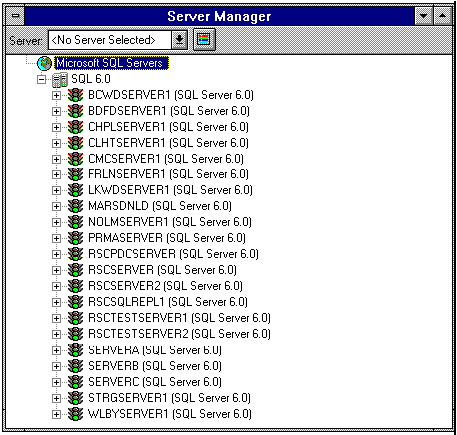
Most of the SQL Servers are used in the MedStar WorkFlow System.
RSCSQLREPL1 has a Special Use as the Configuration Replication
SQL Server for the MedStar WorkFlow System.
RSCPDCSERVER uses SQL for storing the SMS Database.
RSCSERVER2 uses SQL for storing the HUDE and Incident Reporting System.
MARSDNLD and SERVERA-C are Medstar WorkFlow System Test Stations in the Mars Lab.
RSCTESTSERVER1 and RSCTESTSERVER2 are also in the Mars Lab
for Administration and for Windows NT 4.0 Testing, respectively.
Other Servers and WorkStations also run SQL for Administration Purposes
(such as RSCTESTSERVER3), but only run the Administrative Programs.
They do not Store SQL Databases, so they do not appear on the List of Servers.
Resetting MedStar and the SQL Servers
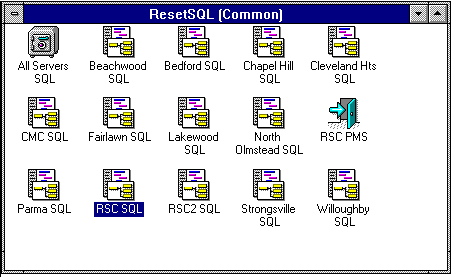
Every Monday at 3:45 AM, the 'ALL' Batch File is run from RSCSERVER2.
It uses the 'AT' Command (with SOON) to have all of the MedStar NT Servers
Stop All MedStar Processes (including SQL) and ReStart them.
Then, Every Day Except Monday at 3:45 AM, the 'PMS' Batch File is run from RSCSERVER2.
It uses the 'AT' Command (with SOON) to have Only the
\\RSCSERVER MedStar NT Server Stop PMS ReStart it.
These Batch Files may also be run On Demand.
They are the Simplest Way to Insure that ReStarts are done Easily and Correctly.
This RESETSQL Window appears on RSCSERVER (for the Help Desk)
as well as on Several Computers in the Mars Lab.
Extra Caution should be taken before running the 'ALL' Batch File
since it will Reset All of the MedStar WorkFlow Servers.
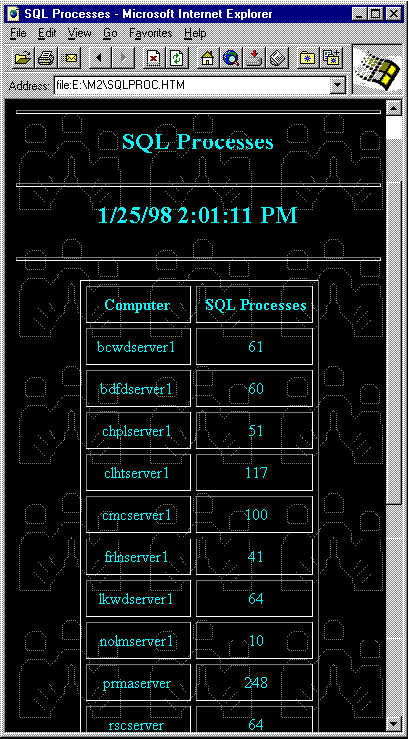
NetCheck Counts the Number of Sysprocesses on each SQL Server once per hour.
(An Automated Process on \\rscserver2.)
It stores this information in the NetSQL Database on \\rscnetchksrvr1\c_drive\netcheck.
It also writes out to an HTML file (AnyBrowser Style) on our Web Server.
As a result, this may be viewed from any computer with a browser installed.