
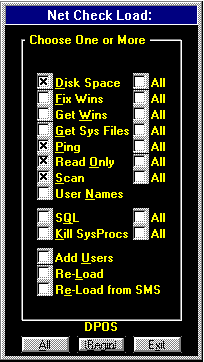
NetCheck may be started with the following parameters:
- 'D' to Check the Disk Space of the connected computer if the Frequency determines that it needs it.
- 'DD' to Check the Disk Space of every connectable computer, whether it needs it or not.
- 'F' to Fix the WINS Primary and Secondary of the connected computer if it needs it.
- 'FF' to Fix the WINS Primary and Secondary of every connectable computer, whether it needs it or not.
- 'I' to Fix the WINS Primary, Secondary, SubNet Mask and Gateway of the connected computer if it needs it.
- 'II' to Fix the WINS Primary, Secondary, SubNet Mask and Gateway of every connectable computer, whether it needs it or not.
- 'W' to Get the WINS Primary, Secondary, SubNet Mask and Gateway of the connected computer if it needs it.
- 'WW' to Get the WINS Primary, Secondary, SubNet Mask and Gateway of every connectable computer, whether it needs it or not.
- 'G' to Get the System Files (autoexec.bat, config.sys, contron.ini, system.ini, win.ini) of the connected computer if it needs it.
- 'GG' to Get the System Files (autoexec.bat, config.sys, contron.ini, system.ini, win.ini) of every connectable computer, whether it needs it or not.
- 'P' to Ping for the IP Address of the connected computer if it needs it.
- 'PP' to Ping for the IP Address of every connectable computer, whether it needs it or not.
- 'O' to Check to see if the Shared Drive is Read Only (or requires a password) of the connected computer if it needs it.
- 'OO' to Check to see if the Shared Drive is Read Only (or requires a password) of every connectable computer, whether it needs it or not.
- 'S' to Scan the Disk for a Virus of the connected computer if the Frequency determines that it needs it.
- 'SS' to Scan the Disk for a Virus of every connectable computer, whether it needs it or not.
- 'N' to Check to see Who was the Last User of the connected computer.
- 'Q' to Check the Free Space for the SQL Databases (Devices) of the connected computer.
- 'QQ' to Check the Free Space for the SQL Databases (Devices) and Dump their Transaction Logs of the connected computer.
- Note that Checking SQL ('Q' or 'QQ') also Queries the NetCheck Database for all current occurrences where a Disk is Full or a Virus has been found and Prints this report to the default printer.
- 'K' to Kill all Process in the SQL Databases that are Empty of the connected computer.
- 'KK' to Kill all Process in the SQL Databases, whether they are Empty or not of the connected computer.
- 'U' to Load All Users with their Groups from the Domain and store them in the NetCheck Database (UserMain, UserGroup).
- 'L' to Load Computers and Shares from the Domain and store them in the NetCheck Database.
- 'E' to Load Computers from SMS and store them in the NetCheck Database.
- 'Y' to Count all of the SysProcesses from the SQL Servers and store them in the NetSQL Database.
For Virus Scanning or Checking Disk Space, NetCheck should be run on the highest level file system that will be scanned. Since NTFS is currently our highest level, NetCheck should be run on Windows NT only, with McAfee's 'NTSCAN.EXE' program for scanning.
The NC.INI file contains the name of the computer where the particular version of NetCheck.EXE resides. When that version is working on a computer, it puts it's reference into the NetCheck Database 'Working' Field so that more than one copy of NetCheck.EXE can be running at a time without both working on the same Computer/Share.
The NetCheck.INI file contains the path to the shared Microsoft Access 2.0 Databases (NetCheck.MDB, NetSQL.MDB, NetFiles.MDB and NCLog.MDB).
NetCheck Logs to a local file (NC.LOG) as well as to the shared database NCLog.MDB. Any results of a Virus Scan that is Found is copied into the local file 'Virus.Txt' for future reference.
If a Virus is Found, NetCheck runs a second pass over the infected disk and attempts to CLEAN the Virus, then runs a third pass to insure that the Virus is gone.
Currently:
- NetCheck is running (Scanning for Virus') 24 hours per day on the \\server1 computer in the Lab. (The NC.INI file includes a second line with the letter 'Y' to instruct NetCheck to run continually.)
- NetCheck runs once per hour (started by dkTimer) on \\server2 to store the SysProcesses in the NetSQL Database.
- Also on \\server2, NetCheck runs twice per day to Load Computers from the Domain, once in the middle of the night and once in the morning.
- And on \\server2, NetCheck runs once per day to Check the SQL Databases and Dump their Transaction Logs and Prints any Computer Names and Shares where Full or Virus is set to 'Y'.
- NetCheck is also started by me Manually on some mornings (usually on \\server3 in the Lab) to also Scan for Virus of Computers that have not been reached in over 14 days. (The NC.INI file includes a second line with the number '14' to instruct NetCheck to run on Computers/Shares where the 'CheckDate' is older than 14 days from today.) This is done because most computers are turned off overnight and end up getting skipped.
The NetCheck Database:
When NetCheck examines the Disk Space, it also looks for the Directory Name of WINDOWS. If that name is found, it is stored in the database in the 'WinDir' Field.
When NetCheck either 'Gets Wins' or 'Fixes Wins', it looks at the 'System.INI' file of every Computer/Share that includes the 'WinDir' of WINDOWS.
- Only Windows 3.1x uses the System.INI file (rather than the registry) to store it's Network Configuration, so NetCheck only fixes these computers at this time.
- In Getting Wins, it copies the NameServer1, NameServer2, DefaultGateway and IPMask Values into the NetCheck Database.
- In Fixing Wins, it compares the above values with the MANUALLY ENTERED (through an Update Query) values in the Wins1, Wins2 and Gateway Fields in the NetCheck Database. If any of these values do not match (Wins1 doesn't equal NameServer1, etc), NetCheck rewrites the System.INI file with the correct values.
- Note that Fix Wins will skip any empty (manually entered) value. Fix Wins will also run without first Getting the Wins as long as the Manually Entered values have been entered.
When NetCheck Loads the Shares from the Domain, it loads all Disk Shares and all Printer shares. Since it is not necessary to Scan for a Virus on a Printer, the 'SkipIt' Field is immediately entered with a 'Y', causing NetCheck is Skip this entry. I also will MANUALLY put a 'Y' in SkipIt for Duplicate entries, such as \\computername\c$ with \\computername\c_drive or \\computername\c_drive with \\computername\windows.
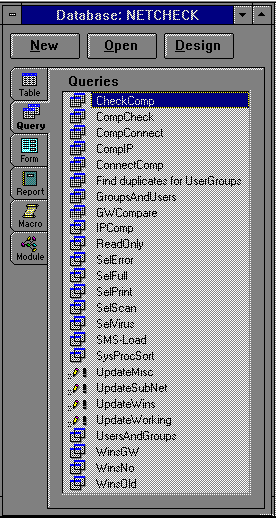
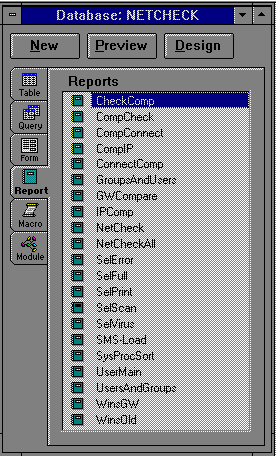
The NetCheck Access Database for Queries and Reports:
The NetCheck Access Database Fields:
| Field Name |
Explanation |
| ComputerName |
Computer to Connect |
| IPAddress |
TCP/IP Address |
| ShareName |
Share Name or SQL |
| LabelName |
Label on Drive or SQL Database |
| ReadOnly |
Read Only Drive |
| AddedDate |
Date Added to Database |
| SizeMin |
Minimum Size (Optional) |
| ConnectDate |
Date Last Connected |
| CheckDate |
Date Last Checked |
| Frequent |
Days before Next Check |
| SizeTotal |
Total Size |
| SizeFree |
Free Size |
| Message |
Any Message |
| Password |
Password Required |
| Full |
Disk or SQL Full |
| Virus |
Virus Found |
| Error |
Error Found |
| Working |
Currently being Worked On |
| SkipIt |
Skip this Entry |
| NightOnly |
Run Only at Night |
| WinDir |
Windows Directory |
| Wins1 |
Desired WINS Primary |
| Wins2 |
Desired WINS Secondary |
| Gateway |
Desired Default Gateway |
| SubNetMask |
Desired Net Mask |
| NameDate |
Date Obtained Wins |
| NameServer1 |
Current WINS Primary |
| NameServer2 |
Current WINS Secondary |
| DefaultGateway |
Current Default Gateway |
| IPMask |
Current Net Mask |
| AutoexecSize |
Size of Obtained 'autoexec.bat' File |
| ConfigSize |
Size of Obtained 'config.sys' File |
| ControlSize |
Size of Obtained 'control.ini' File |
| SystemSize |
Size of Obtained 'system.ini' File |
| WinSize |
Size of Obtained 'win.ini' File |
The NetCheck Access User Database Fields
| Field Name |
Explanation |
| UserName |
User Login |
| DomainName |
Domain where User Belongs |
| Human |
Human Login or Generic / Computer Login |
| UserFullName |
Full Name of User |
| Comment |
Assigned Comment |
| UserComment |
User Comment |
| Active |
Is User an Active Account |
| Expires |
Date Account Expires |
| PwdSet |
Date Password was Setup |
| PwdExpires |
Date Password Expires |
| PwdChangeable |
Is Password Changeable |
| PwdRequired |
Is Password Required |
| UserPwdChangeable |
Is Password Changeable by User |
| WSAllowed |
WorkStations Allowed to Login |
| LogonScript |
The Logon Script |
| UserProfile |
The Users Profile |
| HomeDirectory |
The Users Home Directory |
| LastLogon |
The Last Time User Logged On |
| LogonHours |
Restricted Logon Hours |
| Relational Child: |
|
| UserID |
Relational Link to Above Table |
| UserGroup |
Group User Belongs |
| GroupType |
Global or Local Group |