A computer network can be defined as a network of data processing nodes that are interconnected for the purpose of data communication, or alternatively as a communications network in which the end instruments are computers.
The nodes that one may find on a network can include:
Servers may be classified as:
Peer networks are defined by a lack of central control over a network. Users share resources, disk space, and equipment. The users to control resource sharing, and so there may be lower security levels, and no trained administrator. Since there is no reliance on other computers (server) for their operation such networks are often more tolerant to single points of failure. Peer networks place additional load on individual PCs because of resource sharing. The lack of central organization may make data hard to find, backup or archive.
Hybrid networks can combine the advantages and disadvantages of both of the above types.
These network architectures can be compared with the pre-network host-based model. During the old days of yore, when computers first came out, they were huge clunky things servicing people sitting at dumb terminals. In a host based system, the dumb terminals are just that, dumb. They didn't think. They listen and they do, something like a robot really, without thinking. The host (central mainframe computer) does all the thinking for them. Networks could be employed to interconnect two or more mainframe computers. Terminals could connect only to the mainframe, and never to each other. In a client-server environment, the clients can do some processing on their own as well, without taxing the server. In a peer to peer environment, clients can be connected to one another.
A computer network is created when data communication channels link several
computers and other devices, such as printers and secondary storage devices.
Computer networks can be classified according to a number of criteria (see Table
1.1).
| ||||||||||||||||||||||||||||||||
A Local Area Network (LAN) is a communications network that serves users within a confined geographical area. Specifically it has the properties:
A Wide Area Network (WAN) is a communications network that covers a wide geographic area, such as state or country. Contrast this to a LAN (local area network) which is contained within a building or complex, and a MAN (metropolitan area network) which generally covers a city or suburb. The WAN can span any distance and is usually provided by a public carrier. You get access to the two ends of a circuit; the carrier does everything in between-which is typically drawn as a "grey cloud," since you don't know (or usually care) how the carrier implements it.
A network configuration is also called a network topology. A network topology is the shape or physical connectivity of the network. The network designer has three major goals when establishing the topology of a network:
|
In a bus topology each node (computer, server, peripheral etc.) attaches directly to a common cable. This topology most often serves as the backbone for a network. In some instances, such as in classrooms or labs, a bus will connect small workgroups. Since a hub is not required in a bus topology, the set-up cost is relatively low. However, this topology's wiring scheme is unstructured (without a central point of concentration) making it difficult to troubleshoot. Often if one PC goes down, the whole network can shut down.
Usually the bus must be terminated. Termination is the process of stopping signals sent through a network. Without termination, signals bounce back and forth, causing a log jam over a network.
Bus networks are simple, easy to use, and reliable. They require the least amount of cable and are easy to extend. Repeaters can be used to boost signal and extend bus.
Heavy network traffic can slow a bus considerably. Each connection weakens the signal, causing distortion among too many connections.
A star topology, on the other hand, is relatively easy to troubleshoot due to its structured wiring scheme. With this topology, each node has a dedicated set of wires connecting it to a central network hub. The failure of one connection will not usually affect the others. And, since all traffic passes through the hub, the hub becomes a central point for isolating network problems and gathering network statistics.
The star topology can have a number of different transmission mechanisms, depending on the nature of the central hub.
Central hub failure will lead to total network failure. They are also costly to cable since all network cables must be pulled to one central point.
A ring topology features a logically closed loop of cable - a ring. Data packets travel in a single direction around the ring from one network device to the next. Each network device acts as a repeater, meaning it regenerates the signal. If one device fails, the entire network goes down. This disadvantage gave rise to a hybrid topology referred to as the star-wired ring.
The star-wired ring has essentially replaced the ring topology in practical use. Networks based on star-wired ring topologies have nodes radiating from a wiring center or hub. The hub acts as a logical ring with data packets traveling in sequence from port to port. Just like a star topology, if one node fails, the network will continue to operate.
The hierarchical topology is one of the more common topologies found today. The software to control the network is relatively simple and the topology provides a concentration point for control and error resolution. The node at the highest point in the hierarchy usually controls the network.
Whilst this type of network is attractive for its simplicity it does present a potential significant bottleneck problem. In some instances the uppermost node will control all the traffic. Not only can this cause a bottleneck, but it can also present reliability problems if this node fails.
The mesh topology has been used more frequently in recent years. Its primary attraction is its relative immunity to bottlenecks and channel/node failures. Due to the multiplicity of paths between nodes, traffic can easily be routed around failed or busy nodes. Given that this approach is very expensive in comparison to other topologies, some users will still prefer the reliability of the mesh network to that of others (especially for networks that only have a few nodes that need to be connected together).
Cable is what physically connects network devices together, serving as the conduit for information traveling from one computing device to another. The type of cable you choose for your network will be dictated in part by the network's topology, size and media access method. Small networks may employ only a single cable type, whereas large networks tend to use a combination.
In Project 802, the IEEE established specifications for cables carrying Ethernet signals. 10Base5, 10Base2, 10Base-T and 10Base-F refer to thick coaxial, thin coaxial, unshielded twisted-pair and fiber-optic cables respectively.
The "10" refers to the Ethernet transmission speed - 10 Mbps. The "Base" refers to baseband (single communications channel on each cable). Originally, the last character referred to the maximum cable distance in hundreds of meters. This naming convention changed, however, with the introduction of 10Base-T and 10Base-F. In these instances, the T and F refer to the cable types (twisted-pair and fiber-optic).
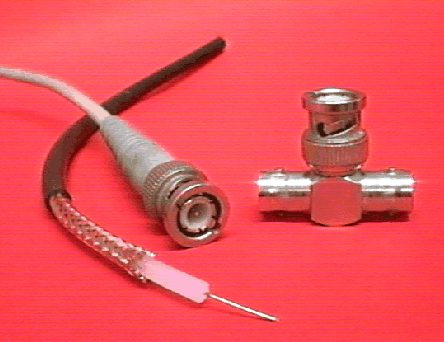
Coaxial cable includes a copper wire surrounded by insulation, a secondary conductor
that acts as a ground, and a plastic outside covering (see Figure 1.3).
Because of coaxial cable's two layers of shielding, it is relatively immune
to electronic noise, such as motors, and can thus transmit data packets long
distances. Coaxial cable is a good choice for running the lengths of buildings
(in a bus topology) as a network backbone.
Local area networks (LANs) primarily use two sizes of coaxial cable, commonly referred to as thick and thin. Thick coaxial cable can extend longer distances than thin and was a popular backbone (bus) cable in the 1970s and 1980s. However, thick is more expensive than thin and difficult to install. Today, thin (which looks similar to a cable television connection) is used more frequently than thick.
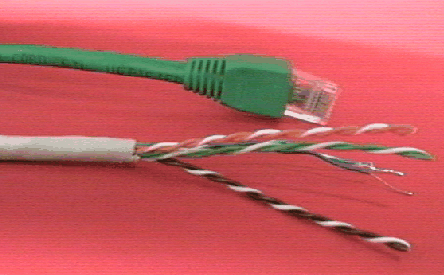
Twisted-pair cable consists of two insulated wires that are twisted around each
other and covered with a plastic casing. It is available in two varieties, unshielded
and shielded. Unshielded twisted-pair (UTP) is similar in appearance (see Figure
1.4) to the wire used for telephone systems. UTP cabling wire is
grouped into categories, numbered 1-5. The higher the category rating, the more
tightly the wires are twisted, allowing faster data transmission without crosstalk.
Since many buildings are pre-wired (or have been retrofitted) with extra UTP
cables, and because UTP is inexpensive and easy to install, it has become a
very popular network media over the last few years.
Shielded twisted-pair cable (STP) adds a layer of shielding to UTP. Although STP is less affected by noise interference than UTP and can transmit data further, it is more expensive and more difficult to install.
Fiber-optic cable is constructed of flexible glass and plastic. It transmits information via photons, or light. More resistant to electronic interference than the other media types, fiber-optic is ideal for environments with a considerable amount of noise (electrical interference). Furthermore, since fiber-optic cable can transmit signals further than coaxial and twisted-pair, more and more educational institutions are installing it as a backbone in large facilities and between buildings. The cost of installing and maintaining fiber-optic cable remains too high, however, for it to be a viable network media connection for classroom computers.
The way data are delivered through networks requires solutions to several problems:
LANs generally operate in baseband mode, which means that a given cable is carrying a single data signal at any one time. The various devices on the LAN must take turns using the medium. This generally is a workable approach for LAN's, because LAN media offer high performance at low cost.
Long-distance data communication media are expensive to install and maintain,
and it would be inefficient if each media path could support only a single data
stream. WANs, therefore, tend to use broadband media, which can support two
or more data streams. Increasingly, as LAN's are expected to carry more and
different kinds of data, broadband media are being considered for LAN as well.
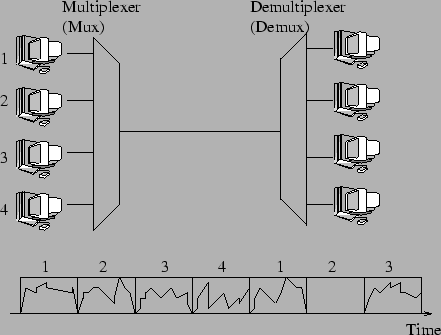
To enable many data streams to share a high-bandwidth medium, a technique called multiplexing is employed. The signals-carrying capacity of the medium is divided into time slots, with a time slot assigned to each signal, a technique called Time-Division Multiplexing (TDM), illustrated in Figure 1.5. Because the sending and receiving devices are synchronized to recognize the same time slots, the receiver can identify each data stream and re-create the original signals. The sending device, which places data into the time slots, is called a multiplexer or mux. The receiving device is called a demultiplexer or demux. TDM can be inefficient. If a data stream falls silent, its time slots are not used and the media bandwidth is underutilized.
A more advanced technique is statistical time-division multiplexing. Time slots are still used, but some data streams are allocated more time slots that others. An idle channel, D, is allocated no time slots at all. A device that performs statistical TDM often is called a stat-MUX.
On an internetwork, data units must be switched through the various intermediate
devices until they are delivered to their destination. Two contrasting methods
of switching data are commonly used: Circuit switching and packet switching.
Both are used in some form by protocols in common use.
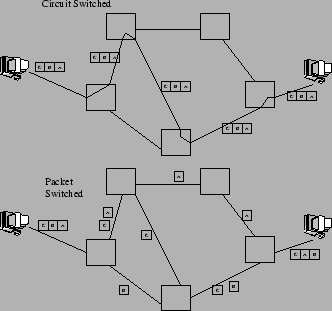
When two devices negotiate the start of a dialogue, they establish a path, called a circuit, through the network, along with a dedicated bandwidth through the circuit (see Figure 1.6). After establishing the circuit, all data for the dialogue flow through that circuit. The chief disadvantage of circuit switching is that when communication takes place at less than the assigned circuit capacity, bandwidth is wasted. Also, communicating devices can't take advantage of other, less busy paths through the network unless the circuit is reconfigured.
Circuit switching does not necessarily mean that a continuous, physical pathway exists for the sole use of the circuit. The message stream may be multiplexed with other message streams in a broadband circuit. In fact, sharing of media is the more likely case with modern telecommunications. The appearance to the end devices, however, is that the network has configured a circuit dedicated to their use.
End devices benefit greatly from circuit switching. Since the path is pre-established, data travel through the network with little processing in transit. And, because multi-part messages travel sequentially through the same path, message segments arrive in an order and little effort is required to reconstruct the original message.
Packet switching takes a different and generally more efficient approach to switching data through networks. Messages are broken into sections called packets, which are routed individually through the network (see Figure 1.6). At the receiving device, the packets are reassembled to construct the complete message. Messages are divided into packets to ensure that large messages do not monopolize the network. Packets from several messages can be multiplexed through the same communication channel. Thus, packet switching enables devices to share the total network bandwidth efficiently.
Two variations of packet switching may be employed:
Calculate the colour of that point in the fractal.
Draw a point of that colour in the appropriate position.