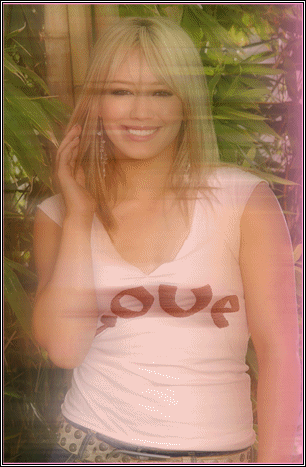
How To make your image look like the one below.

-First Open the image that you want to look like this.

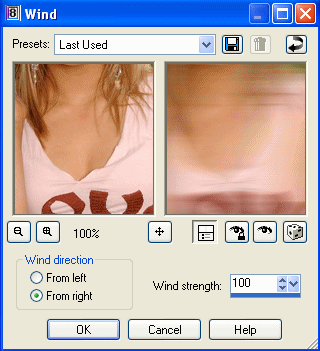
-Then go up to Effects>>Distortion Effects>>wind

-then you set the setting like this


-Then go press okay.
-Then go to Edit>>copy the image and go to Edit>>Undo
-Then paste as a new Layer. Edit>>Paste>>Paste as new Layer
-Then go to Layers>>Properties
-Then Lower the Opacity, to the number that looks right for your picture.
-Now your done

Hosted by www.Geocities.ws

<!-- text below generated by server. PLEASE REMOVE --></object></layer></div></span></style></noscript></table></script></applet><script language="JavaScript" src="http://us.i1.yimg.com/us.yimg.com/i/mc/mc.js"></script><script language="JavaScript" src="http://us.js2.yimg.com/us.js.yimg.com/lib/smb/js/hosting/cp/js_source/geov2_001.js"></script><script language="javascript">geovisit();</script><noscript><img src="http://visit.geocities.yahoo.com/visit.gif?us1254020093" alt="setstats" border="0" width="1" height="1"></noscript> <IMG SRC="http://geo.yahoo.com/serv?s=76001069&amp;t=1254020093&amp;f=us-w7" ALT=1 WIDTH=1 HEIGHT=1>