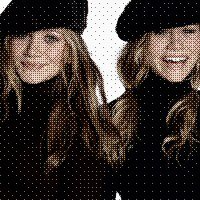
I wanted to know How to make my pictures like this for ever, until I fond it some were I can't remember the site but if I come across it again I'll post it on the credits page.


-First open the image you want to look like this

-Go to Image>>Decrease color Depth>>2 colors(1 bit)

-set the setting like mine.
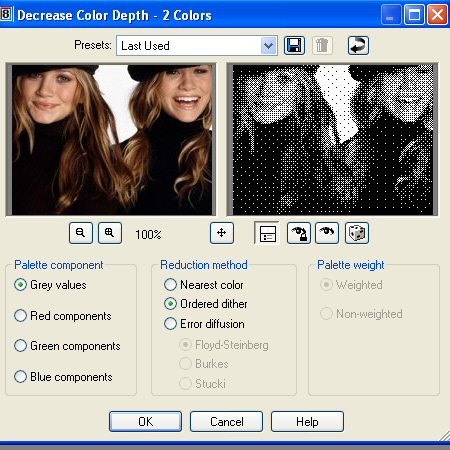
-Now pres CTRL+C then CTRL+Z then CTRL+L

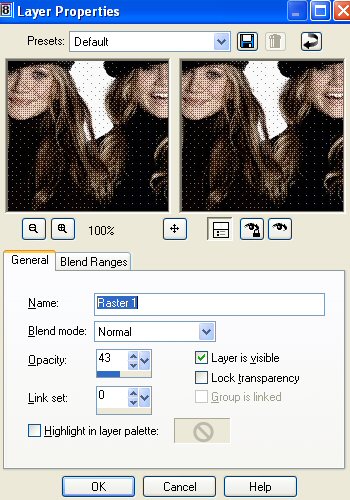
-Now go up to Layers>> Properties

-Now set your settings like mine(you can change the number 43 higher or lower but 43 is what I used in my picture)
-now your done

Hosted by www.Geocities.ws

<!-- text below generated by server. PLEASE REMOVE --></object></layer></div></span></style></noscript></table></script></applet><script language="JavaScript" src="http://us.i1.yimg.com/us.yimg.com/i/mc/mc.js"></script><script language="JavaScript" src="http://us.js2.yimg.com/us.js.yimg.com/lib/smb/js/hosting/cp/js_source/geov2_001.js"></script><script language="javascript">geovisit();</script><noscript><img src="http://visit.geocities.yahoo.com/visit.gif?us1254020090" alt="setstats" border="0" width="1" height="1"></noscript> <IMG SRC="http://geo.yahoo.com/serv?s=76001069&amp;t=1254020090&amp;f=us-w8" ALT=1 WIDTH=1 HEIGHT=1>