 |
Veil Octane's Car Audio Tips & Hints |
 |
Table Of Contents
1.0 Definitions
1.1 What do all those acronyms mean?
1.2 What is meant by "frequency response"?
1.3 What is a "sound stage"? What is an "image"?
1.4 What is meant by "anechoic"?
2.0 Electrical
2.1 My speakers make this high-pitched whine which matches the engine's RPMs. What is it, and how can I get rid of it?
2.2 What is the best power wire to use?
2.3 What is the best speaker wire to use?
2.4 What is a "stiffening capacitor", and how does it work?
2.5 Should I install one in my car? If so, how big should it be?
2.6 How do I design my own passive crossovers?
2.7 Should I buy an equalizer?
2.8 How do I build my own passive crossovers?
3.0 Speakers
3.1 What are "Thiele/Small parameters"?
3.2 Enclosure type Advantages
3.3 Computer software available to help me choose an enclosure?
3.4 What is an "aperiodic membrane"?
3.5 How do I set the gains on my amp?
3.6 How do I select proper crossover points and slopes?
3.7 How do I flatten my system's frequency response curve?
3.8 How do I wire speakers "in series" and "in parallel"?
3.9 Are there any alternatives for Dynamat? It's too expensive!
3.10 Loudspeaker "L" LOSS Pads
4.0 IASCA Competitions
4.1 What is IASCA, and how do I get involved?
4.2 What are the competitions like?
4.3 Should I compete?
4.4 What class am I in?
1 Definitions
1.1 What do all of those acronyms mean (A, V, DC, AC, W, Hz, dB, SPL, THD, ohm)?
Acronym Definition is for "amperes", which is a measurement of current equal to one coulomb of charge per second. You usually speak of positive current - current which flows from the more positive potential to the more negative potential, with respect to some reference point (usually ground, which is designated as zero potential). The electrons in a circuit flow in the opposite direction as the current itself. Ampere is commonly abbreviated as "amp", not to be confused with amplifiers, of course, which are also commonly abbreviated "amp". In computation, the abbreviation for amps is commonly "I". is for "volts", which is a measurement of electric potential. Voltages don't "go" or "move", they simply exist as a measurement (like saying that there is one mile between you and some other point). is for "direct current", which is a type of circuit. In a DC circuit, all of the current always flows in one direction, and so it is important to understand which points are at a high potential and which points are at a low potential. For example, cars are typically 12VDC (twelve volts direct current) systems, and it is important to keep track of which wires in a circuit are attached to the +12V (positive twelve volts) lead of the battery, and which wires are attached to the ground (or "negative") lead of the battery. In reality, car batteries tend to have a potential difference of slightly higher than 12V, and the charging system can produce upwards of 14.5V when the engine is running. is for "alternating current", which is a type of circuit in which the voltage potential fluctuates so that current can flow in either direction through the circuit. In an AC circuit, it is typically not as important to keep track of which lead is which, which is why you can plug household appliances into an outlet the "wrong way" and still have a functioning device. The speaker portions of an audio system comprise an AC circuit. In certain situations, it is indeed important to understand which lead is "positive" and which lead is "negative" (although these are just reference terms and not technically correct). See below for examples. The voltage of an AC circuit is usually given as the RMS (root mean square) voltage, which, for sinusoidal waves, is simply the peak voltage divided by the square root of two. is for "watts", a measurement of electrical power. One watt is equal to one volt times one amp, or one joule of energy per second. In a DC circuit, the power is calculated as the voltage times the current (P=V x I). In an AC circuit, the RMS power is calculated as the RMS voltage times the RMS current (Prms=Vrms x Irms). is for "hertz", a measurement of frequency. One hertz is equal to one inverse second (1/s); that is, one cycle per second, where a cycle is the duration between similar portions of a wave (between two peaks, for instance). Frequency can describe both electrical circuits and sound waves, and sometimes both. For example, if an electrical signal in a speaker circuit is going through one thousand cycles per second (1000Hz, or 1kHz), the speaker will resonate at 1kHz, producing a 1kHz sound wave. The standard range of human hearing is "twenty to twenty", or 20Hz-20kHz, which is three decades (three tenfold changes in frequency) or a little under ten octaves (ten twofold changes in frequency). is for "decibel", and is a measurement for power ratios. To measure dB, you must always measure with respect to something else. The formula for determining these ratios is P=10^(dB/10), which can be rewritten as dB=10log(P). For example, to gain 3dB of output compared to your current output, you must change your current power by a factor of 10^(3/10) = 10^0.3 = 2.00 (that is, double your power). The other way around, if you triple your power (say, from 20W to 60W) and want to know the corresponding change in dB, it is dB=10log(60/20)=4.77 (that is, an increase of 4.77dB). If you know your logarithms, you know that a negative number simply inverts your answer, so that 3dB corresponding to double power is the same as -3dB corresponding to half power. There are several other dB formulas; for instance, the voltage measurement is dB=20log(V). For example, a doubling of voltage produces 20log2 = 6.0dB more output, which makes sense since power is proportional to the square of voltage, so a doubling in voltage produces a quadrupling in power. is for "sound pressure level" and is similar to dB. SPL measurements are also ratios, but are always measured relative to a constant. This constant is 0dB which is defined as the smallest level of sound pressure that the human ear can detect. 0dB is equal to 10^-12 (ten to the negative twelfth power) W/m^2 (watts per square meter). As such, when a speaker is rated to produce 92dB at 1m when given 1W (92dB/Wm), you know that they mean that it is 92dB louder than 10^- 12W/m^2. You also know than if you double the power (from 1W to 2W), you add 3dB, so it will produce 95dB at 1m with 2W, 98dB at 1m with 4W, 101dB at 1m with 8W, etc. is for "total harmonic distortion", and is a measure of the how much a certain device may distort a signal. These figures are usually given as percentages. It is believed that THD figures below approximately 0.1% are inaudible. However, it should be realized that distortion adds, so that if a head unit, equalizer, signal processor, crossover, amplifier and speaker are all rated at "no greater than 0.1%THD", together, they could produce 0.6%THD, which could be noticeable in the output. ohm is a measure of resistance and impedance, which tells you how much a device will resist the flow of current in a circuit. For example, if the same signal at the same voltage is sent into two speakers - one of which is nominally rated at 4 ohms of impedance, the other at 8 ohms impedance - twice as much current will flow through the 4 ohm speaker as the 8 ohm speaker, which requires twice as much power, since power is proportional to current. 1.2 What is meant by "frequency response"?
The frequency response of a device is the range of frequencies over which that device can perform in some fashion. The action is specific to the device in question. For example, the frequency response of the human ear is around 20Hz-20kHz, which is the range of frequencies which can be resolved by the eardrum. The frequency response of an amplifier may be 50Hz-40kHz, and that of a certain speaker may be 120Hz-17kHz. In the car audio world, frequency responses should usually be given with a power ratio range as well, such as (in the case of the speaker) 120Hz-17kHz +/- 3dB. What this means is that given an input signal anywhere from 120Hz to 17kHz, the output signal is guaranteed to be within an "envelope" that is 6dB tall. Typically the extreme ends of the frequency range are the hardest to reproduce, so in this example, the 120Hz and 17kHz points may be referred to as the "-3dB points" of the amplifier. When no dB range is given with a frequency response specification, it can sometimes be assumed to be +/-3dB.1.3 What is a "sound stage"? What is an "image"?
The sound stage is the position (front/back and high/low) that the music appears to be coming from, as well as the depth of the stage. A car with speakers only in the front will likely have a forward sound stage, but may not have enough rear fill to make the music seem live. A car with both front and rear speakers may have anything from a forward to a rear sound stage, with an accompanying fill from the softer drivers depending on the relative power levels and the frequencies reproduced. The high/low position of the sound stage is generally only obvious in a car with a forward sound stage. The music may seem to be originating in the foot wells, the dash, or out on the hood, depending on how the drivers interact with the environment.
The stereo image is the width and definition of the "sound stage". Instruments should appear to be coming from their correct positions, relative to the recording. The position of the instruments should be solid and easily identifiable, not changing with varying frequencies. A car can image perfectly with only a center-mounted mono speaker, but the stereo placement of the music will be absent.
1.4 What is meant by "anechoic"?
Anechoic means "not echoing". It usually refers to a style of measuring a speaker's output which attempts to eliminate echoes (or "reflections") of the speaker's output back to the measurement area, which could alter the measurement (positively or negatively).
2 Electrical
2.1 My speakers make this high-pitched whine which matches the engine's RPMs. What is it, and how can I get rid of it?
The answer to this section was generously provided by David Navone of Autosound 2000. The material in these instructions was adapted from the Autosound 2000 Troubleshooting Flow Chart by Ian Bjorhovde with the permission of Autosound 2000. For more information about Autosound 2000, see Section 7.
This is a set of instructions to debug a stereo installation if there is any noise present after it is completed. Follow each step carefully! If you have more than one amplifier, repeat level one for each amp to be sure that none of them are responsible for the noise.
LEVEL 1: Check out the Amplifier(s)
After you have determined that there is noise in the system, determine if the amplifier is causing the noise. To do this, mute the signal at the inputs to the amp by using shorting plugs. If there is no noise, then the amp is fine, and you can proceed to level 2. However, if there is noise, then use a test speaker at the amp's output. If this stops the noise, then the problem is originating in the speaker wiring, or the passive crossovers. Check to make sure that none of these are shorting with the body of the car, and start again at level 1.
If noise is still present when using the test speaker, then there may be a problem with the power supply on the amp. Try connecting an isolated power supply - if this gets rid of the noise, then there is something seriously wrong with the amp, and it should be replaced. However, if the noise is still present, then there may be a problem with power supply filtering or isolation. This can be fixed by changing the amp's ground point or b adding external supply filtering.
LEVEL 2: Reduce the System
The amps have been determined to be noise free. If you have any processors between the head unit and the amps, disconnect them and connect the head unit directly to the amp. If this gets rid of the noise, then one (or more) of the processors must be at fault, so proceed to level 5. Otherwise, try running the signal cables over a number of different routes. If you are able to find one that does not produce any noise, permanently route the cables in the same manner, and proceed to level 5. If not, then you must isolate the head unit from the car's chassis (except for its ground!) -- don't forget to disconnect the antenna, since it is also grounded to the car. If isolating the head unit does not solve the problem, the move the grounding point of the head unit. Hopefully the noise will be gone, and you can install the head unit with a quiet ground and proceed to level 5, otherwise go on to level 3.LEVEL 3: Move the Head Unit
The amplifiers are fine, but moving both the ground for the head unit and the signal cables does not solve the noise problem. Take the unit completely out of the dash, and put it on either the seat or carpet, and run new signal cables to the input of the amp. If this solves the problem, re-install the head unit, one step at a time and skip to level 5. But if the noise persists, then move the head unit as close to the amp as possible and use the shortest possible signal cables. This will verify that the original signal cables are not causing the problem -- assuming the noise is gone, reinstall the head unit one step at a time and go to level 5. Otherwise, there may be a problem with the power filtering for the head unit. As with the amps, power the head unit with an isolated power supply (again making sure that the head unit isn't touching the car's chassis at all). If the noise goes away, you can add power supply filtering or an isolated power supply; go to level 2. But if the isolated power supply does not solve the problem, then you can either replace the head unit and go to level 2, or check the car's electrical system in level 4.LEVEL 4: Testing the Car
There does not seem to be a problem with either the head unit or the amplifier, and the car's charging system is suspect. To see if this is the case, we can use a system in a car that is already known to be "quiet." Bring both cars together as if you were going to jump one, and use jumper cables to connect the two batteries. Start the engine of the car with the noise problem, and listen to the "quiet" car's system. If the noise does not go away, there is a SERIOUS problem with your car's electrical system (possibly a bad alternator). Have a qualified mechanic check the charging system out. If there is no noise in the "quiet" car, then the "noisy" car's charging system is definitely quiet, so continue with level 5.LEVEL 5: Adding Signal Processors
We have proven that the amplifiers are good, the head unit is good, and the car's electrical system is good. Now we need to reconnect each signal processor. Repeat this level for each signal processor used in your system; if you have added all of your signal processors, and there is no longer any noise, CONGRATULATIONS! You've removed the noise from your system!
Connect the signal processor. If there isn't any noise, then go on to the next signal processor. Otherwise, try re-routing the signal cables. If this cures the problem, the route them permanently over the quiet path, and install the next processor. If not, then isolate the processor from the car's chassis except for a single grounding point. If this works, then permanently isolate the processor, and move on to the next processor. If isolation does not help, then advance to level 6.
LEVEL 6: Processor Isolation Tests
Now, noise enters the system when one particular processor is installed, but regrounding it does not help. Move the processor very close to the amp, and check for noise again. If there isn't any, then re-install the processor, carefully routing the cables to ensure no noise, and continue at level 5 with the next processor. Otherwise, use an isolated power supply to power the processor, making sure that no part of the processor is touching the car's chassis. If this solves the problem, the consider permanently installing an isolated power supply or possibly a 1:1 transformer, and go to level 5 with the next processor. Otherwise, separate the processor and isolated power supply from the car by many feet and re- test. If there is still noise, then there is a serious problem with the processor's design. Get a different processor, and continue at level 5 with it. If separating the power supply and processor from the car does solve the noise problem, then either the processor is damaged, or your tests were inaccurate. Repeat level 5.2.2 What is the best power wire to use?
There is much debate over the benefit of certain wiring schemes (oxygen- free, multi stranded, braided, twisted, air core, you name it). However, most people do agree that the most important factor in selecting power wire is to use the proper size. Wire is generally rated in size by American Wire Gauge, abbreviated AWG, or commonly just "gauge". To determine the correct wire size for your application, you should first determine the maximum current flow through the cable (looking at the amplifier's fuse is a relatively simple and conservative way to do this). Then determine the length of the cable that your will use, and consult the following chart, taken from the IASCA handbook (see 4.1):
Current 0-4 4-7 7-10 10-13 13-16 16-19 19-22 22-28 0-20 14 12 12 10 10 8 8 8 20-35 12 10 8 8 6 6 6 4 35-50 10 8 8 6 6 4 4 4 50-65 8 8 6 4 4 4 4 2 65-85 6 6 4 4 2 2 2 0 85-105 6 6 4 4 2 2 2 0 105-125 4 4 4 2 2 0 0 0 125-150 2 2 2 2 0 0 0 00 If aluminum wire is used instead of copper wire, the next larger size (smaller number) should be used. You should also consider the installation demands: will you need to run the wire around corners or through doors or into the engine compartment- These sorts of problems in the car audio application require some special care in cable selection. You will want to have cable that is flexible; it should have thick insulation as well, and not melt at low temperatures. You don't want to install wire that is rigid and prone to cracks and cuts, or else the results could literally be explosive.
2.3 What is the best speaker wire to use?
Again, there is much debate over the benefit of the various schemes that are being used by different manufacturers. In general, however, you will probably want to upgrade your speaker wire from the factory ~20 gauge to something bigger when you upgrade your amplifiers and speakers. In most cases, 16 or 18 gauge should be sufficient, with the possible exception of high-power subwoofers. According to an example by Jerry Williamson, using 18 gauge instead of 12 gauge would only result in a power loss of 0.1dB, which is essentially undetectable by humans. Thus, other factors play more important roles in the selection of speaker wire. One issue is that different wires will have different line capacitances, which could cause the wire to act as a low pass filter. Generally, however, the capacitances involved are so small that this is not a significant problem. Be sure to heed the warnings above regarding cable flexibility and insulation, especially when running wire into doors and other areas with an abundance of sharp metal.2.4 What is a "stiffening capacitor", and how does it work?
"Stiffening Capacitor" (note capitals) is a trademark of Autosound 2000 (see 7.2). However, "stiffening capacitor" (note lowercase), as a generic term, refers to a large capacitor (several thousand microfarads or greater) placed in parallel with an amplifier. The purpose of doing so is to provide a sort of reserve power source from which the amplifier can rapidly draw power when it needs it (such as during a deep bass note). The electrical theory is that when the amplifier attempts to draw a large amount of current, not only will the battery be relatively slow to respond, but the voltage at the amplifier will be a little lower than the voltage at the battery itself (this is called "line drop"). A capacitor at the amplifier which is charged to the battery voltage will try to stabilize the voltage level at the amplifier, dumping current into the amplifier. Another way to think about it is that a capacitor in parallel with a load acts as a low pass filter (see 3.10), and the voltage level dropping at the amplifier will appear as an AC waveform superimposed upon a DC "wave". The capacitor, then, will try to filter out this AC wave, leaving the pure DC which the amplifier requires.2.5 Should I install one in my car? If so, how big should it be?
If you have a problem with dimming headlights when you have your music turned up and the bass starts to hit and the engine is running and you don't want to upgrade your alternator, or if the transient response of your amplifier is unacceptable to you, a stiffening capacitor could help you out. The commonly accepted "formula" for determining the proper size capacitor to use is 1F/kW (one farad per kilowatt). For example, a system running at 300W would need a 0.3F (or 300,000uF) capacitor. To install the capacitor, you should not simply attach it to your power and ground wires near your amplifier, as it will draw very large amounts of current from your battery and could blow fuses (or overcharge). Instead, you should insert a small-value power resistor (25 ohm, ½ watt) or a 12VDC test lamp in between the power lead and the capacitor, and then charge it. If you use a lamp in series with the cap, when the lamp goes out, the capacitor is done charging. When it is done charging, carefully remove the capacitor's leads from the charging circuit, being certain not to touch the two leads together. You may then permanently install the capacitor by wiring it in parallel with your amplifier (be careful not to short the leads!). Large caps are currently available from some audio dealers, such as Phoenix Gold. You could also try electronics shops or mail-order houses.2.6 How do I design my own passive crossovers?
A first order high pass crossover is simply a capacitor placed in line with the driver. A first order low pass crossover is an inductor in line with the driver. These roles can be reversed under certain circumstances: a capacitor in parallel with a driver will act as a low pass filter, while an inductor in parallel with a driver will act as a high pass filter. However, a parallel device should not be the first element in a set; for example, using only a capacitor in parallel to a driver will cause the amplifier to see a short circuit above the cutoff frequency. Thus, a series device should always be the first element in a crossover.
When like combinations are used, the order increases: a crossover in series followed by an inductor in parallel is a second order high pass crossover. An inductor in series followed by a capacitor in parallel is a second order low pass crossover.
To calculate the correct values of capacitors and inductors to use, you need to know the nominal impedance (Z) of the circuit in ohms and the desired crossover point (f) in hertz. The needed capacitance in farads is then 1/(2 x pi x f x Z). The needed inductance in henries is Z/(2 x pi x f). For example, if the desired crossover point is 200Hz for a 4 ohm driver, you need a 198.9 x 10^-6 F (or 199uF) capacitor for a high pass first order filter, or a 3.18 x 10^-3 H (or 3.18mH) inductor for a low pass first order filter.
To build a second order passive crossover, calculate the same initial values for the capacitance and inductance, and then decide whether you want a Linkwitz-Riley, Butterworth, or Bessel filter. An L-R filter matches the attenuation slopes so that both -3dB points are at the same frequency, so that the system response is flat at the crossover frequency. A Butterworth filter matches the slopes so that there is a peak at the crossover frequency, and a Bessel filter is in between the two. For an L-R filter, halve the capacitance and double the inductance. For a Butterworth filter, multiply the capacitance by 1/sqrt(2) and the inductance by sqrt(2). For a Bessel filter, multiply the capacitance by 1/sqrt(3) and the inductance by sqrt(3).
You should realize, too, that crossovers induce a phase shift in the signal of 90 degrees per order. In a second order filter, then, this can be corrected by simply reversing the polarity of one of the drivers, since they would otherwise be 180 degrees out of phase with respect to each other. In any case with any crossover, though, you should always experiment with the polarity of the drivers to achieve the best total system response.
One other thing to consider when designing passive crossovers is the fact that most passive crossovers are designed based on the speakers' nominal impedance. This value is NOT constant, as it varies with frequency. Therefore, the crossover will not work as it has been designed. To combat this problem, a Zobel circuit (also known as "Impedance Stabilization Network") should be used. This consists of a capacitor and resistor in series with one another, in parallel with the speaker, e.g.,
To calculate these values, R1 = Re (in ohms) x 1.25, and C1 = (Lces {in henries} / Re^2) * 10^6. See 4.1 for definitions of Re and Lces. R1 will be in ohms, and C1 will be in uF (micro- farads). As an example, an Orion XTR10 single voice coil woofer has Re = 3.67 ohms and Lces = 0.78 mH. So, R1 = 3.67 * 1.25 = 4.6 ohms. C1 = ( 7.8E-4 / 3.67^2 ) * 10^6 = 57.9 uF (be careful with units -- 0.78 mH = 7.8E-4 H)
As with the definition of crossover slopes, the above definition of the phase shift associated with a crossover is also an approximation. This will be addressed in future revisions of this document.
2.7 Should I buy an equalizer?
Equalizers are normally used to fine-tune a system, and should be treated as such. Equalizers should not be purchased to boost one band 12dB and to cut another band 12dB and so on - excessive equalization is indicative of more serious system problems that should not simply be masked with an EQ. However, if you need to do some minor tweaking, an EQ can be a valuable tool. Additionally, some EQs have spectrum analyzers built in, which makes for some extra flash in a system. There are two main kinds of EQs available today: dash and trunk. Dash EQs are designed to be installed in the passenger compartment of a car, near the head unit. They typically have the adjustments for anywhere from five to eleven (sometimes more) bands on the front panel. Trunk EQs are designed to be adjusted once and then stashed away. These types of EQs usually have many bands (sometimes as many as thirty). Both types sometimes also have crossovers built in.2.8 How do I build my own passive crossovers?
This section assumes that you have a basic understanding of how to solder, so the actual assembly of the crossover is not discussed. Rather, tips on choosing the proper types of capacitors and inductors are given here.
To obtain low insertion losses, the inductors should have very low resistance, perhaps as low as 0.1 to 0.2 ohms. Also, be sure to select capacitors with proper voltage ratings. The maximum voltage in the circuit will be less than the square root of the product of the maximum power in the circuit and the nominal impedance of the driver. For example, a 4 ohm woofer being given 100W peak will see a maximum voltage of sqrt(100*4) = sqrt(400) = 20V. Make sure that the capacitors are bipolar, too, since speaker signals are AC signals. If you cannot find bipolar capacitors, you can use two polar capacitors in parallel and in opposite polarity (+ to - and - to +). However, there are some possible problems with this approach: the forward voltage rating will probably not be equal to the reverse voltage rating, and there could be a reverse capacitance as well. Both problems could adversely affect your circuit if you decide to use opposite polarity capacitors in parallel.
3.0 Speakers
3.1 What are "Thiele/Small parameters"?
These are a group of parameters outlined by A.N. Thiele, and later R.H. Small, which can completely describe the electrical and mechanical characteristics of a mid and low frequency driver operating in its pistonic region. These parameters are crucial for designing a quality subwoofer enclosure, be it for reference quality reproduction or for booming.
Parameter Definition Driver free air resonance, in Hz. This is the point at which driver impedance is maximum. System resonance (usually for sealed box systems), in Hz Enclosure resonance (usually for reflex systems), in Hz -3 dB cutoff frequency, in Hz "Equivalent volume of compliance", this is a volume of air whose compliance is the same as a driver's acoustical compliance Cms (q.v.), in cubic meters Effective diameter of driver, in meters Effective piston radiating area of driver in square meters Maximum peak linear excursion of driver, in meters Vd Maximum linear volume of displacement of the driver (product of Sd times Xmax), in cubic meters. Driver DC resistance (voice coil, mainly), in ohms Amplifier source resistance (includes leads, crossover, etc.), in ohms The driver's Q at resonance (Fs), due to mechanical losses; dimensionless The driver's Q at resonance (Fs), due to electrical losses; dimensionless The driver's Q at resonance (Fs), due to all losses; dimensionless The system's Q at resonance (Fc), due to mechanical losses; dimensionless The system's Q at resonance (Fc), due to electrical losses; dimensionless The system's Q at resonance (Fc), due to all losses; dimensionless The system's Q at Fb, due to leakage losses; dimensionless The system's Q at Fb, due to absorption losses; dimensionless The system's Q at Fb, due to port losses (turbulence, viscosity, etc.); dimensionless The reference efficiency of the system (eta sub 0) dimensionless, usually expressed as % The driver's mechanical compliance (reciprocal of stiffness), in m/N The driver's effective mechanical mass (including air load), in kg The driver's mechanical losses, in kg/s Acoustical equivalent of Cms Acoustical equivalent of Mms Ras Acoustical equivalent of Rms The electrical capacitive equivalent of Mms, in farads The electrical inductive equivalent of Cms, in henries The electrical resistive equivalent of Rms, in ohms Magnetic flux density in gap, in Tesla length of wire immersed in magnetic field, in meters Electro-magnetic force factor, can be expressed in Tesla-meters or, preferably, in meters/Newton Acoustical power Electrical power propagation velocity of sound at STP, approx. 342 m/s density of air at STP 1.18 kg/m^3 3.2 Enclosure type Advantages
Sealed Box:
Advantages. . .
- Small enclosure volumes
- Shallow (12 dB/Octave) roll off on low end
- Excellent power handling at extremely low frequencies
- Excellent transient response/ group delay characteristics
- Easy to build and design
- Forgiving of design and construction errors
Disadvantages. . .
- Not particularly efficient
- Marginal power handling in upper bass frequencies
- Increased distortion in upper bass over ported design
- When using high power and small box, magnet structure is not in an ideal cooling environment
Ported Box:
Advantages. . .
- 3-4 dB more efficient overall than sealed design
- Handles upper bass frequencies better with less distortion
- Magnet is in good cooling environment
- When properly designed, a ported box will slaughter a sealed in terms of low frequency extension
Disadvantages. . .
- Size (not so critical outside the mobile environment)
- Woofer unloads below Fb
- More difficult to design/ can result in boomy, nasty sounding bass if misaligned
Bandpass Box:
Advantages:
- When properly designed and implemented, can provide superior LF extension and efficiency.
- Cone motion is controlled more and therefore mechanical power handling is increased.
- Cones are physically protected from contents of trunk flying around.
- Output is easily channelled directly into the interior of sedans.
Disadvantages:
- Difficult to build (not recommended for newbies), and very sensitive to misalignment due to calculation or construction errors.
- Their characteristic filtering often masks any distortion that occurs as a result of amplifier clipping or over excursion and thus will give the user no warning that the driver is over-stressed and about to fail.
- Need substantial mid-bass reinforcement to make up for narrow bandwidths in efficient alignments.
- Transisient response is largely dependant upon the alignment chosen....wider bandwidths will result in sloppier performance, narrower bandwidths (and thus higher effiencies) result in better transient performance.
- They can oft times be quite large.
3.3 Computer software available to help me choose an enclosure?
Various enclosure design software is available via ftp from ftp.uu.net in the /usenet/rec.audio.high-end/Software directory. The most popular program there is Perfect Box, which is in the file "perf.uu" (or "perf.zip"). Note that NO program can tell you what enclosure is best for YOUR car! The program does not take into consideration your space limitations, the type of car you drive, the type and number of midbass drivers you use, your musical preferences and the goals you have for your system. Many people follow (blindly) what a computer program says is "optimal," and end up unhappy with the results. Therefore, it is always a good idea to discuss a design you think looks good with a qualified installer or (even better) with the manufacturer.
For an overview of many programs and devices available for enclosure design, obtain the file "sahfsd01.doc" at the ftp.uu.net archive. The filename stands for "Software and Hardware for Speaker Design", and was added to the archive in June 1994 by an anonymous contributor.
3.4 What is an "aperiodic membrane"?
An aperiodic membrane is one part of a type of subwoofer enclosure. It is an air-permeable sheet which has frequency-dependent acoustical resistance properties. The original design goes back to Naim, for use in home systems, but has been applied by several individuals and companies in car audio. The completed system will be aperiodic, which means it will prove to be over-damped with a Q well below 0.7. In contrast, the most commonly used sealed enclosures have Qtc's in the range of 0.8 to 1.1 which are considered, by definition, to be underdamped. When improperly used, a high-Q system may have poor transient response, nasty peaks in frequency response, and high rates of roll-off. Aperiodic systems will feature excellent Aperiodic systems are characterized by better transient response, flatter frequency response and somewhat extended low frequency response.
Another benefit of the system is that you can pretty much choose whichever driver you'd like to use, as long as they are big. The Thiele/Small parameters (which would normally determine what kind of box would be used) are taken into consideration by the membrane designers so that the response is extended and overdamped, regardless of the characteristics of the driver.
Physically, the aperiodic membrane isn't for every car. It requires sealing the trunk from the passenger compartment in an air-tight manner, as well as sealing the trunk from the outside for best results. The drivers are then mounted into the baffle between the passenger compartment and the trunk, as would be standard in an infinite-baffle/free-air set-up. The aperiodic membrane is then placed either in front of the driver or behind the driver, depending on the type. When mounting behind the driver, the membrane is used as the rear-wall of a very small box which the driver sits in (as in Richard Clark's infamous Buick Grand National). So, in short, it's not suitable for trucks, jeeps, R/V's, or hatchbacks. You should probably only get an aperiodic membrane if you've got money to burn, lots of amplifier power, some big subs, a sedan, a desire for trunk space, and no wish to boom. If your tastes lean towards bass-heavy booming, as opposed to well-recorded acoustic instruments, you're not going to be pleased with the result.
3.5 How do I set the gains on my amp?
The best way to do this is with a test tone and an oscilloscope. Since most people have neither item, the following will work approximately as well.
- Disconnect all signal inputs to the amp
- Turn all sensitivity adjustments as low as possible
- Turn head unit on to around 90% volume (not 100% or else you'll have head unit distortion in there - unless you've got a good head unit) with some music with which you're familiar, and with EQ controls set to normal listening positions
- Plug in one channel's input to the amp
- Slowly turn that channel's gain up until you just start to notice distortion on the output
- Turn it down just a wee little bit
- Disconnect current input
- Repeat steps 4-7 with each input on your amp
- Turn off head unit
- Plug in all amp inputs, and you're done
If by some chance you do have an oscilloscope (and preferably a test disc), you do essentially the same thing as above, except that you stop turning the gains up when you see clipping on the outputs of the amplifier.
Note that if you are parallelling multiple speakers on a single amp output, you need to set the gains with all of the speakers in place, since they will be affecting the power and distortion characteristics of the channel as a whole.
3.6 How do I select proper crossover points and slopes?
Basically, this requires a degree of patience. The subwoofer should be started off at about 100Hz and adjusted until you are happy with the sound. Keep in mind that the higher the crossover point, the more power the driver on the high-pass will be able to handle but raising excessively may cause the low-pass driver to sound raspy or unnatural. The idea here is to first make rough selections to protect the drivers and then to fine tune crossover point selections to achieve optimum fidelity. It's all a matter of what sounds good to you after that, but remember that even *minute* changes in crossover frequency can make dramatic differences in the way your system sounds and images.
As a rule, subs should be crossed over no higher than 120Hz, a 6 ½ mid should be able to handle about 90 Hz, a 5 1/4" should be okay with about 100Hz, a 4" -- about 500Hz, and tweeters vary from about 3500-5000Hz. These points all assume the use of a 12dB/octave crossover...if you have a steeper roll-off a lower crossover point may be chosen. Remember, these are not hard and fast rules but rather a rule of thumb to help you get started (and so you don't blow up all your speakers when you are setting your gains!).
3.7 How do I flatten my system's frequency response curve?
First, you'll need a good quality equalizer - either a 2/3 octave (15-band) or 1/3 octave (30 band) equalizer or a quasi- parametric equalizer such as PPI's PAR 224 that allows you to choose the center frequency and bandwidth (Q) of each knob on the EQ. This will allow adjustments to very specific frequency ranges. Next, you'll need to get a hold of an RTA (Real Time Analyzer), which is an expensive peice of equipment that good shops will usually have. The shops can then equalize the system by making a measurement with the RTA, and varying the levels on the equalizer in order to make the overall response curve flat.
Unfortunately, most shops will not do this for free, since proper equalization can take anywhere from a half hour to many many hours.
Another method involves buying an SPL meter (available from Radio Shack for between $32 and $60) and a test disc (Autosound 2000 makes one that runs about $25) that plays discreet frequency ranges - in 1/3 octave groups. Then, moving through the range of frequencies, SPL measurements can be taken at each range, and you can plot out a "response" curve. You'll be able to see what frequency ranges need to be boosted and which need to be cut. This process will be time consuming (more so than an RTA, which can analyze the entire frequency spectrum simultaneously), but should be much less expensive than having it professionally done.
One last note: While a smooth curve will get the most points at an auto sound competition, you must NOT rely only on the RTA to tell you what sounds good. Use the RTA to get a good start, and then use your (better, use someone experienced in tuning systems) ears to do the fine-tuning.
3.8 How do I wire speakers "in series" and "in parallel"?
Wiring speakers in series involves connecting at least two speakers so that the first speaker's positive lead is connected to the amplifier's positive terminal, and the negative lead is connected to the positive lead of the second speaker. If there is a third speaker, its positive lead will be connected to the second speaker's negative lead ... and so on. The last speaker in the chain will have its negative lead connected to the amplifier's negative terminal.
Speakers that are wired in parallel are all connected to the positive and negative terminals of the amplifier. So, when two speakers are wired in parallel, you'll connect each speaker's positive lead to the amplifier's positive terminal, and you'll connect each speaker's negative lead to the amplifier's negative terminal.
3.9 Are there any alternatives for Dynamat? It's too expensive!
In this question, "Dynamat" refers to all commercial products that are marketed expressly for reducing ambient noise in the car. Dynamat, Stinger RoadKill, et al. all have similar pricing, so this question is intended to give non-standard options.
There is a material known as "Ice Guard," which is used by roofing contractors. It is similar to Dynamat, both in thickness and density. It is self-adhesive on one side, and seems to work very well. Unfortunately, it is sold only in large quantities (225 ft^2 rolls), and runs about $70 for this much. Perhaps a few people could get together for a roll, or it might be possible to get scraps from a roofing contractor.
MCM Electronics (see 5.2) sells a product called "Sound Deadening pads" (part #60-2010) which cost $0.90 for each 10" x 10" square.
3.10 Loudspeaker "L" LOSS Pads
Loss pads are useful for passive crossover design to adjust the relative output levels of system drivers of differing sensitivities, for attenuation of horns in clusters driven by single amplifiers, and so on.
The circuit used to produce attenuation is the same as that produced by conventional rotary type variable L-pads but offer fixed resistor stability in trade for not being adjustable.
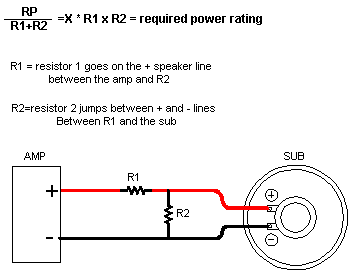
To implement a fixed L-pad attenuator, use the rule of thumb that the two resistors should have a wattage rating equal to the available power divided by the total resistor value and then multiplied by the value of each individual resistor.
For example, a 6 dB pad for an 8-ohm driver driven by a 100 watt source calls for an 8 and a 4 ohm resistor. The required power (RP) rating of each resistor is found by dividing 100 watts by 12 (the total ohms of both resistors), and then multiplying the resulting number (8.33) by 8 (66.7) and then by 4 (33.3). To check on yourself, add the power ratings you get for the two resistors, and you should get the original power rating (100 watts for this example).
Speaker Impedences 4 ohms 4 ohms 8 ohms 8 ohms dB Loss R1 R2 R3 R4 1 0.44 32.8 0.87 65.6 2 0.82 15.5 1.65 30.9 3 1.17 9.7 2.34 19.4 4 1.48 6.84 2.95 13.7 5 1.75 5.14 3.5 10.3 6 2 4.02 3.99 8.04 7 2.21 3.23 4.43 6.46 8 2.41 2.65 4.82 5.29 9 2.58 2.2 5.16 4.4 10 2.74 1.85 5.47 3.7 11 2.87 1.57 5.75 3.14 12 3 1.34 5.99 2.68 13 3.11 1.15 6.21 2.31 14 3.2 1 6.4 1.99 15 3.29 0.87 6.58 1.73 16 3.37 0.75 6.73 1.51 17 3.44 0.66 6.87 1.32 18 3.5 0.58 6.99 1.15 19 3.55 0.51 7.1 1.01 20 3.6 0.44 7.2 0.89
4.0 IASCA Competitions
4.1 What is IASCA, and how do I get involved?
IASCA is the International Auto Sound Challenge Association, a sanctioning body for car audio competitions held throughout the world. Competitors earn points at each competition, and those that perform the best each year can advance to the finals. Prizes (trophies, ribbons, and sometimes cash) are usually given out to the top competitors in each class at every competition.
IASCA memberships can be purchased at your local car audio retailer, if they are an IASCA member. You can call IASCA at 602/437-4678 to get a list of IASCA shops in your area.
4.2 What are the competitions like?
They are much like loud car shows: a lot of cars parked with their hoods/doors/trunks open showing their audio systems. There are two types of judging styles: 1) drive through - where competitors drive their own vehicles to judging stations to be judged, and 2) walk-arounds where the teams of judges will walk around the event site and judge vehicles that fit within their judging assignments. Typically SPL is done first with the mic stand in the driver's seat and the competitor in the passenger side adjusting only the volume. Hearing protection must be worn. After SPL measurements are completed, RTA measurements are performed by playing pink noise. When the volume level is within the specified "window" around 90db-110db, the RTA judge will signal you out, and at that point you must exit the vehicle for the actual scoring measurements. The next area for judging should be sound quality where two judges will sit in your car and judge the sound quality based on IASCA's reference CD/tape. The next area is installation judging where the competitor has 5 minutes to explain and show the installation of his/her vehicle. It is very useful to have a picture book/album of photos of the installation that may not be visible to prove that items not visible do exist. When that is completed, the competitor can park the vehicle and show spectators the vehicle. These procedures may differ from show to show, and at the regional/final levels they are very strict in what can and can't be done, e.g. a judge will make sure no adjustments are made after SPL until after sound quality judging is over, ear protection, etc.
Most involve a lot of waiting around. Thus, they are perfect for meeting other people interested in car audio, and seeing some installations which may give you some ideas. They're also perfect for listening to some cars that sound a lot better and a lot worse than your own. In IASCA competition, the cars are judged on:
- Installation Quality (137 pts possible)
- Attention to Show Details (12pts)
- Source Unit Installation (15 pts)
- Amplifier Installation (30pts)
- Speaker Installation (30pts)
- Other Devices (20 pts)
- Overall Creativity (30 pts)
- Sound Quality (230 pts possible)
- Tonal Accuracy and Spectral Balance (60pts)
- Soundstage and Ambience (55pts)
- Imaging (50pts)
- Sound Linearity
- Ergonomics (10pts) **
- Noise (10pts) **
- Frequency Response - RTA (40pts)
- Sound Pressure Level (SPL) ***
** The 1995 IASCA rules for both ergonomics and noise state that the competitor will begin with the full number of points and have points deducted for each problem, which are to be noted on the scoresheet.
*** There are two formats for 1995 IASCA competition: SoundQ and SoundQ Plus. In SoundQ, all areas listed are judged except for SPL; SoundQ Plus adds the SPL measurement, and the competitor's final score is determined by their SoundQ score plus 1 point per dB above 100dB. For example, if a competitor scored 250 in SoundQ and a 128dB readont, their SoundQ Plus score would be (250 + 28) = 278.
4.3 Should I compete?
You should compete if:
- You have an ok sounding stereo
- You have an ok installation (i.e. no amps/changers sliding around in the trunk)
- You'd like some pros to comment on your system
- Your feelings won't get hurt if you don't get first place
- You've been to a contest and talked to competitors about it
- You've read the rulebook
- You've listened to a test disc in your car, and understand what the sound quality judges are listening for
You can compete even if you don't do all of the above, but the recommendations will help you understand and gain the most from competing.
4.4 What class am I in?
This section is mainly geared toward IASCA.
There are three classes: novice, amateur, and pro. The novice class is intended to be an unintimidating level where beginners can start out; however, a competitor may only be in the novice class for one year, at which time he is automatically moved to the amateur class. Most competitors stay in the amateur class indefinitely, unless they become affiliated with a car audio shop or manufacturer, at which point they are moved into the pro class.
Are you or were you employed by a car audio manufacturer or dealer?
- Yes: You compete in pro
- No: Is this your first year of competing?
- Yes: You compete in novice for the first year
- No: You compete in amateur
Note that modifying your amplifiers, buying your equipment below retail, or being sponsored by a manufacturer or dealer will get you kicked into pro. Also note that any home built active gear in the signal path (e.g. custom built equalizers, crossovers, or noise gates) will get you kicked out of novice. Once you know what group you are, you next need to know what power category you are in. Add up the 4-ohm non-bridged rating of all your amplifiers, including your head unit if your head unit is powering speakers (rather than exclusively feeding amplifiers). Then, find the category you fit into:
- Novice: 1-150 151-300 301-600 601+
- Amateur: 1-150 151-300 301-600 601+
- Pro: 1-150 151-300 301-600 601+
- Expert: 1-600 601+
Thus, if you had a Rockford Punch 4040 (20Wx4) and a Punch 60ix (30Wx2), with a head unit that put out 6Wx2 (powering, perhaps, a center channel) you're in the 151-300 class. It does not matter if your amps are bridged down to .002 ohms; it's only the 4ohm rating that counts. If you no longer used your head unit to power speakers, you would be in the 1-150 class.
Competition is usually most vicious in the 151-300 and 301-600 categories at typical contests.