|
This is one user's comparision of images that were downloaded when accessing webpages at the People website and at the Next Estate website using the JetLink.net dial-up ISP with "Dial Broadband" web acceleration. This discussion and its fair use of the images are only for educational consumer comparison purposes by this user who is not employed by any ISP using this technology and has no interest in the "Dial Broadband" technology except as a mere user. Several other dial-up ISPs have the "Dial Broadband" acceleration in California. "Dial Broadband" is similar to Slipstream acceleration and Propel acceleration except that "Dial Broadband" is all server-based and doesn't require the user to install anything like the slipstream proxy software on the user's PC.
Dial-up web acceleration, such as provided by the "Dial Broadband" technology, can "speed up" the accessing of webpages via dial-up internet by 3-to-5 times the normal speed. One very general simplistic way to explain how web acceleration works is that the "acceleration" would compress webpages when transmitting them from the website to the user's PC. The smaller in file size, particularly for graphics and pictures, then the "less" data to transmit and the "faster" in perceived speed. There is more to this acceleration process, but this is one simplistic way of describing web acceleration. The trick is in maintaining the image quality of how the webpage looks. See the link for the Dial Broadband white paper at the end of this page for a more detailed technical explanation.
An issue that some people have with web acceleration is as to any possible loss in image quality, such as a possible resulting pixelation or degradation, that you may see in pictures and other graphics on a webpage that is accessed when using Dial Broadband. In particular, some people may readily notice a possible difference in image quality if they have the display resolution for their PC monitors set at 800x600 or 640x480. In contrast, others may not notice any difference (unless if they looked really closely at the screen) if they have the display resolution for their PC monitors set at 1024x768 or higher like on a 19-inch monitor or larger. If image quality on webpages does matter to you, then scroll down this webpage to find a few examples of pictures to compare to see what you may get when surfing with Dial Broadband acceleration versus when using plain regular dial-up internet without any acceleration.
With regard to how display resolutions may affect how you may see any possible differences in pictures and graphics on webpages accessed via Dial Broadband, according to Upsdell Browser News as of June 2005, a growing 68% majority of internet users have their displays set at 1024x768 (or at a higher resolution) while a shrinking although still good-sized minority of 29% are set at 800x600. The 1024x768 resolution provides a larger desktop on the display screen, but objects, such as pictures and graphics, may appear "smaller" on a screen that is set at this resolution. The 800x600 resolution provides a smaller desktop, but objects may appear larger on a PC monitor display screen that is set at 800x600. The trend is towards the larger 1024x768 resolution because it provides a larger desktop space on the screen. As a result, many webpages are being designed for 1024x768. However, there will still be users with the 800x600 resolution and they may possibly be more apt to notice any pixelation or degradation in pictures or graphics on a webpage that is accessed via an ISP that uses Dial Broadband acceleration (or any other dial-up web acceleration process). So, you, as a possible user of an ISP that provides the Dial Broadband capability, would have a choice to either set your display resolution for a 800x600 desktop to see a webpage more closely but possibly more readily see differences in image quality in pictures and graphics on a webpage accessed using Dial Broadband -OR- you could set your resolution to the larger 1024x768 desktop to minimize seeing any possible perceptible differences in image quality when using Dial Broadband. With an almost 70% majority of internet users at 1024x768, there could potentially be a lot of people who may probably find any possible differences in image quality when using Dial Broadband to be less noticable or maybe not even noticable at all. Also, if you simply want SPEED for your dial-up internet connection, then you may probably find any difference in image quality to be acceptable or you may probably convince yourself that any differences are not really that noticable to your eyes (particularly if your display is set at 1024x768 or higher). Click here to see current PC display resolution trends.
800x600 Display Resolution
(less desktop space, "larger" detail view)
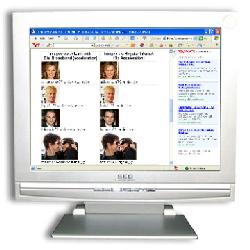
Details in pictures may
be more readily seen at
the 800x600 resolution.
29% have PC displays
set at this resolution.
|
1024x768 Display Resolution
(more desktop space, "smaller" detail view)
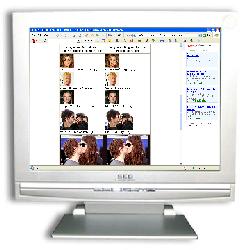
Details in pictures may
be "smaller" when seen at
the 1024x768 resolution.
68% have PC displays
set at this resolution.
|
If you do compare, you could probably see some pixelation and degradation with smaller pictures. For instance, see below and compare the small pictures of Brad Pitt and Leonardo Dicaprio. In contrast, it may be somewhat harder to notice any image quality issues with the small picture of Alicia Silverstone. It may also be harder to notice any possible flaws with the larger Tom Cruise-Katie Holmes kissing picture (but compare when looking at Tom's right check/jaw and at the circled close-up of Katie's ring finger). In some graphics, you may possibly see that small text in graphics may have some problems. As for what the acceleration process does to the resulting files, you may notice that .JPG files may become more compressed .JPEG files and some .GIF files may also become .JPEG files due to how the compression is done in the acceleration process. (Note that sometimes when .GIF files are compressed into .JPEG files that colors could possibly seem to "smear" or "smudge" due to any possible resulting pixelation.) Other picture and graphics files may similarly be transformed by the acceleration process. And either all of the pictures and graphics will look okay to you or some of the pictures and graphics won't depending on what you are looking at, what your display screen resolution is set at, and depending on how perceptive you are when viewing a webpage (or how perceptive you may not want to be if none of these details matter to you).
So, you may want to let your eyes decide if you like what you see or not. And adjust your display screen resolution between 1024x768 and 800x600, particularly if you have a PC monitor that has a 17-inch, 19-inch, or larger display screen, to see which resolution is better for you when using an ISP that provides the Dial Broadband capability. (Click here for directions on how to change your display resolution in Windows XP.) Please also note that pictures and graphics in their original form on a webpage are typically already "optimized" and made web-friendly by the website's webmaster / web designer and will not look as pristine as the higher-quality print-publication-version of the pictures.
IF YOU ARE LOOKING AT THIS WEBPAGE WHILE USING AN ISP THAT HAS WEB ACCELERATION TURNED ON, THEN YOU MAY NOT PROPERLY SEE THE DIFFERENCE WHEN LOOKING AT THE PICTURES AND GRAPHICS ON THIS WEBPAGE.
INSTEAD, CLICK HERE TO GET A ZIP FILE WITH THE PICTURES FOR YOU TO COMPARE WHILE VIEWING ON YOUR PC.
|
Images via JetLink with
Dial Broadband (acceleration) | Images via Regular Internet
(No Acceleration) |

asilverstone75-dialbroadband.jpg
|

asilverstone75-original.jpg
|

bpitt2_75-dialbroadband.jpg
|

bpitt2_75-original.jpg
|

ldicaprio75-dialbroadband.jpg
|

ldicaprio75-original.jpg
|

tcruise150-dialbroadband.jpg
|

tcruise150-original.jpg
|

tcruise2240-dialbroadband.jpg
|

tcruise2240-original.jpg
|
|
Images via JetLink with
Dial Broadband (acceleration) | Images via Regular Internet
(No Acceleration) |

mcsmall-dialbroadband.jpeg
|

mcsmall-original.gif
|

visitmymccard_visasmall-dialbroadband.jpeg
|

visitmymccard_visasmall-original.gif
|
(Note that some .GIF files may be transformed by the
Dial Broadband acceleration into compressed .JPEG files
such as with the credit card graphics on this page.)
More Images with and without Dial Broadband
(first two rows of cards with acceleration)
(second two rows without acceleration)
|

visitmymccard_cards-dialbroadband.jpeg
|
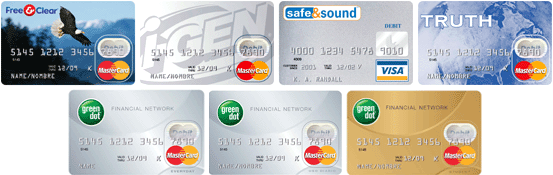
visitmymccard_cards-original.gif
|
BASIC INFORMATION AND TIPS FOR JETLINK.NET
DIAL-UP ISP WITH DIAL BROADBAND ACCELERATION
- California Dial-Up ISP
- Owned by Dock.net
- Uses Dock.net network
- Uses Dial Broadband acceleration to speed up web browsing
- Dial Broadband currently only works with California dial-up phone numbers for California users
- Dial Broadband acceleration does not require any new software for the user
- Dial Broadband acceleration is for speeding up the accessing of webpages
- Dial Broadband performs the acceleration by trying to further compress the file size of the files that make up a webpage including the pictures and graphics on the webpage as well as the HTML page itself
- Expect original (unaccelerated) pictures and graphics on webpages to be web-quality pictures and not print quality: Pictures and graphics on webpages are typically already "optimized" for the web by the website's webmaster / web designer and would most likely not look as pristine as the print-ready publication version of the pictures and graphics
- Acceleration may seem to be 2x or 3x faster most of the time (and maybe sometimes up to 5x) depending on whatever webpage you may be accessing
- Note that the internet in general can still slow things down like if a router is down, or if a website is on the other side of the world, or if a database on the website is being accessed by a lot of people, or if there are simply too many people accessing the website that you are trying to get to
- Dial Broadband will not accelerate anything else like the downloading of MP3 music files or PC software files
- Have to set up a DUN in windows to make a dialer to connect to JetLink.net
(CLICK HERE for basic instructions for setting up DUN for any dial-up ISP)
- User gets email account with 1 gigabyte of email storage
- JetLink email has POP3, SMTP, and Webmail
- JetLink Webmail adds a signature advertisment tag that says: "Sent via the WebMail system at jetlink.net" at the end of email that you send via JetLink webmail
- JetLink email sent via SMTP (such as when using Outlook Express or using Eudora email software on the PC) does NOT add any signature advertisement tag at the end of email messages
- Port 25 for SMTP only works for JetLink email (such as for sending JetLink email when using Outlook Express or Eudora on the PC to send JetLink email only)
- If you want SMTP over Port 25 for any other different email, then you may want to go sign up with a different dial-up ISP
- If you use another different email that does SMTP, then try using another Port if your other email service has the option of using a different Port for sending email via SMTP
- POP3 works for any email that you want to receive via POP3 (such as when using Outlook Express or Eudora on the PC for receiving email)
- Set up your JetLink.net settings as:
Username (for DUN): yourusername
Username (for POP3): [email protected]
Password: whateveryourpasswordis
POP3: mail.jetlink.net
SMTP: smtp.dock.net
- You may have to contact technical support to get your JetLink email working because it may still have to be set up on JetLink's end of the system after you sign up for a JetLink account
- It may be better to call technical support instead of emailing them
- If you send email to technical support, you should get an almost immediate automated email response that says you are in their trouble ticket tracking system
- Any technical support response will most likely be from DOCK.NET (they own and run JetLink.net)
- If you don't get the automated email response, then the chances are your email got lost (or somehow your email didn't get to them) and therefore you may not be in the trouble ticket tracking system - and so you may instead want to call JetLink technical support
- If you send email to technical support about setting up your JetLink email, and assuming you get the automated email response, then expect them to call you back within a day or so
- If you don't receive any technical support help by a return call or by an email response from a real technical support person, then call them or email them again - you may be better off if you call them up on the phone at this point
- JetLink.net does not provide Usenet newsgroups (but you can always go to http://groups.google.com to access Usenet newsgroups via Google)
- JetLink.net does not give you a personal user web page (instead you can always go to http://geocities.yahoo.com if you want to set up a free personal webpage)
- FTP works if you have a website that you want to FTP to
- NTP (time sync) works for synchronizing your PC's time (such as how Windows XP automatically syncs the time on your PC)
- Everything should work except SMTP over Port 25 which only works for JetLink email
- Unlimited internet access for personal usage
- JetLink is currently cheap at $4.95 per month - that's basically $5 a month or a total of $60 a year
- CLICK HERE to see OTHER DIAL-UP ISPs that have DIAL BROADBAND
(THE USER WHO WROTE THIS WEBPAGE DOES NOT WORK FOR JETLINK.NET, DOCK.NET, PACWEST.COM, OR FOR ANY OTHER ISP THAT PROVIDES INTERNET ACCESS. THE USER WHO WROTE THIS PAGE IS ONLY A USER WHO WAS LOOKING FOR DIAL-UP INTERNET ACCESS WITH THE "FASTER" WEB ACCELERATION.)
BASIC DISPLAY RESOLUTION SUGGESTIONS FOR
WHEN USING DIAL BROADBAND ACCELERATION
(ALSO FOR IF YOU ARE USING ANY OTHER DIAL-UP
WEB ACCELERATOR SUCH AS SLIPSTREAM, PROPEL
ACCELERATOR, NETZERO HISPEED, AOL TOPSPEED,
EARTHLINK ACCELERATOR, MSN DIAL-UP ACCELERATOR)
- Set your Display Resolution at 1024x768
- Don't use 800x600 or any other smaller resolution
- If you set your display resolution at 800x600 (or smaller at 640x480), then you may most likely see any perceptibly noticable effects caused by the Dial Broadband acceleration process in pictures or graphics in webpages
- Any compression in pictures or graphics due to Dial Broadband would be LESS NOTICABLE or NOT NOTICABLE at the 1024x768 resolution
- Most new PCs have 17-inch, 19-inch, or larger monitors and are already typically set at the 1024x768 as a default in windows
- If you have an older PC or an older monitor, you may have your display resolution at 800x600 or smaller as a default and you may want to change your Display Property settings (CLICK HERE for directions on how to change your display resolution in Windows XP)
- If you have to scroll horizontally in a maximized full-screen Internet Explorer browser when viewing many web pages, then you probably have your display resolution set at 800x600
- If you have an older 15-inch, 14-inch, or smaller monitor, then you may want to upgrade to a larger monitor to more comfortably view windows and the internet in the 1024x768 resolution
|
FOR MORE INFO ABOUT "DIAL BROADBAND"
THEN CLICK ON THESE URL LINKS:
http://www.pacwest.com/dialbroadband/whitepaper_db.pdf
(white paper on Dial Broadband)
http://www.pacwest.com/dialbroadband/
(home page for Dial Broadband)
http://www.pacwest.com/dialbroadband/landing_isps.cfm
(basic info about Dial Broadand)
http://www.pacwest.com/dialbroadband/faqs.cfm
(FAQ about Dial Broadband)
http://www.pacwest.com/dialbroadband/landing_endusers.cfm
(ISPs that have Dial Broadband)
Copyright © 2005 The DialBroadbandComparison User
|