|

|

|
|
contoh |
- texture 2 (zback004.jpg)
- Buka image contoh texture 2 di
atas di dalam PSP.
- Buka image baru saiz 300 x
300, background color: white, 16 million.
- Flood fill image baru dengan
texture di atas
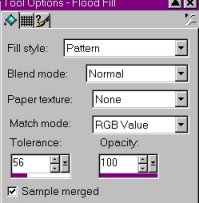
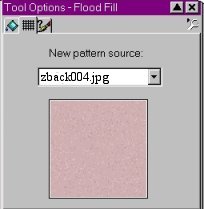
-
Pilih warna
foreground dengan set: Hex code: #E7D5D5 atau R:231 G:213
B:213 yang terdapat di toggle color palette.
-
Klik pada text
tool dan buat text pada image baru yang sudah dibuat flood
fill tadi. Text hendaklah : text effect, klik pada foreground
color, klik floating dan anti alias.(Pilih text yang besar),
dalam keadaan berbintik bintik, kemudian
-
Image, effect
cutout set: Jangan klik pada fill interior with color,
interior color: putih, shadow color: hitam, opacity: 80 blur:
8, vertical: 2, horizontal: 3, ok.
-
Image, drop shadow
dengan set: color: putih, opacity: 90, blur: 3, vertical: 2,
horizontal: 2, ok.
-
Selection,
selection none. save sebagai .gif atau .jpg
|

|