MuOnline Server Setup Guide
|
Requirements: |
|
|
The better OS for this job is Windows
2000 Server or Windows XP Professional, because: |
|
|
The disadvantage
on W2K is that you need more
memory. |
|
I installed Windows
XP
Professional into a
computer with the following specs: |
|
|
The Start: |
|
Of course you can install SQL Server, MuOnline Server and IIS in different machines, but
i dont recommend that
because you use 3 computers when you can use 1 (if you have 3 computers
then make 3 servers :). I used a the SUBST method, creating a folder named "D" on my C drive. Use the SUBST D: C:\D (or the folder name you created before) If you need to use this method,
you
must
unzip the server files into
C:\D
or
your desired folder. If you have a
D: drive,
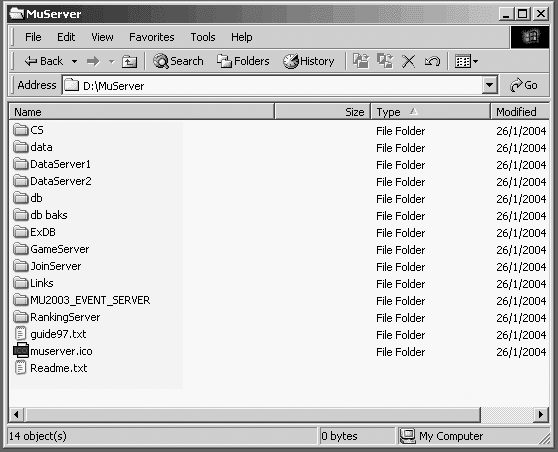
simply extract the server files into p.e, D:\MuServer.
After unzip finish you will have something like this: The above picture show us the directory structure after unzipping the server files. |
|
How to Setup SQL
Server: |
|
Now it is time to
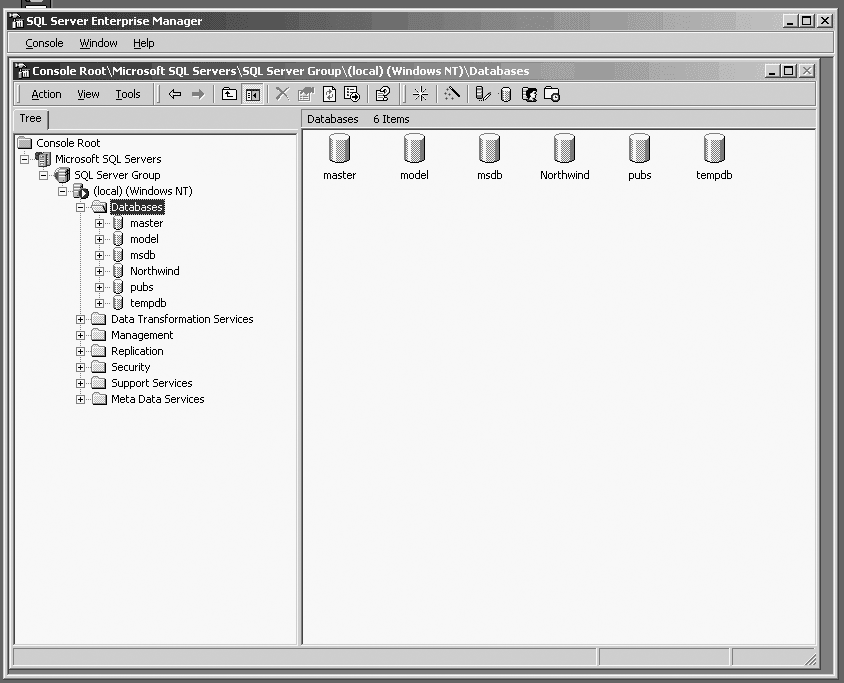
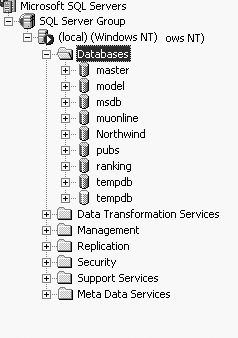
setup SQL Server. Open Enterprise Manager (Start ->
Programs -> Microsoft SQL Server -> Enterprise Manager) and browse
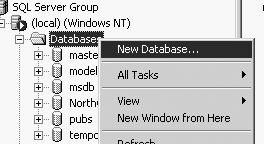
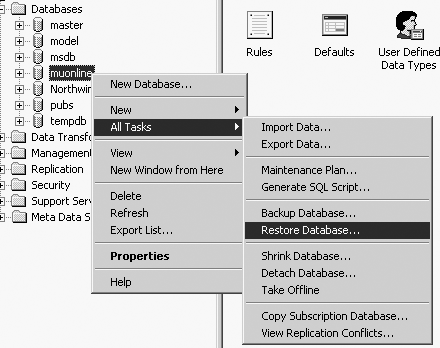
to Databases: Press the right mouse
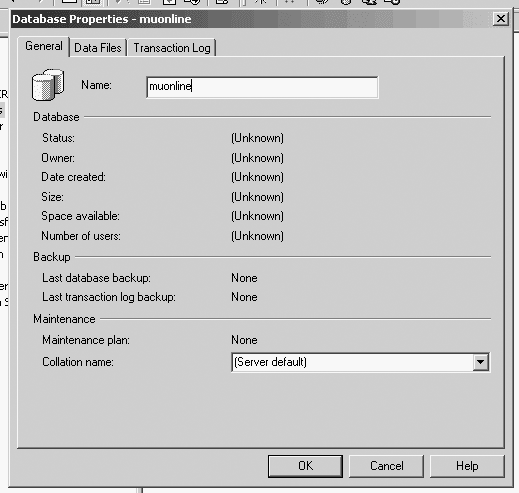
button and create a new database: Here is a Screenshot.
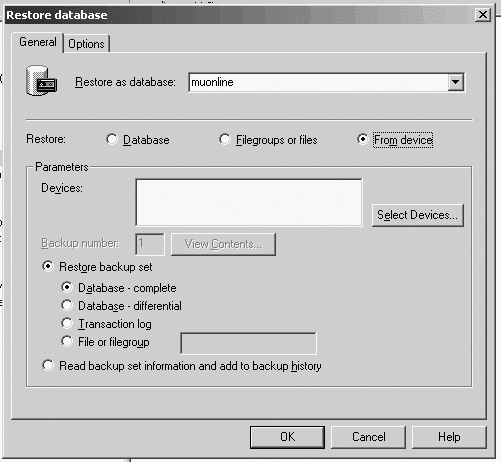
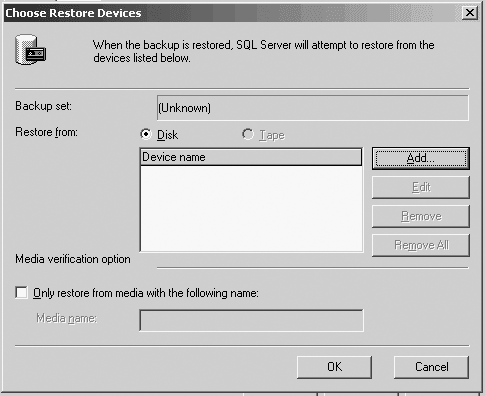
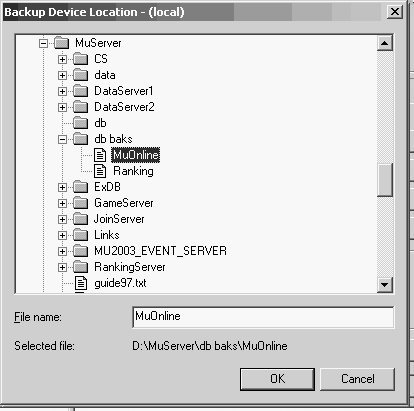
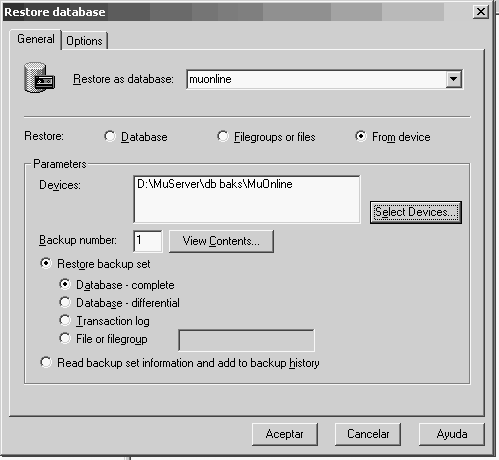
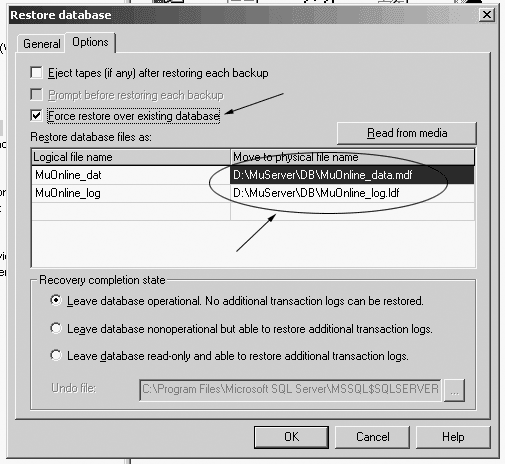
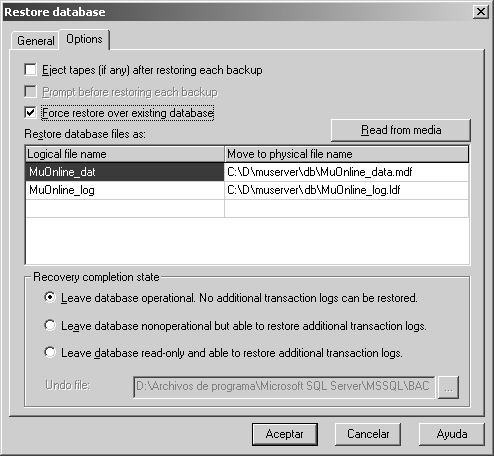
Press OK to import the tables into
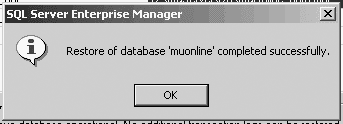
muonline database, if you will
see this message: |
|
How to Add a User to
SQL
(IF YOU
DONT WANT TO INSTALL IIS AND HAVE WEB REGISTRATION SKIP THIS)
: |
|
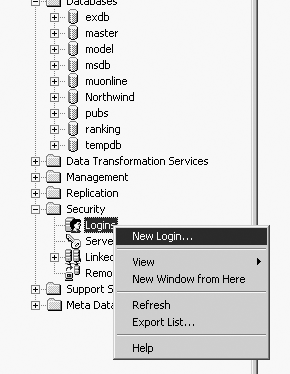
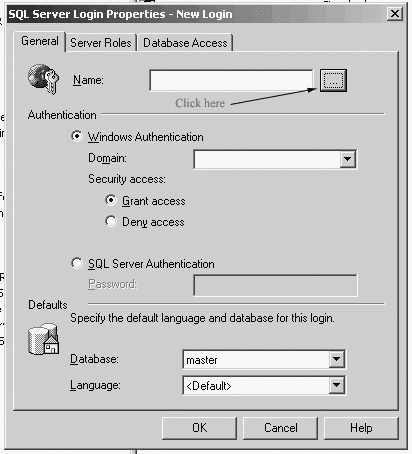
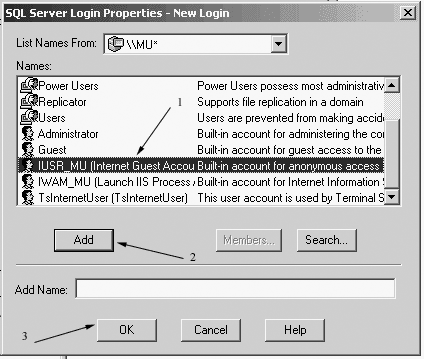
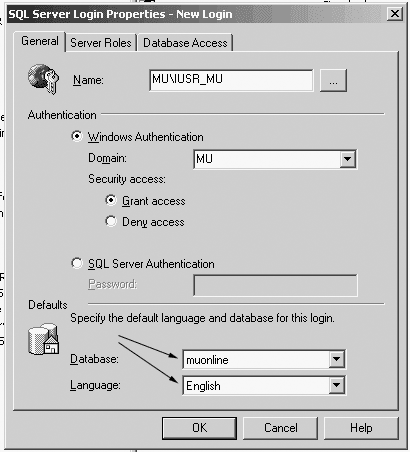
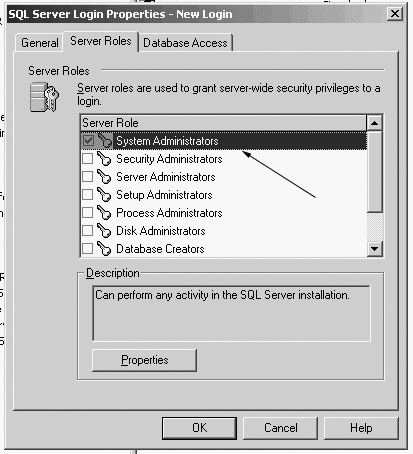
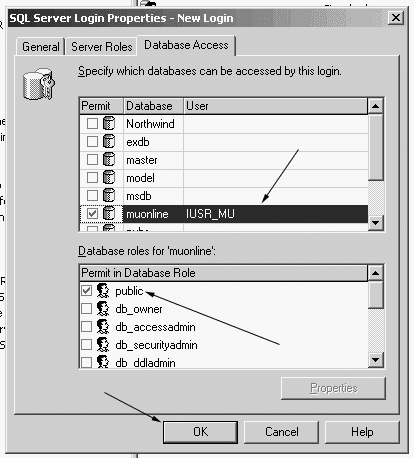
Add a
user to SQL Server Logins. Click Security then right
click on Logins and select New Login...
option: |
|
How to Setup ODBC
Links: |
|
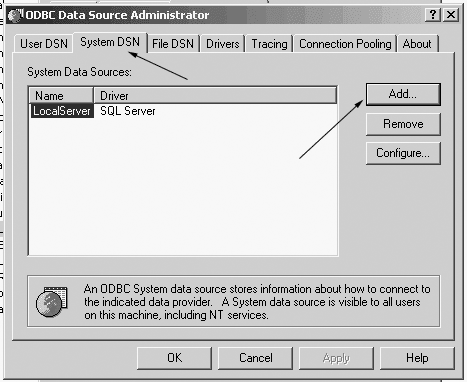
It is
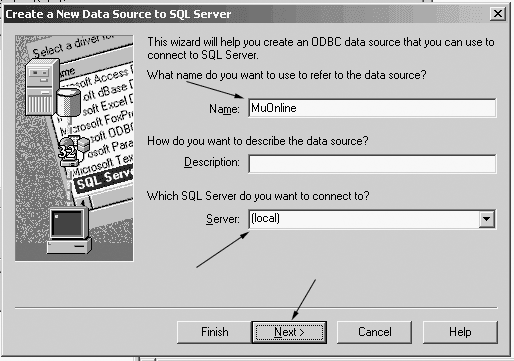
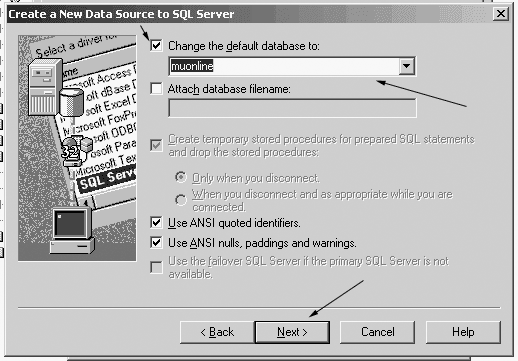
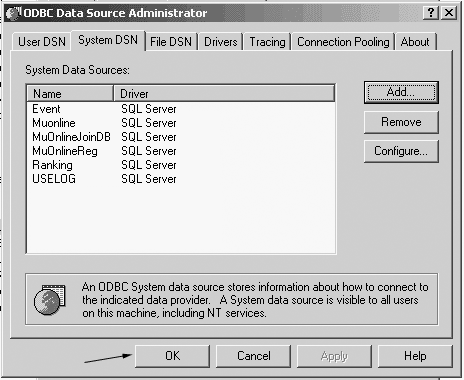
time to setup the ODBC logical links. Start Data Sources (ODBC)
(Start -> Programs -> Administrative Tools -> Data
Sources (ODBC)), browse to System DSN tab then click the
Add... button: |
|
How to Setup MuOnline Server: |
|
Now the edit thing.
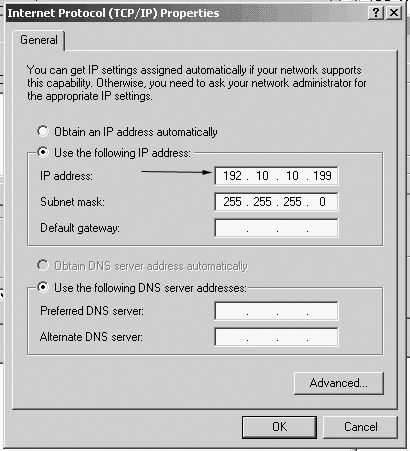
First find out you ip address (you can use ipconfig /all in
Command Prompt):
Then change the IP
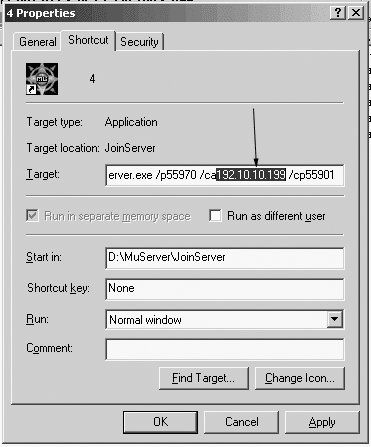
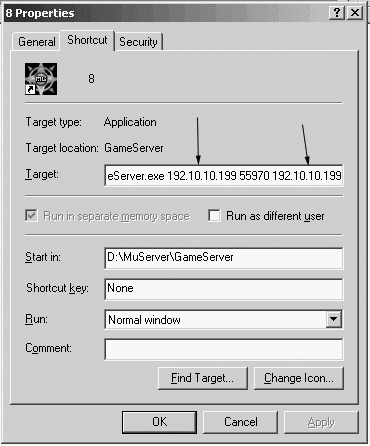
Addresses found as parameters to 4.lnk and 8.lnk files below D:\MuServer\Links folder
(right click on them and select
properties): 4th link target: D\MuServer\JoinServer\JoinServer.exe /p55970 /ca<Your IP> /cp55901 8th link target: D:\MuServer\GameServer\GameServer.exe <Your IP> 55970 <Your IP> 55960 55901 You will realize some ports in JoinServer and GameServer are the same. A few errors are produced because ports numbers do not match. Then edit
D:\MuServer\MU2003_EVENT_SERVER\DATA\svconfig.ini and
change "mu2003_dsn = DEVILSQURE_RANKING" to
"mu2003_dsn = Ranking" and edit
also D:\MuServer\RankingServer\svconfig.ini changing
"odbc_dsn=DEVILSQURE_RANKING"
to "odbc_dsn=Ranking"
. |
|
How to Setup IIS: |
|
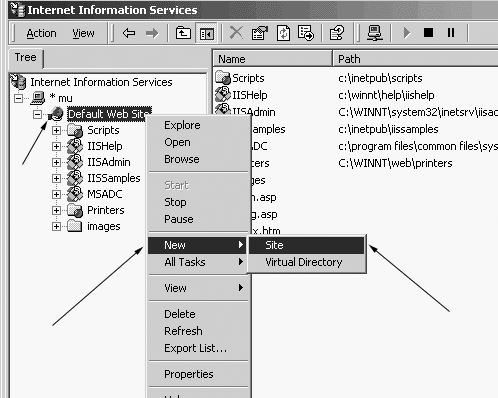
Open Internet Services Manager. Browse to Default Web Site, right mouse button on it and choose New -> Site If this action
doesn't appear, simply rename the Default Web Site to, p.e, MuOnline. |
|
How to Setup Web
Registration: |
|
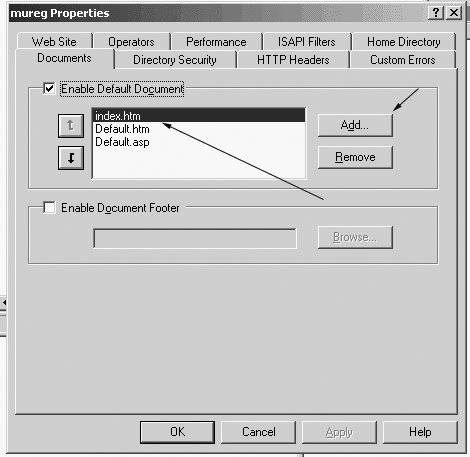
Unzip
the Web Account registration files to D:\MuReg\ (or the directory you
choosed) and edit conn.asp and change Also you can use "MuReg" to create and manage accounts. Get it here |
|
Other things: |
|
The databases are not empty, there are some accounts and characters you should delete before starting the server. Of course you can leave as is. |
|
Starting MuOnline Server: |
|
Browse to D:\MuServer\Links
and double click 1.lnk, wait to load then double
click 2.lnk, then 3.lnk and so on until
8.lnk (lnk is the
extention for shorcut
files). 0.96y Client full - Download it here 0.97 Patch - Get it here or here Translation for 0.97 Client - Get it here, here or here
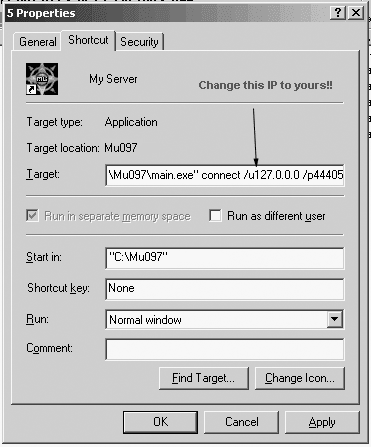
First, unzip the 0.96 client anywhere on your disk drive. Second, unzip the 0.97 patch on the same folder, overwriting the files required. Third, extract the 0.97 client translation to Data\Local in the folder that you extrated the client files. Create a shortcut for main.exe in your desktop. And go to its properties. Change the "Target" field as here:
Don't forget to change the folder address to yours. Run the shortcut and have fun! |
|
Advanced guide: hex-editing GameServer.exe and fixing some bugs |
For do this, you will need a hex-editor, I use XVI32, which
is freeware and is very good for this purposes.
Go to address 068020 (in HEX) and replace "D4" for "1A". Replace "1A 9C F9 FF 83 C4 14 E9 6B FE FF FF 5F 5E 5B 8B" for "1A 9C F9 FF 83 C4 14 E9 6B FE FF FF 8B 4D 0C 33". Replace "E5 5D C3 CC CC CC CC CC CC CC CC CC CC CC CC CC" for "C0 8A 41 5C 83 F8 02 75 20 8B 91 94 00 00 00 89". Replace "CC CC CC CC CC CC CC CC CC CC CC CC CC CC CC CC" for "55 F8 DB 45 F8 D8 0D 74 36 51 00 E8 40 54 03 00". Replace "CC CC CC CC CC CC CC CC CC CC CC CC CC CC CC CC" for "8B 4D 0C 89 81 94 00 00 00 5F 5E 5B 8B E5 5D C3".
Replace "C7 45 94 00 00 40 40" for "90909090909090".
Replace "83 7D 08 01 7C 09 81 7D 08 5E 01" for "83 7D 08 01 7C 09 81 7D 08 E8 03". Replace "81 F9 5E 01 00" for "81 F9 E8 03 00". Replace "3D 5E 01 00 00" for "3D E8 03 00 00". Replace "81 7D F0 5E 01" for "81 7D F0 E8 03". Replace "6B D2 0A 8B 45 F0" for "6B D2 01 8B 45 F0". Replace "83 C1 09 0F AF 4D EC 0F AF 4D EC 69 C9 E8 03" for "83 C1 09 0F AF 4D EC 0F AF 4D EC 69 C9 02 00". Replace "81 7D F0 FF 00 00 00 7E 33 8B 4D EC 83 C1 09 0F AF 4D EC 0F AF" for "81 7D F0 20 03 00 00 7E 33 8B 4D EC 83 C1 09 0F AF 4D EC 0F AF" and "4D EC 69 C9 B8 03 00 00" for "4D EC 69 C9 6E 00 00 00".
Find "19 01 00 00 5e 01 00 00 05 01 00 00 5e 01 00 00"
Jewel of Life. Search for "83 7D FC 32", and change 32 to 0 (fail rate) if you want 100% success rate. Jewel of Soul. Search for "83 7D FC 46" and change 46 to 64 (success rate) with no luck items. Search for "83 7D FC 37" and change 37 to 00 (failure rate) with luck items.
Replace "83 BA 80 0C 00 00 5A" with "83 BA 80 0C 00 00 01"
(Failure Rate is 2%), If you want 100%, change 01 to 00. +10 Items.- Replace "75 0F 8B 4D 08 C7 81 80 0C 00 00 32" with
"75 0F 8B 4D 08 C7 81 80 0C 00 00 4B" Success rate is 75%, If you
want 100%, change 4B to 64.
Find these codes in GameServer.exe: Bless = 9 mill = 40 54 89 Open the windows calculator and switch to Scientific Mode. If you want the bless cost 3 million, type in DEC-mode 3000000. Now, click in HEX, and you will see 2D C6 C0. The GameServer read the codes inverted, so you will need to change 2D C6 C0 to C0 C6 2D. Then Replace the original code for this one. And so on for all jewel prices. You can edit other items prices too, but you need to know the purchasing price at shop, so convert it to HEX and replace it for your desired price. |
|
Changing Items in Shops: |
|
Ok, this is very simple, I think.
//Swords 0 0 0 255 0 0 0 //Kris 0 1 0 255 0 0 0 //Shortsword 0 2 0 255 0 0 0 //Rapier 0 3 0 255 0 0 0 //Katache 0 4 0 255 0 0 0 //Scimitar 0 5 0 255 0 0 0 //Blade 0 6 0 255 0 0 0 //Gladius 0 7 0 255 0 0 0 //Falchion 0 8 0 255 0 0 0 //Serpentsword 0 9 0 255 0 0 0 //Salamandersword 0 10 0 255 0 0 0 //Light Sabre 0 11 0 255 0 0 0 //Legendary Sword 0 12 0 255 0 0 0 //Heliacal Sword 0 13 0 255 0 0 0 //Doubleblade 0 14 0 255 0 0 0 //Lightningsword 0 15 0 255 0 0 0 //Giant Sword 0 16 0 255 0 0 0 //Sword Of Destruction 0 17 0 255 0 0 0 //Dragon Slayer 0 18 0 255 0 0 0 //ThunderBlade 0 19 0 255 0 0 0 //Angelic Sword
//Axes 1 0 0 255 0 0 0 //Small Axe 1 1 0 255 0 0 0 //Hatchet 1 2 0 255 0 0 0 //Doubleaxe 1 3 0 255 0 0 0 //Tomahawk 1 4 0 255 0 0 0 //Fairyaxe 1 5 0 255 0 0 0 //Battleaxe 1 6 0 255 0 0 0 //Nikkeaaxe 1 7 0 255 0 0 0 //Larkanaxe 1 8 0 255 0 0 0 //Crescentic Axe
//Maces/Hammers 2 0 0 255 0 0 0 //Mace 2 1 0 255 0 0 0 //Morningstar 2 2 0 255 0 0 0 //Iron Hammer 2 3 0 255 0 0 0 //Great Hammer 2 4 0 255 0 0 0 //Serpenthammer 2 5 0 255 0 0 0 //Crystal Morningstar 2 6 0 255 0 0 0 //Chaos Axe
//Polearms 3 0 0 255 0 0 0 //Lightspear 3 1 0 255 0 0 0 //Spear 3 2 0 255 0 0 0 //Dragonlance 3 3 0 255 0 0 0 //Big Pike 3 4 0 255 0 0 0 //Serpentspear 3 5 0 255 0 0 0 //Double Halberd 3 6 0 255 0 0 0 //Halberd 3 7 0 255 0 0 0 //Bardiche 3 8 0 255 0 0 0 //Great Scythe 3 9 0 255 0 0 0 //Bill Of Balrog
//Bows 4 0 0 255 0 0 0 //Shortbow 4 1 0 255 0 0 0 //Bow 4 2 0 255 0 0 0 //Fairybow 4 3 0 255 0 0 0 //Battlebow 4 4 0 255 0 0 0 //Tigerbow 4 5 0 255 0 0 0 //Lightbow 4 6 0 255 0 0 0 //Chaosbow 4 7 0 255 0 0 0 //Arrows 4 8 0 255 0 0 0 //Crossbow 4 9 0 255 0 0 0 //Golden Crossbow 4 10 0 255 0 0 0 //Arquebus 4 11 0 255 0 0 0 //Light Crossbow 4 12 0 255 0 0 0 //Serpent Crossbow 4 13 0 255 0 0 0 //Legendary Crossbow 4 14 0 255 0 0 0 //Cannon Crossbow 4 15 0 255 0 0 0 //Bolts 4 16 0 255 0 0 0 //Divine Crossbow 4 17 0 255 0 0 0 //Divine Bow* 4 18 0 255 0 0 0 //Angelic Crossbow
//Staffs 5 0 0 255 0 0 0 //Skullstaff 5 1 0 255 0 0 0 //Angelic Staff 5 2 0 255 0 0 0 //Serpentstaff 5 3 0 255 0 0 0 //Thunderstaff 5 4 0 255 0 0 0 //Gorgonstaff 5 5 0 255 0 0 0 //Legendary Staff 5 6 0 255 0 0 0 //Resurrectstaff 5 7 0 255 0 0 0 //Chaos Lightningstaff 5 8 0 255 0 0 0 //Staff Of Destruction 5 9 0 255 0 0 0 //Unicorn Staff 5 10 0 255 0 0 0//Angelic Staff
//Shield 6 0 0 255 0 0 0 //Roundshield 6 1 0 255 0 0 0 //Hornshield 6 2 0 255 0 0 0 //Kiteshield 6 3 0 255 0 0 0 //Fairyshield 6 4 0 255 0 0 0 //Buckler 6 5 0 255 0 0 0 //Shield Of Dragonslayer 6 6 0 255 0 0 0 //Boneshield 6 7 0 255 0 0 0 //Spikeshield 6 8 0 255 0 0 0 //Towershield 6 9 0 255 0 0 0 //Ironshield 6 10 0 255 0 0 0 //Roundshield 6 11 0 255 0 0 0 //Serpentshield 6 12 0 255 0 0 0 //Bronzeshield 6 13 0 255 0 0 0 //Dragonshield 6 14 0 255 0 0 0 //Legendary shield
//Armors //Bronze(DK) 7 0 0 255 0 0 0 //Bronze helm 8 0 0 255 0 0 0 //Bronze armor 9 0 0 255 0 0 0 //Bronze pants 10 0 0 255 0 0 0 //Bronze gloves 11 0 0 255 0 0 0 //Bronze boots
// Red Dragon(DK) 7 1 0 255 0 0 0 //Dragon Helm 8 1 0 255 0 0 0 //Dragon Armor 9 1 0 255 0 0 0 //Dragon Pants 10 1 0 255 0 0 0 //Dragon Gloves 11 1 0 255 0 0 0 //Dragon Boots
//Pad(DW) 7 2 0 255 0 0 0 //Pad helm 8 2 0 255 0 0 0 //Pad armor 9 2 0 255 0 0 0 //Pad pants 10 2 0 255 0 0 0 //Pad gloves 11 2 0 255 0 0 0 //Pad boots
//Legendary(DW) 7 3 0 255 0 0 0 //Legendary helm 8 3 0 255 0 0 0 //Legendary armor 9 3 0 255 0 0 0 //Legendary pants 10 3 0 255 0 0 0 //Legendary gloves 11 3 0 255 0 0 0 //Legendary boots
//Bone(DW) 7 4 0 255 0 0 0 //Bone helm 8 4 0 255 0 0 0 //Bone armor 9 4 0 255 0 0 0 //Bone pants 10 4 0 255 0 0 0 //Bone gloves 11 4 0 255 0 0 0 //Bone boots
//Leather(DK) 7 5 0 255 0 0 0 //Leather helm 8 5 0 255 0 0 0 //Leather armor 9 5 0 255 0 0 0 //Leather pants 10 5 0 255 0 0 0 //Leather gloves 11 5 0 255 0 0 0 //Leather boots
//Scale(DK) 7 6 0 255 0 0 0 //Scale helm 8 6 0 255 0 0 0 //Scale armor 9 6 0 255 0 0 0 //Scale pants 10 6 0 255 0 0 0 //Scale gloves 11 6 0 255 0 0 0 //Scale boots
//Sphinx(DW) 7 7 0 255 0 0 0 //Sphinx helm 8 7 0 255 0 0 0 //Sphinx armor 9 7 0 255 0 0 0 //Sphinx pants 10 7 0 255 0 0 0 //Sphinx gloves 11 7 0 255 0 0 0 //Sphinx boots
//Brass(DK) 7 8 0 255 0 0 0 //Brass helm 8 8 0 255 0 0 0 //Brass armor 9 8 0 255 0 0 0 //Brass pants 10 8 0 255 0 0 0 //Brass gloves 11 8 0 255 0 0 0 //Brass boots
//Iron Plated(DK) 7 9 0 255 0 0 0 //Iron helm 8 9 0 255 0 0 0 //Iron armor 9 9 0 255 0 0 0 //Iron pants 10 9 0 255 0 0 0 //Iron gloves 11 9 0 255 0 0 0 //Iron boots
//Vine(Elf) 7 10 0 255 0 0 0 //Vine helm 8 10 0 255 0 0 0 //Vine armor 9 10 0 255 0 0 0 //Vine pants 10 10 0 255 0 0 0 //Vine gloves 11 10 0 255 0 0 0 //Vine boots
//Silk(Elf) 7 11 0 255 0 0 0 //Silk helm 8 11 0 255 0 0 0 //Silk armor 9 11 0 255 0 0 0 //Silk pants 10 11 0 255 0 0 0 //Silk gloves 11 11 0 255 0 0 0 //Silk boots
//Wind(Elf) 7 12 0 255 0 0 0 //Wind helm 8 12 0 255 0 0 0 //Wind armor 9 12 0 255 0 0 0 //Wind pants 10 12 0 255 0 0 0 //Wind gloves 11 12 0 255 0 0 0 //Wind boots
//Spirit(Elf) 7 13 0 255 0 0 0 //Spirit helm 8 13 0 255 0 0 0 //Spirit armor 9 13 0 255 0 0 0 //Spirit pants 10 13 0 255 0 0 0 //Spirit gloves 11 13 0 255 0 0 0 //Spirit boots
//Guardian(Elf) 7 14 0 255 0 0 0 //Guardian Helm 8 14 0 255 0 0 0 //Guardian Armor 9 14 0 255 0 0 0 //Guardian Pants 10 14 0 255 0 0 0 //Guardian Gloves 11 14 0 255 0 0 0 //Guardian Boots
//Atlantis(MG) 8 15 0 255 0 0 0 //Atlantis Armor 9 15 0 255 0 0 0 //Atlantis Pants 10 15 0 255 0 0 0 //Atlantis Gloves 11 15 0 255 0 0 0 //Atlantis Boots
//Black Dragon(DK) 7 16 0 255 0 0 0 //Black Dragon helm 8 16 0 255 0 0 0 //Black Dragon armor 9 16 0 255 0 0 0 //Black Dragon pants 10 16 0 255 0 0 0 //Black Dragon gloves 11 16 0 255 0 0 0 //Black Dragon boots
//Black Phoenix(DK)Best 7 17 0 255 0 0 0 //Phoenix Helm 8 17 0 255 0 0 0 //Phoenix Armor 9 17 0 255 0 0 0 //Phoenix Pants 10 17 0 255 0 0 0 //Phoenix Gloves 11 17 0 255 0 0 0 //Phoenix Boots
//Grand Soul(DW)Best 7 18 0 255 0 0 0 //Soul Helm 8 18 0 255 0 0 0 //Soul Armor 9 18 0 255 0 0 0 //Soul Pants 10 18 0 255 0 0 0 //Soul Gloves 11 18 0 255 0 0 0 //Soul Boots
//Divine(Elf)Best 7 19 0 255 0 0 0 //Divine Helm 8 19 0 255 0 0 0 //Divine Armor 9 19 0 255 0 0 0 //Divine Pants 10 19 0 255 0 0 0 //Divine Gloves 11 19 0 255 0 0 0 //Divine Boots
//Thunder(MG)Best 8 20 0 255 0 0 0 //Thunder Armor 9 20 0 255 0 0 0 //Thunder Pants 10 20 0 255 0 0 0 //Thunder Gloves 11 20 0 255 0 0 0 //Thunder Boots
//Chaos Wings 12 0 0 255 0 0 0 //Fairy Wings (Elf) 12 1 0 255 0 0 0 //Heaven Wings (DW) 12 2 0 255 0 0 0 //Satan Wings (DK) 12 3 0 255 0 0 0 //Butterfly Wings (ME) 12 4 0 255 0 0 0 //Arch angel Wings (SM) 12 5 0 255 0 0 0 //Devil Wings (BK) 12 6 0 255 0 0 0 //Dark Wings (MG)
//Summon Orb 12 8 0 0 0 0 0 //Healing Orb 12 9 0 0 0 0 0 //Advanced Defence 12 10 0 0 0 0 0 //Advanced Damage 12 11 0 0 0 0 0 //Summon Goblin 12 11 1 0 0 0 0 //Summon Golem 12 11 2 0 0 0 0 //Summon Assassin 12 11 3 0 0 0 0 //Summon Yeti 12 11 4 0 0 0 0 //Summon DarkKnight 12 11 5 0 0 0 0 //Summon Bali 12 11 6 0 0 0 0 //Summon Soldier 12 7 0 255 0 0 0 //Orb of twisting slash 12 12 0 255 0 0 0 //Earth Break (Blade Knight) 12 13 0 255 0 0 0 //Unicorn Attack (Blade Knight/Dark Knight/MG) 12 14 0 255 0 0 0 //Mass Healing (Blade Knight) 12 16 0 255 0 0 0 //Flame Slash (MG) 12 17 0 255 0 0 0 //Penetration Shot Orb (Muse Elf/Elf) 12 18 0 255 0 0 0 //Ice Age Orb (Muse Elf) 12 19 0 255 0 0 0 //Swift Attack Orb (Dark Knight)
//Guardians 13 0 0 255 0 0 0 //Guardian Angel 13 1 0 255 0 0 0 //Satan 13 2 0 255 0 0 0 //Horn of Unilia 13 3 0 255 0 0 0 //Dinorant
//Misc 13 8 0 255 0 0 0 //Ice Ring 13 9 0 255 0 0 0 //Poison Ring 13 10 0 255 0 0 0 //Dino Transformation Ring 13 10 1 255 0 0 0 //Giant Transformation Ring 13 10 2 255 0 0 0 //Skeleton Transformation Ring 13 10 3 255 0 0 0 //Bull Transformation Ring 13 10 4 255 0 0 0 //Mage Transformation Ring 13 10 5 255 0 0 0 //Death Bull Transformation Ring 13 12 0 255 0 0 0 //Lightning Necklace 13 13 0 255 0 0 0 //Fire Necklace 13 14 0 255 0 0 0 //Blue Feather 13 15 0 255 0 0 0 //Blue Pear 13 16 0 255 0 0 0 //Blood Book 13 17 0 255 0 0 0 //Blood Tooth 13 18 0 255 0 0 0 //Cloak 13 19 0 255 0 0 0 //Mini Angelic Staff 14 10 0 0 0 0 0 //Town Teleport 14 11 0 255 0 0 0 //Box Of Luck 14 12 0 255 0 0 0 //Heart 12 15 0 255 0 0 0 //Jewel of Chaos 14 13 0 255 0 0 0 //Jewel of Bless 14 14 0 255 0 0 0 //Jewel of Soul 14 16 0 255 0 0 0 //Jewel of Life 14 22 0 255 0 0 0 //Jewel Of Creation 14 17 0 255 0 0 0 //Eye of Devil Square 14 18 0 255 0 0 0 //Devil Square Key 14 19 0 255 0 0 0 //Devil Square Invitation 14 20 0 255 0 0 0 //Sentimental Charm 14 21 0 255 0 0 0 //HINET (?) // Quest items 14 23 0 255 0 0 0 //King's Book 14 24 0 255 0 0 0 //Sword Of The Broken Soul 14 25 0 255 0 0 0 //Tear Of The Fairy 14 26 0 255 0 0 0 //Soul Of Instinct
//Spell Book 15 0 0 255 0 0 0 //Poison 15 1 0 255 0 0 0 //Meteorite 15 2 0 255 0 0 0 //Lightning 15 3 0 255 0 0 0 //Fireball 15 4 0 255 0 0 0 //Flame 15 5 0 255 0 0 0 //Teleport 15 6 0 255 0 0 0 //Ice 15 7 0 255 0 0 0 //Twister 15 8 0 255 0 0 0 //Evil Spirits 15 9 0 255 0 0 0 //Hellfire 15 10 0 255 0 0 0 //Power Wave 15 11 0 255 0 0 0 //Aurora 15 12 0 255 0 0 0 //Comet 15 13 0 255 0 0 0 //Inferno 15 14 0 255 0 0 0 //Psychic Teleport 15 15 0 255 0 0 0 //Attack Shield Aura
//Potions 14 0 0 1 0 0 0 //Apple 14 1 0 1 0 0 0 //Small Heal 14 2 0 1 0 0 0 //Med Heal 14 3 0 1 0 0 0 //Lrg Heal 14 4 0 1 0 0 0 //Small Mana 14 5 0 1 0 0 0 //Med Mana 14 6 0 1 0 0 0 //Lrg Mana 14 8 0 1 0 0 0 //Antidote 14 9 0 1 0 0 0 //Alcohol
Item Options: The item code structure is as this: Example:
0 0 0 255 0 0 0 //Kris
a= item level (1~11)
This is the shop list. Edit the shop*.txt file in wich you want to add or remove items.
shop0 - [Lorencia] Weapon Shop (Hans the Blacksmith)
If you want Kris+11+16+luck (You can add skill, but it won't work, kris have no skill) to be on shop, write this line: 0 0 11 255 0 1 4
You only need to change the item level (a), durability (bbb), skill (c) and luck (d). The first and second numbers are the item type, I think.
|
Original guide from http://members.lycos.co.uk/metasha/ - down forever :(
Greetings to Gyumaou for hosting some files.
Click here, here or here to get the fixed main.exe for 0.97, 0.97b and 0.97d.