Desktop Extension
Features | Download Trial | Buy Now | Contact Us | Support | Home
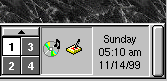
Desktop Extension (DesktopEx) is a platform independent framework that extends Java GUI application developers' reach into desktop user interface. We are proud to release the first member of this family - System Tray.
 The
system tray is a section of the taskbar in the Microsoft Windows desktop user
interface or the desktop panel in the Linux KDE platform. It is usually used
to display the clock and the icons of certain programs so that a user is
continually reminded that they are there and can easily click one of them.
The
system tray is a section of the taskbar in the Microsoft Windows desktop user
interface or the desktop panel in the Linux KDE platform. It is usually used
to display the clock and the icons of certain programs so that a user is
continually reminded that they are there and can easily click one of them.
 System
Tray of DesktopEx helps you add professional and native look and feel to your
GUI applications. You no longer need to write native code using Java Native
Interface. DesktopEx takes care of native coding for you so that you can
focus on building Java applications.
System
Tray of DesktopEx helps you add professional and native look and feel to your
GUI applications. You no longer need to write native code using Java Native
Interface. DesktopEx takes care of native coding for you so that you can
focus on building Java applications.
System Tray is designed based on the Java AWT event model. This familiar event model not only kick starts integration of System Tray into your applications, but it also let you add as many listeners as you like to customize System Tray behaviors any way you desire.
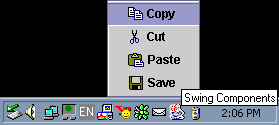 While
AWT event model gives you maximum flexibility, the easiest way to start
integrating System Tray is to use SystemTrayTargetAdapter. It allows you to
control what components to display when any one of the left, middle, right
mouse buttons is clicked. SystemTrayTargetAdapter is specially defined to
support any Swing or AWT components. You can use a JPopupMenu for right mouse
button clicked.
While
AWT event model gives you maximum flexibility, the easiest way to start
integrating System Tray is to use SystemTrayTargetAdapter. It allows you to
control what components to display when any one of the left, middle, right
mouse buttons is clicked. SystemTrayTargetAdapter is specially defined to
support any Swing or AWT components. You can use a JPopupMenu for right mouse
button clicked.
You can even use complex components like JTabbedPane.
Features
|
|
|
|

Features | Download Trial | Buy Now | Contact Us | Support | Home
|
Copyright © 2003 DesktopEx.com. All Rights Reserved. |
�@