|
Denon
DVD-3800 News
Latest
update – If you experience
skipping or freezing problems during playback, even if your serial number
implies it should already have the latest laser pickup installed, then
contact your nearest Denon dealer and ask for the player to have the ‘laser
pickup’ replaced under warranty.
At last it appears that
Denon UK have confirmed that DVD-3800 players above a certain serial number
(XXXXXX1000 for gold finish and XXXXXXX700 for black finish) have the latest
firmware and laser pickups hardware that DOES NOT suffer from the freezing
and skipping issues that plagued some of the earlier models. Click here for more
information.
After contacting Denon
personally regarding the freezing issues I received the following reply:
"Denon UK has not experienced
the problems with the DVD-3800 which are on the AVS American forum, but if
the UK DVD-3800 shows any sign of this problem, then it would be the same
case as Denon USA,
this would mean a replacement laser. This would be carried out at Hayden Laboratories
under warranty by our engineers."
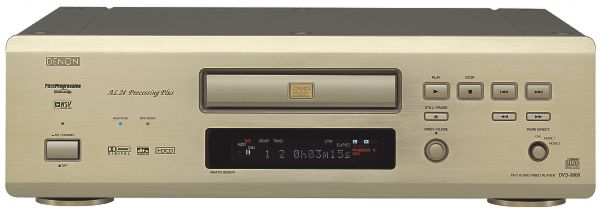
Denon DVD-3800
Manual & Pictures
DVD-3800 Manual (English
& German PDF) – no
longer available online, please contact me if you require a copy…
DVD-3800
Front View in Black (Small) or (Large)
DVD-3800
Rear View in Black (Small) or (Large)
DVD-3800
Front View in Gold (Small)
Denon DVD-3800
Firmware Images
Checking Firmware
Levels Instructions
Firmware Upgrade Instructions
- Please
read these VERY carefully
Please Note: The Playback freezing/skipping fix
and cooler running fix has been fixed in hardware using a new laser pickup,
as opposed to a firmware update. Applying the following firmware(s) will not
fix this type of issue.
WARNING: Due to a few
recently reported issues with firmware update failures, please ensure you are
willing to take the risk of player failure after performing any firmware
updates. This process will also likely invalidate your warranty, if disclosed
to Denon. If in ANY doubt, please take the player to your nearest Denon
dealer, who can apply the update on your behalf. However, numerous owners
(including myself) HAVE applied the updates with 100% success - use at your
own risk...
Denon
DVD-3800 Multiregion Firmware (Released December 2002)
- Multiregion Functionality
& PAL Progressive Output (MR/PAL-P)
- Dec02 Firmware Levels (tested
with Nov02 hardware): ESS 720N, DRV 6193-2, ESS 34625P, PANEL 6093-2
- Dec02 Firmware Levels (tested
with older hardware): ESS 720, DRV 6100, ESS 625P, PANEL 6093
- Default Firmware Levels
(tested with Nov02 Region 2 Hardware): ESS A30N, DRV 6193-2, ESS 6134-4,
PANEL 6093-2
- Firmware tested with European
(R2) hardware only – however,
feedback from several US
owners suggests that the firmware can also be used on US players for
MR/PAL-P.
Please Note: the exact
firmware versions for your player may differ to those shown above due to
present/future hardware changes.
Denon DVD-3800
Setup Tips
General
- Player build date can be
determined from the first three digits of the serial number. The first
digit is the year and the next two digits are the month i.e. 210XXXXXX
is a November 2002 player, while 301XXXXXX is a January 2003 player. The
last four/five digits represent the unique player number.
- It seems quite normal for the
player to run hot before possibly running at a lower operating
temperature after initial use. Hot running may also be normal if you
have had the laser pickup replacement installed.
- Use a set-up disc like AVIA
to calibrate your display and DVD-3800 for optimum video and audio
performance. Click here
for more info.
Video
- Set 'Player Mode' to 'Audio'
to auto recognise DVD-A titles (factory default is Video)
- Set 'Video Mode' to 'Auto' or
'Film' for correct video upsampling (factory default is Video). Note
that Denon recommend setting this value to 'Auto' whereas "Secrets
of Home Theatre" recommend using 'Film' mode - Click here for more info.
- Set 'Progressive mode' to
'Mode 1' for all movies
- Experiment with the sharpness
setting, with a level of -4 recommended to improve the overall picture
quality (Note: this is obviously display specific)
- If using the DVD-3800 with a
Panasonic TX-32PF10 or TX-36PF10 (or possibly other Panasonic TV's) and
experience RGB interference (thin ,white scrolling horizontal lines), it
is necessary to reconfigure the DVCO setting within the Panasonic
service menu. Click here
for more info.
- When using AVIA for setting
colour and hue levels, it may be difficult to achieve correct colour
settings for all three colours (RGB). To achieve the best balance (i.e.
natural colour), use AVIA to perfectly set red colour saturation and
tint. Green and blue will then be a very close match.
- In general, do not make
contrast, tint (hue), and brightness adjustments through the 3800. Do
this through your display settings. However, a fellow owner has stated
that the default value of zero for the 3800 contrast level outputs the
wrong display voltage and can easily be cured by setting the DVD-3800
contrast setting to '-1' and then calibrating the display as normal.
Audio
- Adjust player for optimum
DVD-V & DVD-A sound playback using the following document Denon DVD-3800 DVD-A Setup Tips
- When connecting the Denon
DVD-3800 to an AV amplifier for DVD-A using the 6 channel analogue input
(normally Ext In), be aware that you may need to increase the subwoofer
level for the input by +10db to obtain correct LFE levels. Click here for more info.
Denon DVD-3800
Remote Control Resources
DVD-3800 Pronto CCF (In RU890-1MB
Version Format)
DVD-3800 IR Codes (English PDF)
Denon DVD-3800
Online Reviews




Michael
D’s Hardware Review
Denon DVD-3800
Dealers
Movement Audio
Leading Edge Concepts
Useful Sites for
DVD-3800 Information
Denon Website (United Kingdom)
Denon Website (USA)


 Copyright Jason
Jones 2002. All trademarks acknowledged.
Page
Last Edited: 04/09/2003 18:20:58
Copyright Jason
Jones 2002. All trademarks acknowledged.
Page
Last Edited: 04/09/2003 18:20:58

|