| Home | Index | General Info | API / Developers Manual | Demos | Download | Contact |
| DG_TEXT | Creates a column that contains a editable textbox |
| DG_SELECT | Columns of type DG_SELECT has a dropdown box. The values in the dropdown box can be provided as a string or array. If the option text and value is the same use new Array('FirstText','SecondText',...). To provide a text,value pair that are distinct use the following. new Array(new Array('FirstText','FirstValue'), new Array('SecondText','SecondValue'),....) |
| DG_READONLY | Creates a column with Readonly textboxes. This control is similar to DG_LABEL, but using DG_READONLY displays a textbox where as there is no border for a cell of type DG_LABEL |
| DG_CHECKBOX | Creates a Checkbox. The value for a checkbox can be set using
|
| DG_RADIO | Creates a Column containing Radio buttons. The value for a radio button can be set using
|
| DG_PASSWORD | Using DG_PASSWORD creates a password field. |
| DG_TEXTAREA | Creates a textarea. |
| DG_FILE | Creates a Column of type File. This Column Type can be used to select files from the local drives. |
| DG_LABEL | Creates a Column that contains Labels. Labels are readonly widgets that similar to readonly textboxes but do not have a bounding border as in a textbox |
| DG_IMAGE | This column type can be used to place images in the cells |
| DG_HIDDEN | Hidden Column type contains controls that can be used store value but is not visible to the user. WARNING : Using a column type to be DG_HIDDEN does not hide the column. The column remains visible but the user will not be able to see any component in the cell. To hide/show a column refer setVisible() method of Column |
| DG_NUMERIC | This is a extended control and can be used for columns that accept only numeric values |
| DG_BOOLEAN | This control is a extended control and is very much similar to the checkbox control. The difference is in the value that is passed to the server on submission. This control returns a boolean value (true/false) depending on whether the cell is selected or not. |
| DG_TEXTX | This extended control is used to create a column that contains a textbox to which a text and value can be associated. The user is shown the text while a value which can be different from the text is associated with each cell. |
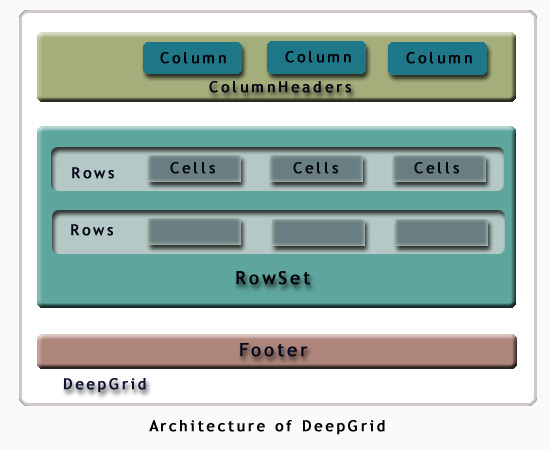
   DeepGrid
     |
     |--ColumnHeaders
     |     |
     |     |--Column
     |
     |--RowSet
     |     |
     |     |--Row
     |         |
     |         |--Cell
     |
     |--Footer
The Relationship between the classes is a aggregate relationship. ie. the Deepgrid contains ColumnHeaders, RowSet and the Footer. The ColumnHeader contains Column objects. The RowSet contains many Row objects which in turn contains many Cell objects.
| DeepGrid | Contains the interfaces and classes for creating the Grid and for accessing the subcomponents of the grid.The DeepGrid class contains the ColumnHeaders, RowSet and the Footer. |
| ColumnHeaders | Provides the interface for accessing the ColumnHeaders and the collection of Columns. |
| Column | Class that provides the interface to the Column. |
| RowSet | Contains the classes that form the Rows. Provides inteface for accessing the RowSet and the subclasses |
| Row | Provides the interface for the Rows and interfaces to access the Cells of each row. |
| Cell | Class that provides the interface to the cells. |
| Footer | Class that provides the interface to the Footer of the Grid. |