Digital Simulator
The Digital Simulator is a program
written in Turbo C++ 3.0. It is designed to simulate elementary logic gates like
AND, OR, NOR, NAND, NOT etc to implement asynchronous combinational circuits.
The interface in easy use and mouse driven.
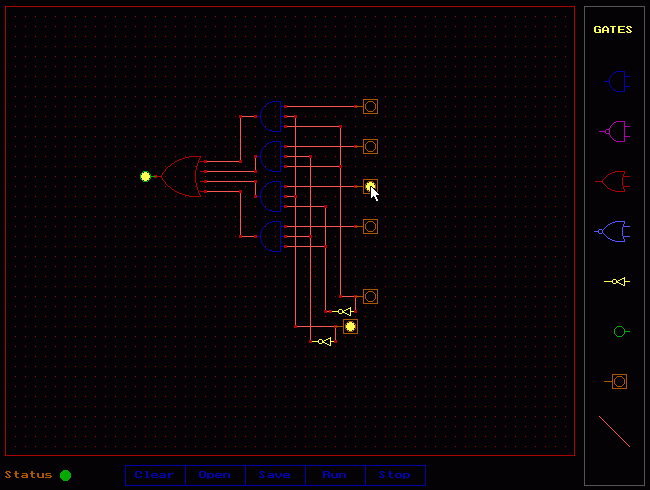
A 4*1 MUX Design in Digisim
In order to run the
Digisim application
:-
1. Extract the files in
digisim.zip
into
C:\DIGISIM
folder using
WINZIP.
2. If copied form a CD, you must subsequently remove the
read only property of the folder and the files in it.
This can be done from the Properties window.
3. Now double click the main.exe or
digisim.bat
file.
To design circuits just click on the gate you want in your
design and it appears on the dotted design area. Now click and drag the gate to
the desired location. The program can sense connections between inputs and
outputs of gates. Once such a connection is sensed a small red square appears on
the point of connection.
Connectors/wires can be used to connect distant gates. First click on the
connector in the selector menu. The click first on a terminal of either gate,
then drag and release the mouse on the other end. A successful connection is
indicated by
red squares on both ends of the connector.
Gates can be deleted by clicking on them and pressing
DELETE
key.
On clicking on the menu for gates like
AND the program asks for the
number of inputs.
| 2 input AND gate |
|
| 2 input OR gate |
 |
| 2 input NAND gate |
 |
| 2 input NOR gate |
 |
| NOT gate |
 |
| LED or OUTPUT |
 |
| SWITCH or INPUT |
 |
The circuit can be simulated by the
RUN
button. The input to the circuit is
given through the SWITCHes. A mouse click toggles the SWITCHes and the circuit
is evaluated.
In the
RUN mode designing is
disabled. The simulation is stopped by the
STOP
button.
The program is a simple C++ program and uses the following files
main.cpp
- the main program.
dia.h
- handles graphics.
mouse.h
- handles mouse.
digital.h
- class declaration
Program documentation also available in
pdf format and doc format.
A few designs avalilable
are inorder to load these click
OPEN button and give the
filename as below:-
all - All gates
mux - A 4*1 multiplexer
flipflop - An RS flipflop
halfadd - Halfadder
fulladd - Fulladder
xor - Nand implementation of XOR
Designs can also be save using the SAVE option and giving the filename. The CLEAR buttons clears the current design.
The program can be terminated by pressing ESC
key.
Thank you for using
Digisim
BACK
Debprakash Patnaik
<[email protected]>
