General Description
The rules of this game is easy to
learn, but it is tough if not impossible to master. The game is played with four
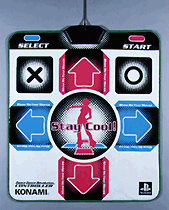
buttons: left, right, down, up on a controller or a Dance Dance Revolution
mat/pad. To play with the controller is no challenge, so I would suggest that
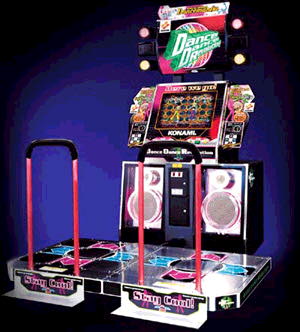
you play with the Dance Dance Revolution mat/pad. On your side of the game
screen, you will see these four directions indicated on the top section. While
you play, flashing arrows will move slowly or sometimes quickly from the bottom
of the column to the top where the arrows are. The goal is the hit the correct
direction's button whenever the flashing arrows meet with the arrows at the top.
You have to listen to the rhythm of the song because you can't always judge when
to press the arrows by sight. On the top of your column, you will see a "dance
meter" which increases if you dance well and decreases if you miss. If the bar
empties, you lose.
Every time you press a directional button, the game will keep track of how close to the exact beat you were. You get a "Miss" or a "Boo" if you do poorly. A "Good" means you did it fairly well or average. A "Great" or "Perfect" is excellent or superior. Each of these possibilities earns more points than the one before it. The game also keeps track of a "combo" for you. A combo is how many "Greats" or "Perfects" you have gotten in a row. If you get a "Good" or worse, the combo ends. You will receive a score at the end of the level, depending on how well you did. The scoring is from "E", which is failing, "D", which is poor, "C", which is average, "B", which is above average, "A", which is great, "S", which is excellent, and "SS", which is superior. You get an "SS" if you did a combo for the entire level. It takes coordination as well as a sense of rhythm to play this game well, especially for the later levels. You will want to play this game again and again until you earn and "SS" on every level.
Arcade Mode
The Arcade Mode is the primary mode of the game, and it's the plae where you will spend most of your time. You must first choose the game's "difficulty", which really just determines which set of levels you will play. You can also choose which "variant" of the levels you will play. Finally, you can also decide which "effects" you want to take place on the level. In the first DDR game, however, you must input a few codes in order to choose the variants and effects.(Explained later) After inputting some codes in, you can choose the variants and effects that you wish to use by pressing the "select" button t the screen where you choose the game difficulty. This takes you to the secret screen where you input the codes and choose the ptions in here by pressing "start."There are 3 difficulty choices: "Easy," "Normal," or "Hard." Normal Mode has the first set of the game's levels, while Hard Mode has the other half of the levels. (the tougher ones) You play a set of 3 stages in whichever you choose, and you choose which song you will play for each new stage. All of the game's songs/levels are found within these two main modes. If you choose Easy Mode, you will play 1 stage. (chosen from an assortment of levels from both Normal and Hard) On Easy Mode, you can not lose the stage, no matter how low your dance meter goes. Easy Mode is just for practice, and it does not let you set records or progress farther.
There are 5 variant choices: "Basic," "Another/Trick," "Maniac," "Double Basic," or "Double Another/Trick." Basic is the default set of steps/arrows for a level. This is the easiest choice of the bunch. Another/Trick is a bit harder and has more steps in it. Maniac is the hardest and has the most steps of all . Think of those as the easy, medium and hard variants of each level. Double Mode lets one person play with both controllers/mats. Double Another/Trick is the harder version of Double, which more steps in the song.
There are 5 effects choices: "Mirror," "Hidden," "Shuffle," Left," and "Right." In Mirror Mode, the steps in the level will be reversed to their opposite. In other words, left and right get switched, and up and down will get reversed as well. (Not at the top or anything) In Hidden Mode, the arrows disappear halfway up the screen, so you'll have to know the beats. In Shuffle Mode, the steps are all in messed up. Left and Right Modes allow you to do 90 degree stunts.
Each song in the game has a difficulty level associated with it, and each song has a different difficulty for each of its variants. You can see the difficulty level below each song disc that you can select. The difficulty level itself is indicated by how many "feet" markers you will see, as well as a title. Each level of difficulty has a title that indicates how tough it is. These difficult levels are in relation to the other levels in the particular game. A specific level's difficulty number can always change if it appears again in a later DDR game. These difficulty titles are listed in the table below, along with how many "footmarks" each represents.
There is also the list of each step rank you can get while playing the game. (along with the colors that represent them) This comes into play during the level, to tell how close you were to hitting a step(arrow) at the correct time. They are listed in order from best to worst. "Perfect" is right on the beat, and "Great" is extremely close. "Good" is close to the beat, and "Boo" is far off. "Miss" is what you get when you totally miss the beat or just don't even input anything at all for it. "Ouch" is if you press the steps when you aren't supposed to, or when you are far off. It's only in the first Dance Dance Revolution game in the arrange mode. Your "Grade" at the end of the level depends on how well you did with the steps. If you keep a combo going for every beat of the stage(start to finish) you will receive an "SS" rank. (though in the first Dance Dance Revolution game, "S" is the highest. The higher ranks are not present until later DDR games. Here are the tables of important info:
|
Song Difficulty |
Step Rank |
Level Grade |
|
1. Simple |
Perfect: Yellow |
E: Terrible |
|
2. Moderate |
Great: Green |
D: Poor |
|
3. Ordinary |
Good: Blue |
C: Fair |
|
4. Superior |
Boo: Purple |
B: Good |
|
5. Marvelous |
Miss: Red |
A: Great |
|
6. Genuine |
Ouch: White |
S: Excellent |
|
7. Paramount |
SS: Superior | |
|
8. Exorbitant |
Arrange Mode
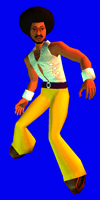
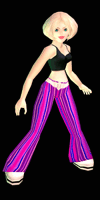
The Arrange Mode in the first Dance Dance Revolution game is just a slight variant on the Aracde Mode. This mode has a different set of character costumes, and it also adds a new sixth (and worst) rank that steps can be judged on called "Ouch." This extra ranking changes the meaning of "Miss." Usually, the rank "Miss" can either mean that you were way off on hitting the step, or it could mean that you did not press a button for that step at all. In Arange mode, "Miss" only means that you did not press the step at all, where "Ouch" takes the role of saying that you were way off. Besides this, both games are the same for everything: steps, difficulties, variants, and effects. However, because of this slight difference in rankings, this mode has its own whole set of records which can only be filled in.
Secret Songs
Some of the game's songs will not be accessible from the start of the game.
You must fulfill a certain requirement in order to unlock each of them.
Once you do so, they will be available to play at any time in their respective
modes and stages:
|
Make a Jam!
|
clear Normal mode 10 times
|
| Boys | clear 600 songs |
| I Believe in Miracles | clear 700 songs |
| Paranoia KCET ~clean mix~ | clear Hard mode 100 times |
|
Paranoia MAX ~dirty mix~
|
clear Hard mode 500 times
|
In the first DDR game, you cannot choose the level "variants" or "effects" by default. When you start Arcade or Arrange mode, and are choosing the game's dificulty, you can access the special menu by pressing the "select" button or by pressing "up" on the directional pad. This menu starts out empty, and you must input the codes in that are in the Codes for Playstation section.
|
Mode
|
Left
|
Neutral
|
Right
|
|
Arcade P1:
|
Plug
|
Afro
|
Mars
|
|
Arcade P2:
|
Bunny
|
Girl
|
Venus
|
|
Arrange P1:
|
Bug
|
Afro2
|
Exclaim
|
|
Arrange P2:
|
Cat
|
Girl2
|
Question
|