Integrated Action Learning Project Plan
Development of a Redesign Plan for Placer Court’s
Security Network
Dan Cunningham
TS4990 Integrated Action Learning Project
Instructor, Sharon Bender
April 26, 2006
Project Description
My IAL project would be to
develop a robust series of servers and processes’ revolving around network
security to insure Placer Courts has a reliable backup, DR solution and virus
management that can be accessed or modified without disturbing Placer’s core
network.
The initial thought behind
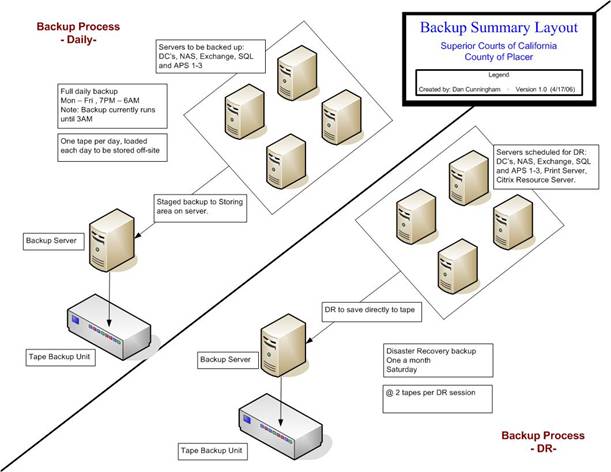
this project would be to develop a backup server that can be maintained during
work-hours without disrupting any services.
Currently, the backup software is installed on a file server that can’t
be brought down during business hours.
Since the backup software
would be on its own server, disk staging would be initiated. Disk staging copies data to the backup
server’s hard drive allowing one to backup the data to tape at a later time and
to more easily recover data utilizing the original stage the media was copied
to.
Disaster Recovery (DR) would
also be brought into the mix and performed automatically on all servers given a
‘critical’ rating once a month or manually when a major change is done to a
server.
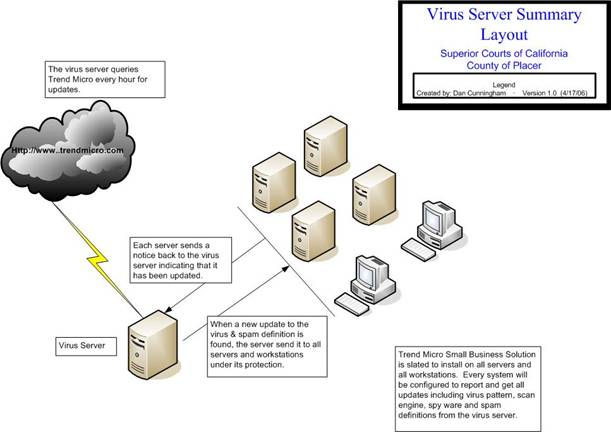
Concerning virus protection,
McAfee is installed on most of the servers.
There is no management or reporting function with that software and our
license is due to expire. Previous
research revealed Trend Micro’s Small Business Solution would do what we want
and has discovered (through Trend’s free scanning on their website), viruses on
a couple of IT laptops that McAfee did not detect. The key to success with this part of the
project would be to figure out how to roll it out on all servers and
workstations with minimal downtime.
In addition, standards will
be created on backing up system data, DR and virus protection.
The project will begin in
Unit 6 and conclude in Unit 10 of the TS4990 course. To evidence completion of the project, I
would include the following appendixes in the project final report: Appendix A:
Pictures of the installed equipment and screen shots of completed work while
keeping in mind not to divulge proprietary information. Appendix B: Letter of Project Completion from
Stakeholder, John Mendes, CEO.
Feasibility
In performing a feasibility
check I examined the following areas:
- Proposed Change: Define the proposed plan
- Is the problem worth solving?
- How do end-users and management feel about the
problem?
- Level of Need: What is the urgency of completing
the project?
- Measure of how reasonable the project timetable
is?
- Requirements: Time, money, commitment from CEO,
technical items (see items needed below).
- Technical: Is the proposed technology or solution
practical?
- Items needed: (estimated components that will be
required)
i.
Utilize 2
in-stock servers believed to have all necessary components for the project.
ii.
Tape library
backup unit. (compatible with current tapes)
iii.
Spare unit (for
redundancy, tape backup unit can be a lesser model)
iv.
Upgrade current
backup software to latest version.
1. Purchase @10 client agents for backup software
2. Upon upgrading software believe to have all necessary
components. (open file agents, tape library, DR, Exchange, SQL)
v.
New virus
protection software that can replace current software and provide reporting.
1. Appropriate licensing
- Economic Issues: Measure the cost effectiveness
of the project
- Cost-benefit analysis
- Constraints: Budget, other priority work currently
being conducted, time to receive items ordered.
Prototype
The following prototype
depicts my project.
Objectives
My
learning objectives in producing my IAL Project are to:
1. Apply what I have learned
at Capella to contribute towards a successful
project.
2. Improve my understanding
of the critical components of building a project.
3. Improve my understanding
of the critical components of managing a project.
My
project objectives in producing my IAL Project are to:
1. Produce a finished product
that will successfully handle the need described in the project title and
description.
2. Provide documentation on
server assembly.
3. Provide standards from
which to operate by concerning this project.
Project Schedule
In producing my IAL Project I
will apply the following project schedule:
|
Tasks |
Duration |
|
Research Phase |
5/8/06 – 5/14/06 |
|
Task 1: Inventory &
check existing equipment to be used in project. Task 2: Research Dell
web site concerning additional items needed (tape drive). Task 3: Research Trend
Micro site for appropriate software and licensing to be ordered. Task 4: Research ArcServe site for items to be ordered. |
|
|
Assisting Resources: Literature Bender, S. L. (2003).
Producing the Capstone Project. Internet http://www.dell.com, http://www.ca.com http://www.trendmicro.com/en/home/us/home.htm People /Budget Additional assistance (people)
not needed at this time. Budget set at
$20,000 Equipment Dell 2850, Dell SC420 |
|
|
Analysis/Ordering Phase |
5/15/06 – 5/21/06 |
|
Task 1: Review plans on
items needed to be ordered. Task 2: Determine if
everything will work as planned. Task 3: Generate final
list of items that need to be ordered. Task 4: Hand list off to
employee responsible for ordering.
Have him order product. |
|
|
Assisting Resources: Literature Bender, S. L. (2003).
Producing the Capstone Project. Internet http://www.dell.com, http://www.ca.com http://www.trendmicro.com/en/home/us/home.htm People Gerald Story, Assistant
Network Adiministrator Equipment Tape library backup
unit, spare backup unit, 4 Dell 300GB SCSI Drives, Upgrade ArcServe to version 11.0 to 11.5, 10 ArcServe
client agents, Trend Micro virus protection |
|
|
Install/Documentation Phase |
5/22/06 – 5/28/06 |
|
Task 1: Track orders, look out for items to be received. Task 2: Setup equipment
(Configure OS, install software & agents,
configure tape drive) Task 3: Document work
done |
|
|
Assisting Resources: Literature Bender, S. L. (2003).
Producing the Capstone Project. Computer Associates
(2005) Brightstor Arcserve
Backup for Windows Trend Micro (2003) Trend
Micro Client/Server/Messaging Suite Administration Guide Internet http://www.ca.com , http://www.trendmicro.com/en/home/us/home.htm People Greg Harding, Network
Administrator Equipment Dell 2850, Dell SC420,
Dell Backup unit, Trend software and licensing info, ArcServe
software and licensing info, 300GB SCSI drives |
|
|
Testing Phase |
5/29/06 – 6/4/06 |
|
Task 1: Configure ArcServe and Trend Micro Task 2: Configure DR Task 3: Test all
components configured |
|
|
Assisting Resources: Literature Bender, S. L. (2003).
Producing the Capstone Project. Computer Associates
(2005) Brightstor Arcserve
Backup for Windows Trend Micro (2003) Trend
Micro Client/Server/Messaging Suite Administration Guide Internet People Greg Harding, Network
Administrator Equipment Configured servers, tape
drive, tapes |
|
|
Implementation Phase |
6/5/06 – 6/11/06 |
|
Task 1: Bring new system
live Task 2: Shut down
previous systems Task 3: Seek feedback
from the Stakeholder. |
|
|
Assisting Resources: Literature Bender, S. L. (2003).
Producing the Capstone Project. Internet People Stakeholder, John
Mendes- CEO Equipment Configured servers, tape
drive, tapes |
|
Risk Management
I have performed a risk
management analysis as follows:
|
Risk
Factor Checklist |
||||
|
Risk
Considerations |
Low
Risk |
Medium
Risk |
High
Risk |
|
|
Team Subject Matter Knowledge |
X |
|
|
|
|
Mature Hardware Reliability |
X |
|
|
|
|
Hard Drive Reliability |
|
X |
|
|
|
Clear Performance Objectives |
X |
|
|
|
|
Funding Stability |
|
X |
|
|
|
Untested Disaster Recovery Plan |
|
|
X |
|
|
Security Breach during
Implementation |
|
|
X |
|
|
High
Risk Analysis |
||||
|
Risk
Considerations |
Risk
Significance and Potential Solution |
|||
|
Untested Disaster Recovery Plan |
Problem: Planned Disaster Recovery
‘concept only’ not tested by team. If fails, no formal DR. Solution: Complete daily backups
will be done on all servers at risk, CA assoc. web site and former instructor
for assistance. |
|||
|
Security Breach during
Implementation |
Problem: Current security processes
could be put at risk when new processes are introduced. Risk of taking down
current security network. Solution: Backup and virus
protection on completely different servers than what is currently being
utilized. Team is very knowledgeable
with current system, can rebuild if necessary. |
|||
My contingency plan is to…
After completing a risk analysis it
has been determined that the high-level risks to the successful completion of
my project are:
1. Untested Disaster Recovery Plan
2. Security
Breach during Implementation
Efforts to offset these risks are in
place. However, if for some reason my project does not appear to be developing
successfully regardless of the efforts made, I would present reasons why I am
unable to proceed with the project as planned. Appropriate redirection of the
plan would take place upon instructor and/or stakeholder approval and the new
direction would be discussed in the final project report. Redirection might be
to permit the [analysis, testing, presentation, or other] phase(s) of my
project to constitute my project in its entirety. The outstanding phase(s)
(e.g., implementation) of my project would in such case be completed outside
the scope of the capstone project. Upon approval, such redirection would
represent my project in its entirety.
Literature Review
I performed the following
literature review concerning their value in producing my project:
Internet
1. University of Denver (2005). Network
Security. University Technology Services. Retrieved April 28, 2006, from http://www.du.edu/security/virus.html
Dealing with
computer viruses has become a way of life for everyone who uses a
computer. Some users tend to ignore
virus threats until a virus disrupts their computing world beyond a simple
reboot. For the rest of us who can’t
afford downtime caused by malicious code we choose to combat the intruder by
utilizing antivirus programs such as McAfee, Norton and Trend Micro. For those who aren’t familiar with the
specifics, a virus is defined as malicious code that damages or destroys
data. A worm is a self replicating
virus.
There are many
types of programs that can harm your computer besides viruses. Spyware is a type
of program that gathers and reports information about your computer activities
to a system controlling it. You can most
likely discover spyware on your system if it’s
unreasonably slow and seems to have an abnormal amount of pop-ups while you
surf the Internet. Such free programs as
Ad-Aware will find spyware on your computer and get
rid of it.
The Courts will
be changing its virus protection from McAfee (the familiar shield with an ‘M’
in it) to Trend Micro (a blue circle with a pulse meter in the middle of it). Trend Micro, besides cost has many advantages
over their competitors, namely a free scanning engine available at http://housecall.trendmicro.com/ .
As the Network Security paper points out, “Although this is a valuable and
useful tool, it does not provide real-time scanning and is, therefore, not a
viable substitute for a full antivirus package” (University of Denver,
2005). Basically this is a single use
method to scan your system for viruses or a try before you buy method to see
how it stacks up against virus protection already installed on your
system. For the record, Trend Micro
found viruses on the test system that McAfee did not.
2. Computer Associates (2005). The Threats
You Face: Why Total Protection Matters. Retrieved April 27, 2006, from http://www3.ca.com/smb/viewpdf.aspx?cid=71763
The threats we
face as computer users are many and they seems to grow in numbers by the
day. The main reason behind building a
security division is to combat what (Computer Associates 2005) calls “the top 5
technology challenges and the solutions you need to address them”. Though not all will be addressed in this
initial phase of the security project, the rest will come in time based on the
success of this initial project.
Though the
Internet is a great source of information and has become the ‘de-facto’ source
for research, there are no real safeguards to police or control the information
on the ‘web’. If you’re not careful you
can unknowingly let in hackers, spam, spyware, and
virus that can cause all sorts of damages, perhaps even loss data, software and
systems. This in turn could cause loss
of productivity and revenue. According to CA, “dollar losses from virus attacks cost more than
twice as much as the next most costly kind of attack” (Computer Associates
2005).
Backing up your data should
be a ‘no-brainer’ for any company wishing to stay in business. However, there are some businesses that rely
on un-experienced information technology professionals who don’t know how to
properly backup or test their backups for reliability. According to CA, “companies that suffer
outages lasting more than ten days never fully recover financially, and more
than 50% of these firms are out of business within five years” (Computer Associates 2005).
To mitigate this threat, a backup and disaster recovery plan will be
implemented.
3. Uniblue (2005). Business Continuity or Disaster: The need for
Backup among Small and Medium Sized Businesses. Uniblue
White Papers. Retrieved April 26, 2006, from http://www.liutilities.com/products/resources/whitepapers/wbzwhitepaper1.pdf
A strong backup is more
important than most might realize. Some
companies might not consider backing up their data due to a misconception that
they can only loose their data should they be hacked. Data can be lost for many reasons, some
including theft, user error and natural disasters. That on its own should prompt any company,
big or small to invest in a formal backup system. Once businesses venture to form a plan around
backing up their data they often come across to issues that they must solve;
management and storage and how to recover should a disaster strike.
The Uniblue
white paper advises companies to examine the impact of lost data and as such to
devise a top down approach to protect this data. This would involve the use of firewalls,
antivirus protection and backup and recovery software. According to studies read in the (Uniblue 2005) whitepaper, the following will provide an
idea of the types of data loss that can happen to any given company:
- Hardware problems and malfunctions (between 44%
and 56%).
- Human error including accidental deletion
(between 26% and 32%).
- Software and application corruption (between 9%
and 14%).
- Viruses (between 4% and 7%).
- Natural disasters (between 4% and 7%).
(Uniblue
2005) also mentions that other forms of data loss might include faulty software
rollouts, driver setting conflicts, lost or locked-out passwords, equipment
theft, power surges, intrusion and hacking.
As one might guess, such a loss of data can cause irreparable damage
that some companies might never recover from.
As such, data and information assets and those who manage them are
arguably the most valuable assets to any business.
Appendix
The following appendixes
would be added to the Integrated Action Learning Project Final Report to provide
a sample of my work and to evidence satisfactory project completion:
Appendix A: Sample Pictures
of the Installed Equipment
Appendix B: Letter of
Satisfactory Project Completion from Stakeholder, John Mendes