NEW MEMORY CHECKING INFO!!!

*From an Internet Source:
There IS a way I've discovered for CHECKING whether the purchases
are still stored in memory. I only know how to do it for the Scientific
Here's how to check whether or not the memory has successfully
been deleted:
1 - Make SURE you ALWAYS leave the filter on, and NEVER take it off
even if your box locks up and gives you an error message (i.e., "Error 184
- Cannot process PPV request). Otherwise the cable
company will receive your PPV bill.
2 - Turn on your TV and Digital Cable box (Scientific
3 - There are 5 (FIVE) buttons on the right side of the box. 4 (FOUR) on the outside and 1 (ONE) in the middle). The one
in the middle usually has a CIRCLE printed on it. Press and HOLD this button
until the LED Light (Green Light) above the envelop picture starts to blink.
4 - After the light starts blinking immediately press the button
that is exactly to the right of the TIME DISPLAY. It has a picture of a
diagonal square drawn on it.
5 - You will be taken into a menu that links the inside system
board of the cable box DIRECTLY to the screen. Now you can use the CHANNEL +/-
buttons to scroll through this LONG ASS menu until you find the menu that says
"PPV COLLECT". This is what lets you know
whether the PPV movies you watched are still in the
boxes' memory.
Kewl, huh? Peace.
IMPORTANT
UPDATE:
NEVER
REMOVE THE FILTER ONCE IT HAS BEEN ATTACHED TO YOUR BOX. OTHERWISE YOU WILL GET
A BILL FROM YOUR CABLE COMPANY! PLEASE IGNORE THE PARTS OF THIS DOCUMENT WHICH
INSTRUCT YOU TO REMOVE THE FILTER. THAT IS NOT THE CORRECT WAY TO USE THEM! WE
SINCERELY APOLOGIZE TO THOSE OF OUR CUSTOMERS WHO WERE BILLED BY THEIR CABLE
COMPANIES FOR FOLLOWING THE MISLEADING PARTS OF THIS WEB PAGE. SORRY!!! (WE
WILL FULLY CORRECT THE ERRORS ON THIS PAGE SOON.)
Digital Cable Filter Setup
Instructions
NOTE: It is recommended that you print and/or
save this web page to the Desktop on hard drive for viewing at a later time.
Otherwise you will be continuously returning to this site. To save this web
page click “File” and “Save As”. When the “Save As”
dialogue box opens select “Web Page, complete (*.htm,*.html)”
in the “Save as type:” drop down list. Click “Save”.
What this filter will do for you:
ü
Save TONS of money!
ü
Watch the BEST entertainment FREE!
ü
Watch the Soccer World Cup FREE!
ü
Watch the Cricket World Cup FREE!
ü
Watch WWE Wrestlemania
FREE!
ü
Watch the LATEST
ü
Watch the BEST Adult XXX Movies
FREE!
THERE’S MORE!
ü
Works on 99% of all Digital Cable Networks, e.g. Rogers,
Look, Shaw, etc…!
ü
NO time restraints. Watch WHAT you want WHEN you want it!
ü
Your parents will NEVER know what you watched!
ü
Even your cable company WONT know
what you’ve been watching!
ü
NEVER leaves a trace of your viewings!
ü
Latest and smallest filtering technology!
ü
Installs in a MINUTE!
ü
Makes a GREAT gift!
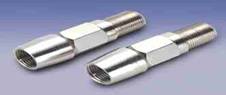
The purpose of this device is to prevent your billing information from
being transmitted to your cable company through your DCT
(Digital Communications Terminal). However, it is also used as a testing device
by cable contractors to check whether a customer’s PPV
service is up and running.
The original, LEGAL purpose of this
filter was to block out radio waves interfering with television reception – NOT
to steal cable! (But, WHO CARES?!) Therefore, it is a legal product.
Note: This is NOT a de-scrambler. It does
NOT de-scramble channels. It is meant to “filter out” your bill, not
de-scramble channels. This is why it is called a FILTER and not a de-scrambler.
In other words, by having this
device connected to your digital cable box… any and ALL programming that can be
received by pressing the “BUY”, “ORDER” or “PURCHASE” button on your remote can
be viewed without the billing information reaching the cable company. Thus, eliminating it from your monthly cable bill.
Use it view: Pay-Per-View channels, Adult (XXX) channels, Movie channels, and Special events!!! Examples: World Cup Soccer, WWE Wrestlemania, Viewer’s Choice
Erotica, Boxing matches, Hollywood movies, etc…
Note: Please note that specialty channels
like Playboy TV, HBO, ATN, B4U, SexTV,
etc… Cannot be viewed using this devices as those types of specialty channels
require you to call your cable company and place an order with a customer rep.
Broadband Internet
Interference Correction: This
device is also an excellent solution to your broadband internet connection
problems. If you are experiencing interference with your television reception
because of your broadband connection, simply installing this device will
dramatically improve your reception.
Important: In order for this device to work you
must be a digital cable service subscriber, and your cable box system must be
set up so that ordering PPV (Pay-Per-View) content is
done through your remote control.
If your cable company requires you
to order PPV (Pay-Per-View) content over the phone
instead, then this device will NOT
work.
Directions:
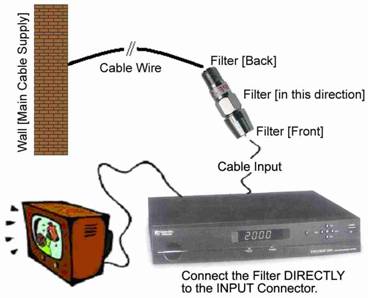
Simply connect the open end of the
filter to the INPUT connector on your cable box (usually located @ rear of
digital box) on one end, and attach the main cable supply (from the wall) to
the other end of the filter. Refer to
diagram on last page.
Clearing
Memory in the DCT [Digital Communications Terminal]:
It is essential for you to CLEAR the “MEMORY” in your digital cable box
on a regular basis. AFTER clearing the memory the filter should be removed
until you wish to make another PPV “purchase”. This
is because the cable company attempts communicating with the box several times
a day, and the filter will prevent it from doing so.
And if the head office has too many unsuccessful communication attempts with
your box it will automatically “lock up”. And you will have to “COME CLEAN”
with the company and call them to have it unlocked. What a pain! Therefore,
always remember to clear the box’s memory on a regular basis. E.g. Every night. And AFTER clearing the memory in the box
remember to “detach” the filter from the box so it doesn’t “lock up” due to
communication failure. E.g. Leave it detached until
you get back home from work.
The memory must also be cleared once
it becomes “FULL”. If it becomes full you will not be able to make any more “purchases”
because you will have exceeded your monthly viewing limit (usually after 15 PPV’s). This section explains how to clear the memory.
Here’s How: The box memory may be “cleared” in
any of several ways depending on the brand you have. No ONE way works for every
box. It is different for each. However, the memory in all types of boxes CAN be cleared, so don’t give up
if it doesn’t work right the first time. Please keep in mind that the filter
MUST be left ATTACHED to the digital terminal WHILE clearing its memory.
Otherwise the box will immediately begin transmitting signals. However, after
successfully clearing the memory the filter SHOULD be REMOVED until your next viewing. Here are a few methods to
try:
Method #1:
Motorola, Gerald,
General Instruments, and other boxes:
1.
Leave
the filter attached to the terminal.
2.
Press
and hold the SELECT and POWER buttons on the cable box at the same time for
about 20 seconds. [Sometimes the SELECT
button is located only on the remote.]
3.
Next,
immediately remove the electric wire of your cable box from the power outlet in
the wall, and wait 30 seconds.
4.
Finally,
reconnect the cable box to the power outlet and wait for the box to make a
“click” sound before turning it back on.
5.
The
box memory will now be cleared.
Method #2:
Most Cable Terminals:
If “clearing” the memory in the
cable box does not work using the procedure described above then try unplugging
the box from the wall (leaving the
filter attached) overnight. In the morning (8 hours later), plug it back
into the power supply. The memory should have been cleared by this time.
Method #3:
Scientific
It is also possible to clear the
memory by repeatedly plugging/unplugging the cable box from the power outlet.
While at the same time, repeatedly pressing the POWER button on the box (leaving the filter attached).
Method #4:
Unplug the power of your digital box
and hold down the ON/OFF button and the SETUP buttons and plug it back in. Hold
these two buttons down for 15 seconds after powering ON and release.
Method #5:
Unplug the power, hold down the
ON/OFF switch and GUIDE buttons (may be on remote) and plug it back in.
Continue holding for 15 seconds and release.
Method #6:
Unplug the box, disconnect all
cables and remove the filter. Unscrew and open up the box cover and disconnect
the battery from anywhere between 10 minutes to 8 hours. The batteries usually
look purple. It will do a cold reset every time the power is cut off. Reinstall
the battery, reconnect the filter, and then plug box back to the power outlet.
The box will read 0000 on the LCD. When the box boots up
check if the memory has cleared. If it has you’re done!
If not then remove the filter and
call the cable company and tell them your box froze. They will tell you how to
do a cold reset and ask you to do this. Play along and follow their lead. Once
they send the re-initialization signal and your menus and on screen programming
are all up and running with all the correct show times, put the filter back on
and enjoy all over again!
Method #7:
1.
Unplug
the power from the cable box (not the wall!!)
2.
Wait
3-5 min... No more than 5 MIN (very important)
3.
Hold
down the power and setup button (setup not settings) together and don’t let go.
4.
Have
someone plug the power back in and keep holding until it resets the box down.
You will see it counting down from 300+ to 0.
5.
Don’t
let go until it gets to 0 (it's about 5 min)
6.
Once
it gets to 0 then it will stop counting down, that when you let go!!
7.
Don’t
touch anything, what you did is clear the power supply bat' and that will clear
the EPROM from the last time the cable company called up to it, basically you
just reset the MAC address.
8.
The
screen will reset and it will go blank. Just want 5 min and wait for the clock
to come back on. DON’T TOUCH THE BOX UNTIL THE CLOCK COMES BACK ON!!!!!!!
9.
Now
the clock is back on and NOW you can press power button. Go to your settings
and you can see all your past PPV was cleared, even
the pending ones!!!! Cool...
Method #8:
Scientific
Simultaneously press VOL+, VOL- and INFO buttons on
the front of your Digital Cable Box and hold until box shuts down. Release the
buttons and box will automatically reset. Press CBL
on remote to turn Box on. Menu screen will need to be reloaded may take a few
seconds/minutes.
Method #9:
One way to reset the cable box is to
de-magnetize the memory. Just get a giant magnet and drag it across the top
your cable box until it “zaps”.
Important: Please note that you must NOT ever remove the filter from
the cable box unless you have cleared the memory first. The reason for this is
simple. If you remove it from the box without clearing the memory first then
the box will automatically begin transmitting the purchase information recorded
in its memory to your cable company. Therefore, you will be billed for every
purchase in the box’s “memory”.
This is why it is extremely
important that you clear all purchase information from the box when it gets
“full”, or before removing the filter from the box.
It is recommended that you clear the
memory in your cable box every night, or once it has “memorized” several PPV (Pay-Per-View) purchases.
Frequently
Asked Questions (FAQs):
Is
it legal to own this device?
Yes, it is perfectly legal to own
your own cable filter/testing system. Unless, of course, you are not informing
your cable company of the views made with this device… But then again, how many
of us would do that? **Chuckle**
Its original purpose was to block
radio waves from interfering with television, and AM/FM reception. Therefore,
it does have a LEGAL purpose.
Think of it this way: It is
completely legal to own a CD Re-Writer. In fact, every new computer comes with
one pre-installed. However, ‘burning’ CD’s you have not paid for using that CD
Re-Writer is illegal. It’s the same with MP3’s and Digital Cable Filters.
Will
it work in my city with my cable company?
It does not matter what city you live
in or what cable company you have. It will work!
How
do I connect it?
The filter connects on the INPUT
switch of your digital cable box [where the incoming cable line is connected].
The open end of the filter attaches directly to the INPUT connector on your
cable box, and the other end attaches to the wire coming in from the main cable
source in the wall. Refer to diagram
below.
Which
digital box brands is it compatible with?
Motorola, RCA, Jerrold, General
Instruments, Pioneer, Scientific Atlanta, Explorer Series, Zenith, Tocom, and many more!
If
I connect it, can I remove it?
Once the filter is connected do NOT remove it unless the digital cable
box is unplugged from the wall (power supply) first and its memory “CLEARED”.
Or it will otherwise result in charges from your cable company as your PPV billing information will begin transmitting
automatically.
Problems, Questions, or Concerns?
If you incur any problems,
questions, or concerns with regards to this device please email them to the
following address: [email protected]
Setup
Diagram:
Disclaimer: The device is for testing purposes
only. You must inform your cable provider of any PPV content
ordered. Purchaser must abide by all local, state and federal laws regarding
the ownership of cable equipment. We take no responsibility for views made
using this device. As the purchaser it is solely your responsibility to advise
your cable service provider of its use and any purchases made using it, as they
will have no way of knowing whether a PPV event was
viewed due to the installation of this device. Therefore, all such issues are
dealt with at your own discretion.