Home
Beginning Linux Audio Hardware and Software
Last update: November 23, 2007
This document describes various software and hardware that can be used on Linux. All of the software used here is free and is very high quality. Most of this document was tested using Ubuntu.
I have found that some parts of learning sound on Linux can be very difficult because there is so much confusing information on the internet, and it is difficult to know which parts relate to which.
Loading the operating system
Since I have a computer that was purchased in January of 2006, it is plenty powerful to create music. It also has a cheap on-board sound system that works well. I first started playing with music using Ubuntu 7.04. The Ubuntu operating system can be downloaded from the internet, and copied onto a CD-ROM. Then it is fairly easy to install on most computers. Loading onto computers must be done with care, because it is possible to overwrite your current computer's operating system. Get a friend to help if you are unsure about doing this or do a full backup of your system first.
An option other than downloading the standard version of Ubuntu is to download the Uunbuntu Studio release of ubuntu. I am not sure if this will go away in the future since it seems like the base Ubuntu has a studio package that can be downloaded using the package manager of Ubuntu.
Loading some initial software
Ubuntu has a great package manager to manage downloading of applications. For a very simple composing system, use the package manager to download Rosegarden. This application has a notation editor that can be used to create music, but does not play music by itself. For it to play music, use the package manager to download fluidsynth unless you have a very special sound card or MIDI support. See the hardware section in this case.
Fluidsynth is a software synthesizer. Fluidsynth requires a sound font in order to make sounds. See the sound font section below for more information.
To get fluidsynth working with Rosegarden, I am using a terminal to run fluidsynth. It seemed that Qsynth did not run as well. Fluidsynth must be running at the same time as Rosegarden in order to hear the sound from Rosegarden. Jack does not have to be used to get this amount of software running together.
The software section below lists additional software that can be downloaded for free. They are all very good, high quality applications.
Music Software Diagram
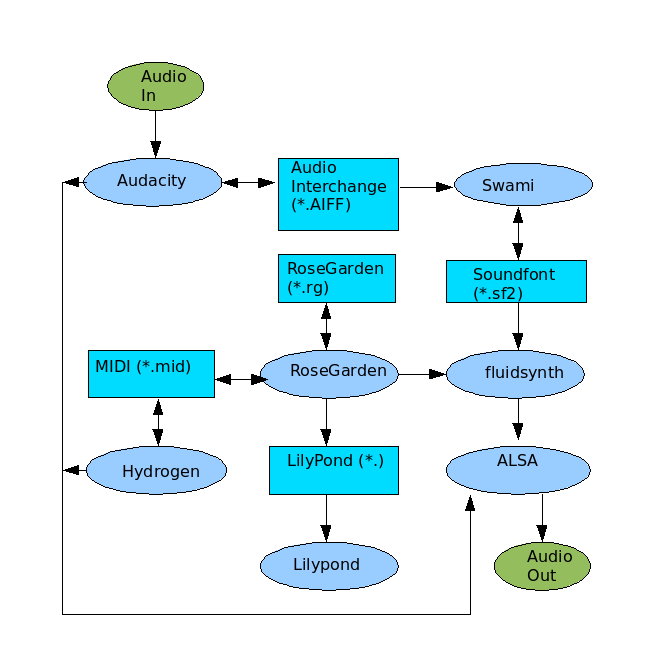
The following diagram shows some of the things that can be done with these programs. Much more than this can be done once Jack is used along with other music hardware. This diagram shows a very simple flow of the audio information. Many samples and scores can be downloaded from the internet. This means that a microphone or other music hardware is not required.
Fine Tuning
I used the Ubuntu package manager to download the linux-lowlatency package for 7.04 Ubuntu. In the new version of Ubuntu (7.10), this has been replaced with linux-rt. These remove a warning, "System timer resolution is too low", on startup from Rosegarden, and should make the MIDI timing better.
Hardware
At first, I didn't try a good software synthese sound font, so I thought I needed a sound card that would do this. If your computer is fairly old, you may need a sound card that can do hardware synthesis. At this time (2007), there are really not many options.
I looked at purchasing a sound card since I didn't know that my problem was the sound font file. There are many cheap wavetable sound cards, but for some reason these are not usable in Linux to synthesize sounds. I looked at buying a more advanced sound card that had 7.1 output and SDL, but this is also is not usable in Linux. It turns out that there are only some older Creative Labs boards that can do this. But, be careful, because not all boards do. The cheap cards like the Audigy SE and X-Fi Audio do not do sound synthesis. The X-Fi cards may eventually work now that a beta Linux driver has been released. But it may be some time before it works with many applications.
I am running AMD X2 64 and polyphony sounds very good with quite a few instruments (of course with the right sound font). I have not heard any limitations yet. Although there is only stereo sound.
Software
Downloading Software
Using Ubuntu, it is very easy to download software. Another option is using Ubuntu Studio.
Just us Synaptic Package Manager from the menu, search for the desired applications, and apply the selections. In Ubuntu, there will be a green box if the package is already installed.
Software
It is easiest to download these in Ubuntu using the package manager. Simply search for the name and then select the package to download.
Sound Fonts
A sound font file is a file that contains waveforms for many instruments. Each sound file may contain different instruments, and different sounds for each instrument. There is sort of a MIDI standard, so that some sound font files will contain certain instruments at certain locations, and so that different songs can be played using a sort of standard soundfont.
There are many sound fonts that can be downloaded from the internet. Every sound file is different, choosing a good one can make a huge difference. Most places recommend the Musica Theoria 2 sound font from hammersound, but I have never been able to download this file and have tried over multiple days. So I tried some Gort sound files, and these sounded terrible on my system. Eventually I found one from http://josefhuber.com that was better. But the one I like most is the PC51f.sf2 from http://www.personalcopy.com/home.htm.
MIDI Files
MIDI files only contain the notes/timing of the music. The notes are read from the file, and used with a sound font to create sound.
I found that this site is very good and fast for classical midi downloads.
http://www.classicalmidi.co.uk
Audacity
Audacity can edit recorded or downloaded audio samples. It can read and write many file formats.
To export AIFF samples, use the Edit/Preferences menu to select the file formats.
Audacity allows creating Lisp type Nyquist programs. There are instructions here
http://audacity.sourceforge.net/help/nyquist
FluidSynth
FluidSynth only needs to be used if there is no hardware available that can do synthesis.
See the hardware section for more information. Fluidsynth can load sound font files. See the sound font section for more information. A graphical interface to fluidsynth is called qsynth for anybody that doesn't want to use a shell/command prompt. I have actually found this harder than using fluidsynth from a terminal. I run fluidsynth with the following command line.
fluidsynth soundfont.sf2
After fluidsynth has loaded a sound font file, it is possible to play a note
using the following:
noteon 5 77 108
Lilypond
Lilypond will engrave high quality sheet music. Rosegarden will output files that lilypond can use to print the music. Lilypond does not have a user interface since it just reads the input files.
RoseGarden
RoseGarden is an awesome application.
To make sound, it can use Jack to route the MIDI output into some other MIDI device. If there is no MIDI hardware or hardware synthesizer card connected to the PC, then it is possible to run fluidsynth along with Rosegarden to output sound.
An easy way to get started is to download some MIDI (files with .mid extension) file from the internet, and use File/Import to load it into RoseGarden. Then double click on the tracks to edit the music.
Sox
To use sox, create a file named midi2avi with the following.
   #!/bin/sh
   # convert midi to avi

   fluidsynth -i -a file soundfont.sf2 midifile.mid
   sox -r 44100 -w -c 2 -s fluidsynth.raw fluidsynth.wav
Then in a command shell, enter "sh midi2avi". At the moment, the wave files produced only have a limited number of voices. I am not sure if this is the cause of Rosegarden or
or Sox. I may try Timidity at some point to resolve this problem.
Swami
Swami is not the highest quality program, but does do the job well when it is working. The user interface is not polished, and I have had the program crash.
At this time, Swami is not added to the Ubuntu "Sound & Video" menu. To do this, go to System/Preferences/Main Menu, and click on "Sound & Videos", and press the New Item button. For the command, enter or browse to /usr/bin/swami.
The easiest way to get started is to open an existing sound font file (*.sf2), and then go to Samples/User and select a sound. Then clicking on the keyboard will make that sound.
The hierarchy is that Presets that are Melodic are made up of Instruments. Instruments are made up of Samples. This allows that samples can be taken for different frequency or note ranges. The Swami UI is a bit strange, since to add a sample to an instrument, the sample must be selected, and then the instrument must be right clicked, and then select paste. In other words, whatever is currently selected can be pasted.
Swami can read AIFF are audio sample files that can be downloaded from the internet. Audacity can also read and write AIFF samples.