
HISTORY / INFO:
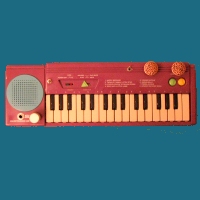
This ol' thing I got from the Salvation Army for 99 cents. Had lots of baby crud on it. I cleaned it up as best as I could. Built in 1993 by DSI (Deversified Specialists Inc.), this little keyboard has two sounds available; organ and piano. It has a recording feature where you can record some notes and then play them back. It also has 8 built in songs: 1) Happy Birthday, 2) Twinkle Twinkle Little Star, 3) London Bridge Is Falling Down, 4) Mary Had A Little Lamb, 5) Yankee Doodle, 6) Jingle Bells, 7) Frere Jacque and 8) Hickory Dickory Dock.
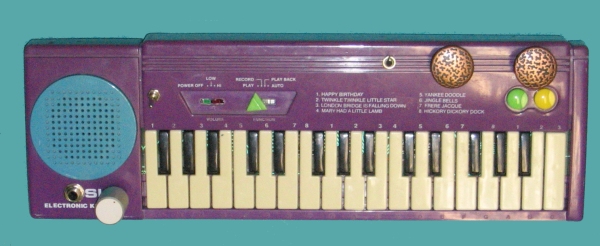
This is my 9th project. I guess everyone has a bad one or ten and this is one of mine. Just about everything I added did not work out quite right. I was unemployed at the time and I guess I was a bit stressed and a bit unfocused. The volume LEDS used to blink to the sound and now they don't. When selecting the piano sound, instead of sounding something like a piano, it now hold the note, which is kind of a happy accident since it can now be theremin-like. I'm also not convinced that the 1/4 inch jack I added is even working, hence there is no mp3 for this one. On this keyboard, the slider knobs were literally glued onto their posts. In order to get the sliders off (which in hindsight I probably didn't need to do), I had to break them from the part which has the contact. While I made the power switch an on/off toggle (it only had two volume levels anyway, so wired it for HI), I needed the slider switch so one could go between the play/record/playback/auto modes. I had to reconstruct the post using a piece of plastic from a plastic cable tie and then had to drill out the broken piece from the selector know. I think that might be my proudest point on this keyboard, which is really sad.
PRE-MODIFICATION PICTURES:

MODIFICATIONS:
1) Power switch - When trying to find bends, I grew tired of trying to keep the slider switch taped down, so I simply found the spots that it needed to touch when off and on and wired that to a DPDT toggle switch.
2) Volume control - Since I hard wired the keyboard to always be playing on HI, my second mod was to put in a volume control. I should have simply put it in line with the speaker. That would have been the smart way to do it. However, I chose to find a set of points that would do the same thing. In addition to the normal range, when I added the modification, it now can go no sound to super-loud.
3) Volume LEDs - I added a green LED and a red LED that were to glow with the volume of the instrument. A note would play and the LED would blink. However, sometime when wiring everything up, they now glow all the time. So consider them more like power LEDs instead of Volume LEDs
4) Pitch body contacts - Two copper drawer knobs help control the pitch. If you touch either one of the knobs, the pitch goes down. Touching both with the palm of your hand and the pitch goes up.
5) Distortion switch - I added a momentary swtich which, on higher notes, caused a ring mod like effect plus added distortion (plus makes it kinda quiet, which is unfortunate).
6) 1/4" audio out
POST-MODIFICATION PICTURES:
 front view |
 detail view of sticker on back |
SOUNDS:
DOH! No MP3s for this one.
FUTURE MODIFICATIONS PLANNED:
This one I would, quite honestly, like to completely re-bend. I would like to get the volume LEDs working like they should. I also need to check to see if I have fubar'd the audio out jack. I thought I had that down to a science, but alas, either I am hooking it up to my computer wrong (which is very well possible) or I had connected the audio out incorrectly (which is possible as well).
Last Modified: February 13, 2005