
*Remember, if your using the TxPlay (or another script) keep your displayed lines to 3 maximum!*
**See NEWS below***

mIRC has a default setting under DCC called "Fill Spaces" basically what this does is to "Replace" the spaces in a filename with underscores ("_'s") So lets say your sending a friend "The Beatles - Yesterday.mp3" when that person recieves the file, they get it as "The_Beatles_-_Yesterday.mp3" So the filename is no longer consistant!
Below is how to fix this innocuous problem!
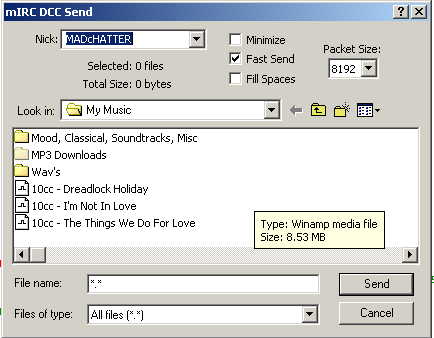
and send a file...To Yourself! If you simply uncheck the box when you send a file to someone else, it will revert back and recheck the "Fill Spaces" box at your next DCC send.
Be sure to save the file you send to yourself somewhere other than the same folder your sending from, or at least rename the file something different (You can try adding a (1) to the end! Files cant overwrite themselves in a DCC send as a target in the same directory as the source! If you try and save it to the same place you're sending from, you could get a "Blue Screen of Death" screen that says "CRC Error in file at line blahblahblahblah" and it could lock up your computer! This means you have caused a "Cyclitic Redundancy Check Error" because you tried to send a file from the folder, and save it back to the same folder with the same file name! You want to avoid that!
After doing this, all future DCC Files will be sent as you have them in your folder! This unfortunately will not remedy the situation for files you've already recieved. That means you have to rename the ones you have to match! *Sorry Kids!*
