
Bandwidth referes to the transmittion rate of packets (short bursts of information packed together) over a TCP connection. What I will cover here is how to open up the TCP/IP protocol to its maximum allowable rate for different Windows Operating Systems. Other factors affect speed as well. Such as Bandwidth usage limits set by your ISP, amount of Ram, Free harddrive space, Viruses, Spybots and hardware. These will be covered on another Tech Page. But for now, lets go over how to Tweak your windows to allow the maximum use of TCP. By opening up the TCP settings to their max, even Cable, DSL and ISDN lines will show a marked increase in speed. To test these settings, I suggest when you're done you avail yourself the use of a Performance/Speed Checker on a website, the best i've used it at www.toast.net/performance
Go there and select Both Image & Text then select one of the Free Type sites (such as Toast.Net CA) The information is dislayed on a simple bar graph. (Now sometimes network connections between servers can run slow. This is not an indicator of a problem with your computer or these settings)
NOTE: If your on a Dialup 56K modem, this procedure will only bring your File Downloads up to a maximum speed of 3.99-KBPS (KiloBytesPerSecond) and will top your connection speed out to a maximum of 52-KBPS (sometimes) These speeds are because of F.C.C. Restrictions on Voice Grade (regular phone) Lines. So-Called High Speed Dialups (like NetZero) only inclrease the speed at which webpages are viewed by specifially speeding up the HTTP Port 80. They do not increse download/upload or connection speeds!.

Disclaimer: iWebRadio, its operators and owners are not responsible for any loss or damage of data or programs by the use of this information. It has been shown to work under normal conditions when performed by a qualified technical personnel. Use of this information is soley up to the discretion of the user. Implementation of this information consitutes acceptance of the Terms of Use policy. The Terms of Use Policy simply states, if you use it, you're responsible!!!
This will open a new window that looks like this...
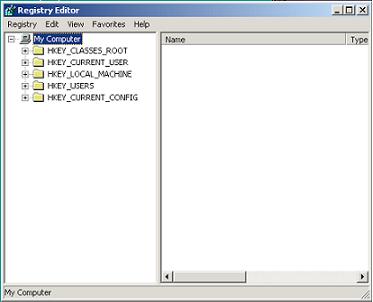

Here's how you change/create the MTU:
1.) Click on the "Start" button, and then "Run";
2.) Enter regedit into the box that comes up and press OK.;
3.) At the top, you will see several folders. Press the plus sign (+) next to "HKEY_LOCAL_MACHINE." This will expand that folder and show you its contents.
4.) Windows NT/2000/XP Navigate to 'HKEY_LOCAL_MACHINE\System\ CurrentControlSet\Services\ Tcp\Parameters]'
Windows 95/98/ME go to 'HKEY_LOCAL_MACHINE\System\CurrentControlSet\Services\Class\NetTrans]'
5.) Right click on the window to the right. Click on New then DWORD Value.
6.) A new icon titled New Value #1 should appear at the bottom of the window.
7.) Right click on the icon, click on Rename and rename it to 'MaxMTU'
8.) Right click on the icon again, and click on Modify. Enter one of the following values:
For 56K modems or lower, enter 576.
For DSL, enter 1500.
For Cable, enter 1500.
Next!
Set the Windows MAXRecvSize (using the same procedure as above to create/modify.)
For Windows 95/98/ME:
go to [HKEY_LOCAL_MACHINE\System\CurrentControlSet\Services\VxD\MSTCP] create or set the
DefaultRcvWindow DWord Value is "32767"
For Windows 2000/XP
[HKEY_LOCAL_MACHINE\SYSTEM\CurrentControlSet\Services\Tcpip\Parameters] create or set the
GlobalMaxTcpWindowSize; DWord Value is "00007fff"
9.) Exit regedit and restart your computer...When your back up go to websites that normally took forever and see the difference! If you dont see a difference. Recheck the settings! ENJOY!!!
