
Ok today we will learn how to take away from a picture.. Meaning that we all like pictures, BUT wouldent thay be better If.... So what we will be doing is taking a "Combadge" and takeing the Grey away from it.. It will be easy trust me..=)
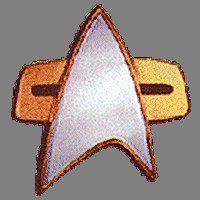 Do you see all the grey, well what we are going to do is take it away! Trust me it will be easy..really! Below you will see how it is done, and I think I can give you some hints as to how to do it.. What you need to do is, go into PSP7, and open up a plain sheet of paper, (I say plain couse I want you all to see how easy it is, and then you can take your Combage and finish it!) So you have you normal peoce of paper... what I need you to do is go up to the top of PSP7.. and click on the "View" button. there you will see a whole bounch of options.. what I need you to click on is the "Zoom in by" so what you can do is zoom in so you can see the oput line of the picture, Please do not cut the picture! So know what I would like you to do, is cute the picture you have saved on this page, until you can completelly cover the picture so no grey shows.
so do you want to see what it should look like?
lol.....
ok..  Ok, I look forward to seeing what you can do for us..=) Back to intro
This Page � Area52 University 2002 |