|
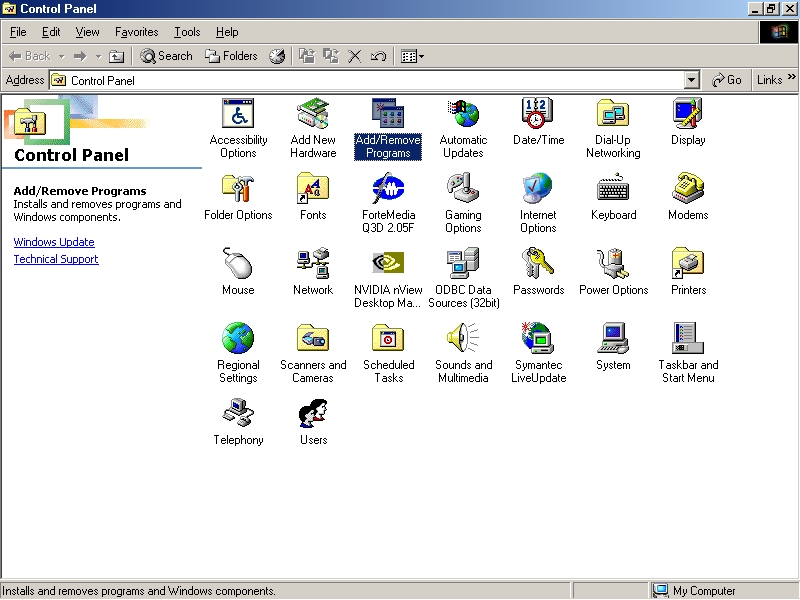
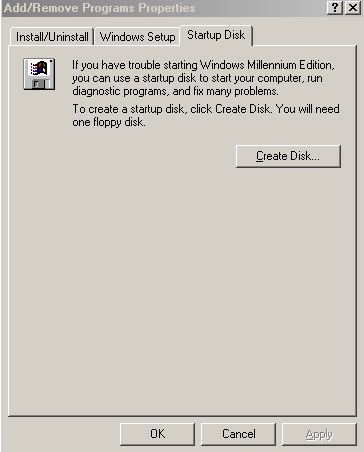
Four steps to format your hard drive 1. You must have a startup disk. If you don't have one, go to control panel, add/remove programs, startup disk then click create disk (See screen shot below). You'd better use new diskette or if not just make sure that the diskette is not broken. (Click thumbnails to enlarge)
2. Insert the startup disk to your floppy A. Restart your computer. 3. Choose number 3 (Start
computer without CD-ROM support). It will take several seconds to download.
At the end of this step three you will see this sentence: If you want to format drive C, type "format c:" as shown below: ormat c:Then press ENTER and you will be
asked a question to get your confirmation. Type Y if you
want to proceed.. After your drive(s) has/have been formatted, press ctrl+alt+Delete to restart your PC again. 4. In the step 3 you needed to choose number 3, but in this step you must choose number 2 (Start computer with CD-ROM support). Before that make sure your Microsoft Windows CD has been inserted to your CD-ROM. After it stops downloading these sentences will appear: Your CD-ROM is drive ? (If your CD-ROM is G, replace the question mark behind with G. If H replace with H. To view help, type HELP and then press ENTER Then type as shown below: opy h:\winmeHints:- C is your hard drive where you'll install your programs, h is your CD-ROM and winme is your windows name. For more information about your windows name type dir and press ENTER. Wait until your PC finish copying the windows program. Once finished, type setup.exe I think no need to explain any further because after you type setup.exe, information will be displayed and all you have to do is to follow the instructions. If you want to make partition in your hard disk, type fdisk and you have to follow all instructions and try and error. I also did the same when i first learned formatting my PC.. Have a try.....good luck!! |