200Mnu
version 3.03
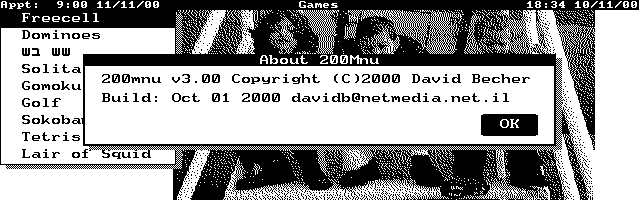
Screen Capture
Download 200mn303.zip (62KB)
Description
200MNU is a menu driven application launcher for the HP200 Palmtop PC. It
displays a user-defined menu on top of your topcard or another background
picture (see the screen capture) allowing you to pick whichever program you
want to run. Menu items can call further menus to an almost unlimited depth.
200MNU has 3 modes of operation:
- Outside of SysMgr: For
large DOS applications that will not run under System Manager, you exit
system manager (MORE-APPLICATION-TERMINATE) and can run the programs. Once
outside System manager, the blue keys are all active and will call the
System manager application related to that key by restarting System
Manager, so for example, pressing the FILER key will automatically launch
System Manager and go straight into FILER. Also in this mode, if an alarm
becomes due, 200MNU can automatically act on the alarm by going into
System Manager, which will then display your alarm message.
- Under SysMgr: you can use
200Mnu to collect similar applications into folders or call the menu
system to select the DOS application you want to run. Once you have
selected the application and run it, you can either return directly to
system manager (close the DOS BOX) or return to 200MNU.
- Under MaxDos (called from
System Manager), 200MNU works similarly to under DOS. 200MNUU
automatically recognises under which system it is running and each of the
three operating modes can have its own independent set of menus, or you
can have one set of menus no matter under which system you are running.
200MNU runs applications with almost NO MEMORY OVERHEAD AT ALL. Once you
select the application you want to run,
200MNU exits and calls a batch file that runs your application. Thus there
is a dos memory "cost" of about 40 bytes which is what you have to
"pay" for running a batch file! This means that 200MNU is also useful
for installing and uninstalling TSR programs (such as LAPLINK Remote Access
Server) as well as running a series of programs in a specific order.
200MNU supports calling applications using DOS redirection <> and
piping |
200MNU uses a derivation of the Palmtop Application Library to display user
friendly menus, using the same large text fonts as the built-in applications.
200MNU uses a text file to define the menu system, which makes defining and
modifying menus fairly simple and straight forward (IMHO).
WHAT'S NEW IN VERSION 3.03
- When starting up, in MSDOS
mode, 200mnu can optionally check if the time has been reset and open a
dialog box to modify the time. Also you can set whether you want to allow
charging of rechargeable batteries.
- You can decide not to have
a background picture or allow 200mnu to choose at random from a selection
of background pictures.
- When you want 200mnu to
call a batch file to run your program, the batch file can be written as a
section in 200mnu.ini.
- You can set the graphics
display mode for each program in 200mnu.ini. All the Hp200LX graphics
modes are supported.
- Multiple main menus are
supported by calling m.bat with a menu name parameter
- 200MNU can return to system
manager when an alarm goes off.
- Under Application Manager,
200mnu can select an item once and return or stay active.
- Version 3.03 wont display
the “End of HPLX” alarm on 31 Dec 2099.
Download 200mn303.zip (62KB)
Back to My Hp200LX Software Page