The downloadable file at the bottom of this page is an MS Excel Add-In containing 4 functions I created for your free use:
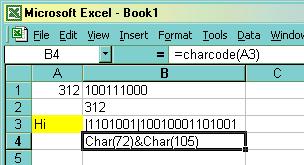
- CharCode
- This function takes a string value, or a reference to a cell containing a string value, and returns the ASCII character codes in VB string expression format.
- setBinary
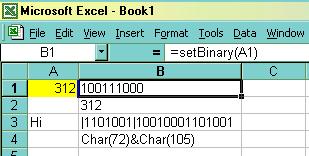
- This function returns the binary (1s and 0s) representation of a number you reference. This is not the true binary (8 bit) representation of a number, but rather uses the conversion formula that each digit (1 or 0) is a value of 2 raised to that positions power, with the furthest right being 2^0 (2^0 = 1, 2^1 = 2, 2^2 = 4, etc.)
In the image below, the number 312 = 100111000 is calculated by:
| 1* | 0* | 0* | 1* | 1* | 1* | 0* | 0* | 0* |
{2^8}
256 | {2^7}
128 | {2^6}
64 | {2^5}
32 | {2^4}
16 | {2^3}
8 | {2^2}
4 | {2^1}
2 | {2^0}
1 |
| 256 | +0 | +0 | +32 | +16 | +8 | +0 | +0 | +0 |
= 312
- setDecimal
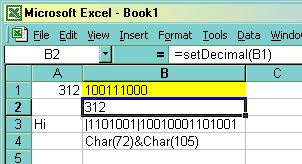
- This function does just the reverse as setBinary(), it takes a binary reference (1s and 0s) and converts it into decimal (integer) format.
- setTxtBinary
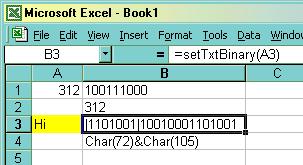
- This function converts each character in a text string into it's ASCII code and then converts that ASCII code into a binary number like in setBinary(). This function places a pipe "|" at the beginning of each new character so you can see the binary equivalent for each character
Download the Add-In File HERE
� 2002 Dan Herrera
These functions may be distributed freely, but please give credit where credit is due.
And if you feel you must give credit, or have a request for a custom function/macro,
please send me a note DataMasterFla
Sign Guestbook
View Guestbook
Back.
Close