The downloadable file at the bottom of this page is an MS Excel Add-In containing 4 functions I created for your free use.
**New 3/5/2004** I added functionality, by request (thanks, Stephen), to allow for embedded operators (<, >, <>, <=, >=) in the Criteria value for MaxIf() and MinIf().:
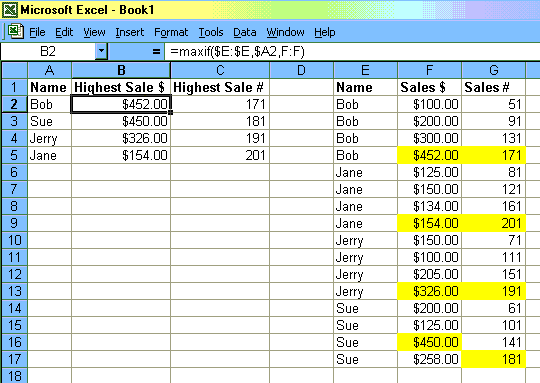
- MaxIf
- This function is useful if you only want to find the highest associated value for a singular item in a list. For example: you have a list of Sales Person Names, and from a list of recent sales, you want to find the highest sale for each.
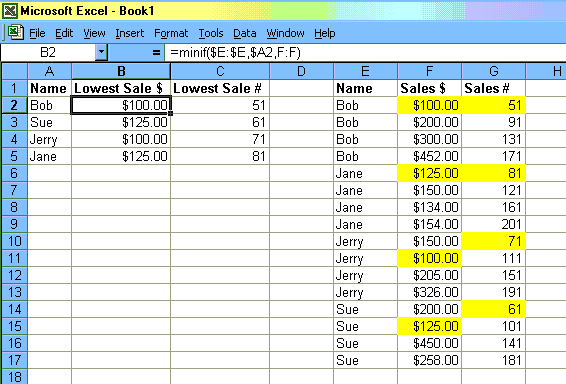
- MinIf
- This function is useful if you only want to find the lowest associated value for a singular item in a list. For example: you have a list of Sales Person Names, and from a list of recent sales, you want to find the lowest sale for each.
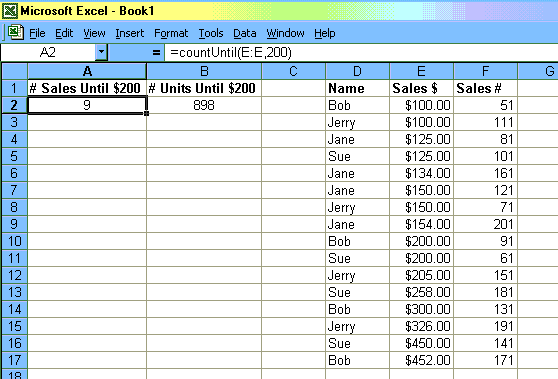
- CountUntil
This function is useful if you want to count the items in a list before a certain condition is met. For example: you have a list of Sales recent sales, and you want to find the number of sales it took before you had a $200 sale.
(NOTE: If you use an entire column as your test range, this function will count your column headings with the data, as sampled below)
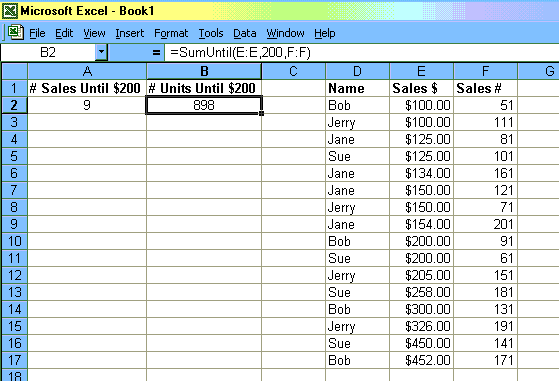
- SumUntil
- This function is useful if you want to sum the items in a list before a certain condition is met. For example: you have a list of Sales recent sales, and you want to find the number of units you sold before you had a $200 sale.
Download the Add-In File HERE
� 2002 Dan Herrera
These functions may be distributed freely, but please give credit where credit is due.
And if you feel you must give credit, or have a request for a custom function/macro,
please send me a note DataMasterFla
Sign Guestbook
View Guestbook
Back.
Close