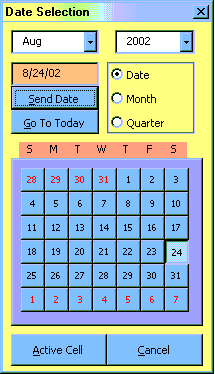
NOTE: I have updated this file to correct an issue with changing the year
NOTE: Your system colors will vary from the ones used in the image
To use this Calendar as part of an existing module, simply include the following code at the top of your procedure:
Dim RptDate
Dim Dt, Mt, Qt
Application.Run "CALENDAR.XLS!Calendar_Frm"
Dt =
Workbooks("Calendar.xls").Sheets(1).Range("A1").Value
Mt =
Workbooks("Calendar.xls").Sheets(1).Range("A2").Value
Qt =
Workbooks("Calendar.xls").Sheets(1).Range("A3").Value
If Dt <> "" Then
ElseIf Mt <> "" Then
Else
End If
Note: The variable "RptDate" will now hold the date value for the remainder of your code.
Download the zipped File HERE
Save this file to:
"C:\Program Files\Microsoft Office\Office\Xlstart\"
and it will open every time you start a MS Excel session.