Encoding files for playback on Pocket PC
2002 Devices via Pocket MVP
overview: this guide does not explain how to rip a dvd or clips from
a dvd to avi or mpg, rather this guide shows you how to convert files
you have downloaded (divx, avi or mpg) so they are playable on a Pocket
PC 2002 device (in my example, my Ipaq 3635). |
Programs:
VirtualDub
Divx 5.0 or higher installed
Mp3 Codec installed
-ALSO need to have Pocket MVP installed onto your Pocket PC 2002
device. |
| 1. Open VirtualDub and then open your movie file (avi, mpg or divx avi).
First, go to Video under the menu and click Full
Processing Mode. |
 |
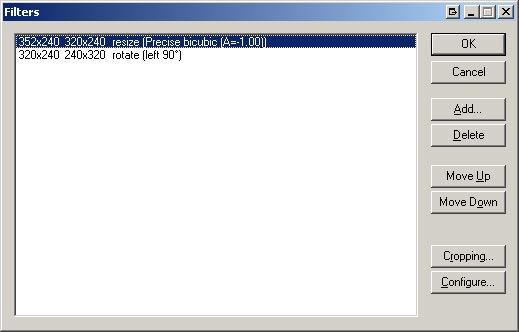
| 2. Once you have your video file opened. We need re-encode the video and
audio with a lower bitrate and to make it playback smoothly on a PDA. First
go to the Video >Filters. We will
want to resize and rotate our video so it plays in landscape mode on your
pda. Click the Add button, then choose the Resize filter. We want our image
to be 320x240 or for slower PDAs 208x160(depending on the aspect ratio,
just look at the preview to see if it looks ok or not). Also, we want to
add a rotate filter, rotate (left 90 degrees). Then Click OK. |
 |
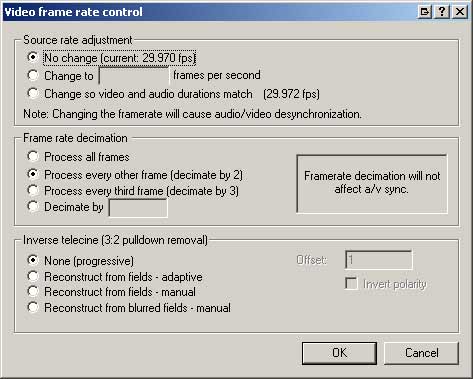
3. Next, go to the menu, Video > Framerate
and change the settings to this (see right). and click OK.
|
 |
4. Then go to Video > Color
Depth and change the settings as such:
|
 |
| 5. Next, go to the menu, Video > Compression.
Select the DIVX 5.0.2 code and click the Configure button. |
|
| 6. On the DivX Codec, change Variable bitrate mode
to 1-pass and encoding bitrate to
300 kbps (you can tweak this to your device, but for now
lets use this number) |
|
| 7. Leave the rest of the settings as is except MAKE SURE that the Psychovisual
Enhancements are NOT CHECKED. Then click OK. |
|
| 8. Next, we need to edit the Audio settings. Go to the menu, under Audio,
and make sure that Full processing mode is checked. |
 |
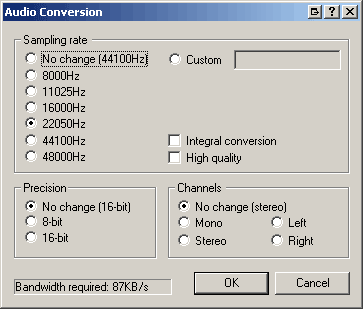
| 9. Go to Audio > Conversion, change Sampling Rate to: 22050Hz and leave
the rest as is and click OK. |
 |
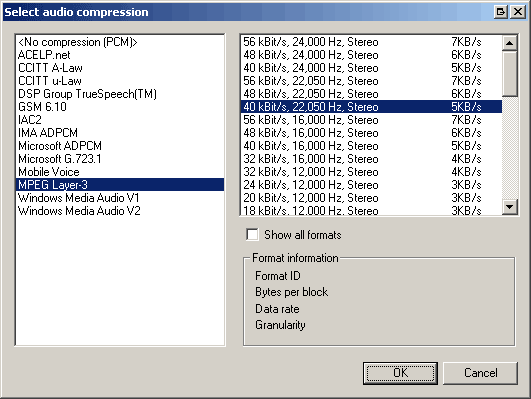
| 10. Go to Audio > Compression. You will need to have a MP3 codec installed.
Once you do, use settings similar to those in blue. Remember that we changed
the sampling rate to 22,050Hz so we need to use a bitrate that uses the
same one. Then click OK. |
 |
| 11. Now just go to File > Save as Avi and save your new movie/video.
Let virtualdub finish, then copy the program over to your PDA and play it
with Pocket MVP. Then just tweak the divx bitrates and audio bitrates so
it runs smoothly on your pda. |
|
| Hope that helps! |
|
 |
|